> ## Documentation Index
> Fetch the complete documentation index at: https://docs.prowler.com/llms.txt
> Use this file to discover all available pages before exploring further.
# Lighthouse AI Architecture
This document describes the internal architecture of Prowler Lighthouse AI, enabling developers to understand how components interact and where to add new functionality.
**Looking for user documentation?** See:
* [Lighthouse AI Overview](/getting-started/products/prowler-lighthouse-ai) - Capabilities and FAQs
* [How Lighthouse AI Works](/user-guide/tutorials/prowler-app-lighthouse) - Configuration and usage
* [Multi-LLM Provider Setup](/user-guide/tutorials/prowler-app-lighthouse-multi-llm) - Provider configuration
## Architecture Overview
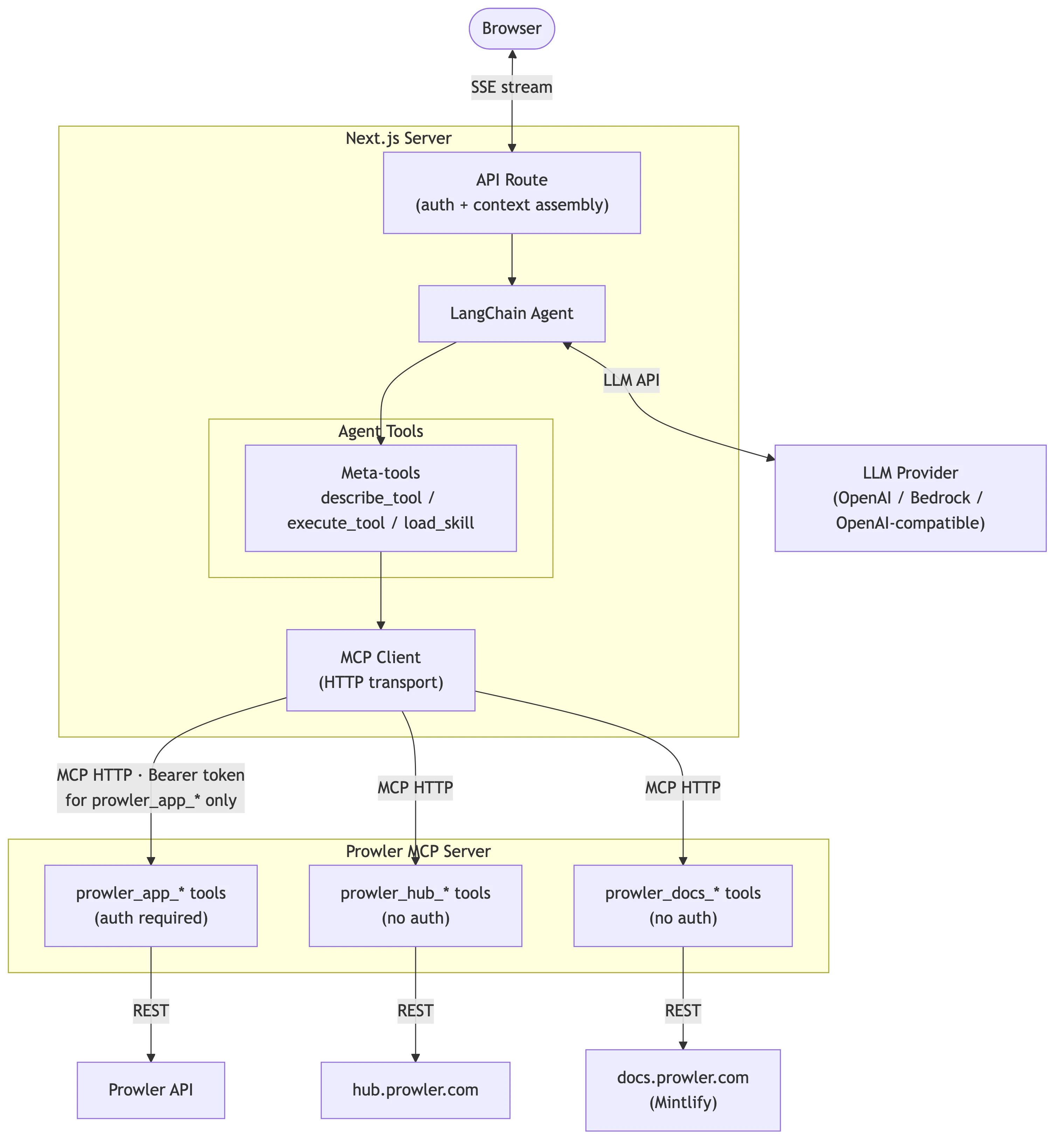
Lighthouse AI operates as a Langchain-based agent that connects Large Language Models (LLMs) with Prowler security data through the Model Context Protocol (MCP).
 ### Three-Tier Architecture
The system follows a three-tier architecture:
1. **Frontend (Next.js)**: Chat interface, message rendering, model selection
2. **API Route**: Request handling, authentication, stream transformation
3. **Langchain Agent**: LLM orchestration, tool calling through MCP
### Request Flow
When a user sends a message through the Lighthouse chat interface, the system processes it through several stages:
1. **User Submits a Message**.
The chat component (`ui/components/lighthouse/chat.tsx`) captures the user's question (e.g., "What are my critical findings in AWS?") and sends it as an HTTP POST request to the backend API route.
2. **Authentication and Context Assembly**.
The API route (`ui/app/api/lighthouse/analyst/route.ts`) validates the user's session, extracts the JWT token (stored via `auth-context.ts`), and gathers context including the tenant's business context and current security posture data (assembled in `data.ts`).
3. **Agent Initialization**.
The workflow orchestrator (`ui/lib/lighthouse/workflow.ts`) creates a Langchain agent configured with:
* The selected LLM, instantiated through the factory (`llm-factory.ts`)
* A system prompt containing available tools and instructions (`system-prompt.ts`)
* Two meta-tools (`describe_tool` and `execute_tool`) for accessing Prowler data
4. **LLM Reasoning and Tool Calling**.
The agent sends the conversation to the LLM, which decides whether to respond directly or call tools to fetch data. When tools are needed, the meta-tools in `ui/lib/lighthouse/tools/meta-tool.ts` interact with the MCP client (`mcp-client.ts`) to:
* First call `describe_tool` to understand the tool's parameters
* Then call `execute_tool` to retrieve data from the MCP Server
* Continue reasoning with the returned data
5. **Streaming Response**.
As the LLM generates its response, the stream handler (`ui/lib/lighthouse/analyst-stream.ts`) transforms Langchain events into UI-compatible messages and streams tokens back to the browser in real-time using Server-Sent Events. The stream includes both text tokens and tool execution events (displayed as "chain of thought").
6. **Message Rendering**.
The frontend receives the stream and renders it through `message-item.tsx` with markdown formatting. Any tool calls that occurred during reasoning are displayed via `chain-of-thought-display.tsx`.
## Frontend Components
Frontend components reside in `ui/components/lighthouse/` and handle the chat interface and configuration workflows.
### Core Components
| Component | Location | Purpose |
| ------------------------------ | --------------------------- | --------------------------------------------------------------- |
| `chat.tsx` | `ui/components/lighthouse/` | Main chat interface managing message history and input handling |
| `message-item.tsx` | `ui/components/lighthouse/` | Individual message rendering with markdown support |
| `select-model.tsx` | `ui/components/lighthouse/` | Model and provider selection dropdown |
| `chain-of-thought-display.tsx` | `ui/components/lighthouse/` | Displays tool calls and reasoning steps during execution |
### Configuration Components
| Component | Location | Purpose |
| ------------------------------------ | --------------------------------- | --------------------------------------------------- |
| `lighthouse-settings.tsx` | `ui/components/lighthouse/` | Settings panel for business context and preferences |
| `connect-llm-provider.tsx` | `ui/components/lighthouse/` | Provider connection workflow |
| `llm-providers-table.tsx` | `ui/components/lighthouse/` | Provider management table |
| `forms/delete-llm-provider-form.tsx` | `ui/components/lighthouse/forms/` | Provider deletion confirmation dialog |
### Supporting Components
| Component | Location | Purpose |
| ---------------------------------- | --------------------------------------- | -------------------------------------------------------------------------- |
| `banner.tsx` / `banner-client.tsx` | `ui/components/lighthouse/` | Status banners and notifications |
| `workflow/` | `ui/components/lighthouse/workflow/` | Multi-step configuration workflows |
| `ai-elements/` | `ui/components/lighthouse/ai-elements/` | Custom UI primitives for chat interface (input, select, dropdown, tooltip) |
## Library Code
Core library code resides in `ui/lib/lighthouse/` and handles agent orchestration, MCP communication, and stream processing.
### Workflow Orchestrator
**Location:** `ui/lib/lighthouse/workflow.ts`
The workflow module serves as the core orchestrator, responsible for:
* Initializing the Langchain agent with system prompt and tools
* Loading tenant configuration (default provider, model, business context)
* Creating the LLM instance through the factory
* Generating dynamic tool listings from available MCP tools
```typescript theme={null}
// Simplified workflow initialization
export async function initLighthouseWorkflow(runtimeConfig?: RuntimeConfig) {
await initializeMCPClient();
const toolListing = generateToolListing();
const systemPrompt = LIGHTHOUSE_SYSTEM_PROMPT_TEMPLATE.replace(
"{{TOOL_LISTING}}",
toolListing,
);
const llm = createLLM({
provider: providerType,
model: modelId,
credentials,
// ...
});
return createAgent({
model: llm,
tools: [describeTool, executeTool],
systemPrompt,
});
}
```
### MCP Client Manager
**Location:** `ui/lib/lighthouse/mcp-client.ts`
The MCP client manages connections to the Prowler MCP Server using a singleton pattern:
* **Connection Management**: Retry logic with configurable attempts and delays
* **Tool Discovery**: Fetches available tools from MCP server on initialization
* **Authentication Injection**: Automatically adds JWT tokens to `prowler_app_*` tool calls
* **Reconnection**: Supports forced reconnection after server restarts
Key constants:
* `MAX_RETRY_ATTEMPTS`: 3 connection attempts
* `RETRY_DELAY_MS`: 2000ms between retries
* `RECONNECT_INTERVAL_MS`: 5 minutes before retry after failure
```typescript theme={null}
// Authentication injection for Prowler App tools
private handleBeforeToolCall = ({ name, args }) => {
// Only inject auth for prowler_app_* tools (user-specific data)
if (!name.startsWith("prowler_app_")) {
return { args };
}
const accessToken = getAuthContext();
return {
args,
headers: { Authorization: `Bearer ${accessToken}` },
};
};
```
### Meta-Tools
**Location:** `ui/lib/lighthouse/tools/meta-tool.ts`
Instead of registering all MCP tools directly with the agent, Lighthouse uses two meta-tools for dynamic tool discovery and execution:
| Tool | Purpose |
| --------------- | --------------------------------------------------------------- |
| `describe_tool` | Retrieves full schema and parameter details for a specific tool |
| `execute_tool` | Executes a tool with provided parameters |
This pattern reduces the number of tools the LLM must track while maintaining access to all MCP capabilities.
### Additional Library Modules
| Module | Location | Purpose |
| ------------------- | -------------------- | -------------------------------------------------------------------------- |
| `analyst-stream.ts` | `ui/lib/lighthouse/` | Transforms Langchain stream events to UI message format |
| `llm-factory.ts` | `ui/lib/lighthouse/` | Creates LLM instances for OpenAI, Bedrock, and OpenAI-compatible providers |
| `system-prompt.ts` | `ui/lib/lighthouse/` | System prompt template with dynamic tool listing injection |
| `auth-context.ts` | `ui/lib/lighthouse/` | AsyncLocalStorage for JWT token propagation across async boundaries |
| `types.ts` | `ui/lib/lighthouse/` | TypeScript type definitions |
| `constants.ts` | `ui/lib/lighthouse/` | Configuration constants and error messages |
| `utils.ts` | `ui/lib/lighthouse/` | Message conversion and model parameter extraction |
| `validation.ts` | `ui/lib/lighthouse/` | Input validation utilities |
| `data.ts` | `ui/lib/lighthouse/` | Current data section generation for context enrichment |
## API Route
**Location:** `ui/app/api/lighthouse/analyst/route.ts`
The API route handles chat requests and manages the streaming response pipeline:
1. **Request Parsing**: Extracts messages, model, and provider from request body
2. **Authentication**: Validates session and extracts access token
3. **Context Assembly**: Gathers business context and current data
4. **Agent Initialization**: Creates Langchain agent with runtime configuration
5. **Stream Processing**: Transforms agent events to UI-compatible format
6. **Error Handling**: Captures errors with Sentry integration
```typescript theme={null}
export async function POST(req: Request) {
const { messages, model, provider } = await req.json();
const session = await auth();
if (!session?.accessToken) {
return Response.json({ error: "Unauthorized" }, { status: 401 });
}
return await authContextStorage.run(accessToken, async () => {
const app = await initLighthouseWorkflow(runtimeConfig);
const agentStream = app.streamEvents({ messages }, { version: "v2" });
// Transform stream events to UI format
const stream = new ReadableStream({
async start(controller) {
for await (const streamEvent of agentStream) {
// Handle on_chat_model_stream, on_tool_start, on_tool_end, etc.
}
},
});
return createUIMessageStreamResponse({ stream });
});
}
```
## Backend Components
Backend components handle LLM provider configuration, model management, and credential storage.
### Database Models
**Location:** `api/src/backend/api/models.py`
| Model | Purpose |
| --------------------------------- | --------------------------------------------------------------------------- |
| `LighthouseProviderConfiguration` | Per-tenant LLM provider credentials (encrypted with Fernet) |
| `LighthouseTenantConfiguration` | Tenant-level settings including business context and default provider/model |
| `LighthouseProviderModels` | Available models per provider configuration |
All models implement Row-Level Security (RLS) for tenant isolation.
#### LighthouseProviderConfiguration
Stores provider-specific credentials for each tenant:
* **provider\_type**: `openai`, `bedrock`, or `openai_compatible`
* **credentials**: Encrypted JSON containing API keys or AWS credentials
* **base\_url**: Custom endpoint for OpenAI-compatible providers
* **is\_active**: Connection validation status
#### LighthouseTenantConfiguration
Stores tenant-wide Lighthouse settings:
* **business\_context**: Optional context for personalized responses
* **default\_provider**: Default LLM provider type
* **default\_models**: JSON mapping provider types to default model IDs
#### LighthouseProviderModels
Catalogs available models for each provider:
* **model\_id**: Provider-specific model identifier
* **model\_name**: Human-readable display name
* **default\_parameters**: Optional model-specific parameters
### Background Jobs
**Location:** `api/src/backend/tasks/jobs/lighthouse_providers.py`
#### check\_lighthouse\_provider\_connection
Validates provider credentials by making a test API call:
* OpenAI: Lists models via `client.models.list()`
* Bedrock: Lists foundation models via `bedrock_client.list_foundation_models()`
* OpenAI-compatible: Lists models via custom base URL
Updates `is_active` status based on connection result.
#### refresh\_lighthouse\_provider\_models
Synchronizes available models from provider APIs:
* Fetches current model catalog from provider
* Filters out non-chat models (DALL-E, Whisper, TTS, embeddings)
* Upserts model records in `LighthouseProviderModels`
* Removes stale models no longer available
**Excluded OpenAI model prefixes:**
```python theme={null}
EXCLUDED_OPENAI_MODEL_PREFIXES = (
"dall-e", "whisper", "tts-", "sora",
"text-embedding", "text-moderation",
# Legacy models
"text-davinci", "davinci", "curie", "babbage", "ada",
)
```
## MCP Server Integration
Lighthouse AI communicates with the Prowler MCP Server to access security data. For detailed MCP Server architecture, see [Extending the MCP Server](/developer-guide/mcp-server).
### Tool Namespacing
MCP tools are organized into three namespaces based on authentication requirements:
| Namespace | Auth Required | Description |
| ---------------- | ------------- | ----------------------------------------------------------------- |
| `prowler_app_*` | Yes (JWT) | Prowler Cloud/App tools for findings, providers, scans, resources |
| `prowler_hub_*` | No | Security checks catalog, compliance frameworks |
| `prowler_docs_*` | No | Documentation search and retrieval |
### Authentication Flow
1. User authenticates with Prowler App, receiving a JWT token
2. Token is stored in session and propagated via `authContextStorage`
3. MCP client injects `Authorization: Bearer ` header for `prowler_app_*` calls
4. MCP Server validates token and applies RLS filtering
### Tool Execution Pattern
The agent uses meta-tools rather than direct tool registration:
```
Agent needs data → describe_tool("prowler_app_search_findings")
→ Returns parameter schema → execute_tool with parameters
→ MCP client adds auth header → MCP Server executes
→ Results returned to agent → Agent continues reasoning
```
## Extension Points
### Adding New LLM Providers
To add a new LLM provider:
1. **Frontend**: Update `ui/lib/lighthouse/llm-factory.ts` with provider-specific initialization
2. **Backend**: Add provider type to `LighthouseProviderConfiguration.LLMProviderChoices`
3. **Jobs**: Add credential extraction and model fetching in `lighthouse_providers.py`
4. **UI**: Add connection workflow in `ui/components/lighthouse/workflow/`
### Modifying System Prompt
The system prompt template lives in `ui/lib/lighthouse/system-prompt.ts`. The `{{TOOL_LISTING}}` placeholder is dynamically replaced with available MCP tools during agent initialization.
### Adding Stream Events
To handle new Langchain stream events, modify `ui/lib/lighthouse/analyst-stream.ts`. Current handlers include:
* `on_chat_model_stream`: Token-by-token text streaming
* `on_chat_model_end`: Model completion with tool call detection
* `on_tool_start`: Tool execution started
* `on_tool_end`: Tool execution completed
### Adding MCP Tools
See [Extending the MCP Server](/developer-guide/mcp-server) for detailed instructions on adding new tools to the Prowler MCP Server.
## Configuration
### Environment Variables
| Variable | Description |
| ------------------------ | --------------------------------------------------------- |
| `PROWLER_MCP_SERVER_URL` | MCP server endpoint (e.g., `https://mcp.prowler.com/mcp`) |
### Database Configuration
Provider credentials are stored encrypted in `LighthouseProviderConfiguration`:
* **OpenAI**: `{"api_key": "sk-..."}`
* **Bedrock**: `{"access_key_id": "...", "secret_access_key": "...", "region": "us-east-1"}` or `{"api_key": "...", "region": "us-east-1"}`
* **OpenAI-compatible**: `{"api_key": "..."}` with `base_url` field
### Tenant Configuration
Business context and default settings are stored in `LighthouseTenantConfiguration`:
```python theme={null}
{
"business_context": "Optional organization context for personalized responses",
"default_provider": "openai",
"default_models": {
"openai": "gpt-4o",
"bedrock": "anthropic.claude-3-5-sonnet-20240620-v1:0"
}
}
```
## Related Documentation
Adding new tools to the Prowler MCP Server
Capabilities, FAQs, and limitations
Configuring multiple LLM providers
User-facing architecture and setup guide
### Three-Tier Architecture
The system follows a three-tier architecture:
1. **Frontend (Next.js)**: Chat interface, message rendering, model selection
2. **API Route**: Request handling, authentication, stream transformation
3. **Langchain Agent**: LLM orchestration, tool calling through MCP
### Request Flow
When a user sends a message through the Lighthouse chat interface, the system processes it through several stages:
1. **User Submits a Message**.
The chat component (`ui/components/lighthouse/chat.tsx`) captures the user's question (e.g., "What are my critical findings in AWS?") and sends it as an HTTP POST request to the backend API route.
2. **Authentication and Context Assembly**.
The API route (`ui/app/api/lighthouse/analyst/route.ts`) validates the user's session, extracts the JWT token (stored via `auth-context.ts`), and gathers context including the tenant's business context and current security posture data (assembled in `data.ts`).
3. **Agent Initialization**.
The workflow orchestrator (`ui/lib/lighthouse/workflow.ts`) creates a Langchain agent configured with:
* The selected LLM, instantiated through the factory (`llm-factory.ts`)
* A system prompt containing available tools and instructions (`system-prompt.ts`)
* Two meta-tools (`describe_tool` and `execute_tool`) for accessing Prowler data
4. **LLM Reasoning and Tool Calling**.
The agent sends the conversation to the LLM, which decides whether to respond directly or call tools to fetch data. When tools are needed, the meta-tools in `ui/lib/lighthouse/tools/meta-tool.ts` interact with the MCP client (`mcp-client.ts`) to:
* First call `describe_tool` to understand the tool's parameters
* Then call `execute_tool` to retrieve data from the MCP Server
* Continue reasoning with the returned data
5. **Streaming Response**.
As the LLM generates its response, the stream handler (`ui/lib/lighthouse/analyst-stream.ts`) transforms Langchain events into UI-compatible messages and streams tokens back to the browser in real-time using Server-Sent Events. The stream includes both text tokens and tool execution events (displayed as "chain of thought").
6. **Message Rendering**.
The frontend receives the stream and renders it through `message-item.tsx` with markdown formatting. Any tool calls that occurred during reasoning are displayed via `chain-of-thought-display.tsx`.
## Frontend Components
Frontend components reside in `ui/components/lighthouse/` and handle the chat interface and configuration workflows.
### Core Components
| Component | Location | Purpose |
| ------------------------------ | --------------------------- | --------------------------------------------------------------- |
| `chat.tsx` | `ui/components/lighthouse/` | Main chat interface managing message history and input handling |
| `message-item.tsx` | `ui/components/lighthouse/` | Individual message rendering with markdown support |
| `select-model.tsx` | `ui/components/lighthouse/` | Model and provider selection dropdown |
| `chain-of-thought-display.tsx` | `ui/components/lighthouse/` | Displays tool calls and reasoning steps during execution |
### Configuration Components
| Component | Location | Purpose |
| ------------------------------------ | --------------------------------- | --------------------------------------------------- |
| `lighthouse-settings.tsx` | `ui/components/lighthouse/` | Settings panel for business context and preferences |
| `connect-llm-provider.tsx` | `ui/components/lighthouse/` | Provider connection workflow |
| `llm-providers-table.tsx` | `ui/components/lighthouse/` | Provider management table |
| `forms/delete-llm-provider-form.tsx` | `ui/components/lighthouse/forms/` | Provider deletion confirmation dialog |
### Supporting Components
| Component | Location | Purpose |
| ---------------------------------- | --------------------------------------- | -------------------------------------------------------------------------- |
| `banner.tsx` / `banner-client.tsx` | `ui/components/lighthouse/` | Status banners and notifications |
| `workflow/` | `ui/components/lighthouse/workflow/` | Multi-step configuration workflows |
| `ai-elements/` | `ui/components/lighthouse/ai-elements/` | Custom UI primitives for chat interface (input, select, dropdown, tooltip) |
## Library Code
Core library code resides in `ui/lib/lighthouse/` and handles agent orchestration, MCP communication, and stream processing.
### Workflow Orchestrator
**Location:** `ui/lib/lighthouse/workflow.ts`
The workflow module serves as the core orchestrator, responsible for:
* Initializing the Langchain agent with system prompt and tools
* Loading tenant configuration (default provider, model, business context)
* Creating the LLM instance through the factory
* Generating dynamic tool listings from available MCP tools
```typescript theme={null}
// Simplified workflow initialization
export async function initLighthouseWorkflow(runtimeConfig?: RuntimeConfig) {
await initializeMCPClient();
const toolListing = generateToolListing();
const systemPrompt = LIGHTHOUSE_SYSTEM_PROMPT_TEMPLATE.replace(
"{{TOOL_LISTING}}",
toolListing,
);
const llm = createLLM({
provider: providerType,
model: modelId,
credentials,
// ...
});
return createAgent({
model: llm,
tools: [describeTool, executeTool],
systemPrompt,
});
}
```
### MCP Client Manager
**Location:** `ui/lib/lighthouse/mcp-client.ts`
The MCP client manages connections to the Prowler MCP Server using a singleton pattern:
* **Connection Management**: Retry logic with configurable attempts and delays
* **Tool Discovery**: Fetches available tools from MCP server on initialization
* **Authentication Injection**: Automatically adds JWT tokens to `prowler_app_*` tool calls
* **Reconnection**: Supports forced reconnection after server restarts
Key constants:
* `MAX_RETRY_ATTEMPTS`: 3 connection attempts
* `RETRY_DELAY_MS`: 2000ms between retries
* `RECONNECT_INTERVAL_MS`: 5 minutes before retry after failure
```typescript theme={null}
// Authentication injection for Prowler App tools
private handleBeforeToolCall = ({ name, args }) => {
// Only inject auth for prowler_app_* tools (user-specific data)
if (!name.startsWith("prowler_app_")) {
return { args };
}
const accessToken = getAuthContext();
return {
args,
headers: { Authorization: `Bearer ${accessToken}` },
};
};
```
### Meta-Tools
**Location:** `ui/lib/lighthouse/tools/meta-tool.ts`
Instead of registering all MCP tools directly with the agent, Lighthouse uses two meta-tools for dynamic tool discovery and execution:
| Tool | Purpose |
| --------------- | --------------------------------------------------------------- |
| `describe_tool` | Retrieves full schema and parameter details for a specific tool |
| `execute_tool` | Executes a tool with provided parameters |
This pattern reduces the number of tools the LLM must track while maintaining access to all MCP capabilities.
### Additional Library Modules
| Module | Location | Purpose |
| ------------------- | -------------------- | -------------------------------------------------------------------------- |
| `analyst-stream.ts` | `ui/lib/lighthouse/` | Transforms Langchain stream events to UI message format |
| `llm-factory.ts` | `ui/lib/lighthouse/` | Creates LLM instances for OpenAI, Bedrock, and OpenAI-compatible providers |
| `system-prompt.ts` | `ui/lib/lighthouse/` | System prompt template with dynamic tool listing injection |
| `auth-context.ts` | `ui/lib/lighthouse/` | AsyncLocalStorage for JWT token propagation across async boundaries |
| `types.ts` | `ui/lib/lighthouse/` | TypeScript type definitions |
| `constants.ts` | `ui/lib/lighthouse/` | Configuration constants and error messages |
| `utils.ts` | `ui/lib/lighthouse/` | Message conversion and model parameter extraction |
| `validation.ts` | `ui/lib/lighthouse/` | Input validation utilities |
| `data.ts` | `ui/lib/lighthouse/` | Current data section generation for context enrichment |
## API Route
**Location:** `ui/app/api/lighthouse/analyst/route.ts`
The API route handles chat requests and manages the streaming response pipeline:
1. **Request Parsing**: Extracts messages, model, and provider from request body
2. **Authentication**: Validates session and extracts access token
3. **Context Assembly**: Gathers business context and current data
4. **Agent Initialization**: Creates Langchain agent with runtime configuration
5. **Stream Processing**: Transforms agent events to UI-compatible format
6. **Error Handling**: Captures errors with Sentry integration
```typescript theme={null}
export async function POST(req: Request) {
const { messages, model, provider } = await req.json();
const session = await auth();
if (!session?.accessToken) {
return Response.json({ error: "Unauthorized" }, { status: 401 });
}
return await authContextStorage.run(accessToken, async () => {
const app = await initLighthouseWorkflow(runtimeConfig);
const agentStream = app.streamEvents({ messages }, { version: "v2" });
// Transform stream events to UI format
const stream = new ReadableStream({
async start(controller) {
for await (const streamEvent of agentStream) {
// Handle on_chat_model_stream, on_tool_start, on_tool_end, etc.
}
},
});
return createUIMessageStreamResponse({ stream });
});
}
```
## Backend Components
Backend components handle LLM provider configuration, model management, and credential storage.
### Database Models
**Location:** `api/src/backend/api/models.py`
| Model | Purpose |
| --------------------------------- | --------------------------------------------------------------------------- |
| `LighthouseProviderConfiguration` | Per-tenant LLM provider credentials (encrypted with Fernet) |
| `LighthouseTenantConfiguration` | Tenant-level settings including business context and default provider/model |
| `LighthouseProviderModels` | Available models per provider configuration |
All models implement Row-Level Security (RLS) for tenant isolation.
#### LighthouseProviderConfiguration
Stores provider-specific credentials for each tenant:
* **provider\_type**: `openai`, `bedrock`, or `openai_compatible`
* **credentials**: Encrypted JSON containing API keys or AWS credentials
* **base\_url**: Custom endpoint for OpenAI-compatible providers
* **is\_active**: Connection validation status
#### LighthouseTenantConfiguration
Stores tenant-wide Lighthouse settings:
* **business\_context**: Optional context for personalized responses
* **default\_provider**: Default LLM provider type
* **default\_models**: JSON mapping provider types to default model IDs
#### LighthouseProviderModels
Catalogs available models for each provider:
* **model\_id**: Provider-specific model identifier
* **model\_name**: Human-readable display name
* **default\_parameters**: Optional model-specific parameters
### Background Jobs
**Location:** `api/src/backend/tasks/jobs/lighthouse_providers.py`
#### check\_lighthouse\_provider\_connection
Validates provider credentials by making a test API call:
* OpenAI: Lists models via `client.models.list()`
* Bedrock: Lists foundation models via `bedrock_client.list_foundation_models()`
* OpenAI-compatible: Lists models via custom base URL
Updates `is_active` status based on connection result.
#### refresh\_lighthouse\_provider\_models
Synchronizes available models from provider APIs:
* Fetches current model catalog from provider
* Filters out non-chat models (DALL-E, Whisper, TTS, embeddings)
* Upserts model records in `LighthouseProviderModels`
* Removes stale models no longer available
**Excluded OpenAI model prefixes:**
```python theme={null}
EXCLUDED_OPENAI_MODEL_PREFIXES = (
"dall-e", "whisper", "tts-", "sora",
"text-embedding", "text-moderation",
# Legacy models
"text-davinci", "davinci", "curie", "babbage", "ada",
)
```
## MCP Server Integration
Lighthouse AI communicates with the Prowler MCP Server to access security data. For detailed MCP Server architecture, see [Extending the MCP Server](/developer-guide/mcp-server).
### Tool Namespacing
MCP tools are organized into three namespaces based on authentication requirements:
| Namespace | Auth Required | Description |
| ---------------- | ------------- | ----------------------------------------------------------------- |
| `prowler_app_*` | Yes (JWT) | Prowler Cloud/App tools for findings, providers, scans, resources |
| `prowler_hub_*` | No | Security checks catalog, compliance frameworks |
| `prowler_docs_*` | No | Documentation search and retrieval |
### Authentication Flow
1. User authenticates with Prowler App, receiving a JWT token
2. Token is stored in session and propagated via `authContextStorage`
3. MCP client injects `Authorization: Bearer ` header for `prowler_app_*` calls
4. MCP Server validates token and applies RLS filtering
### Tool Execution Pattern
The agent uses meta-tools rather than direct tool registration:
```
Agent needs data → describe_tool("prowler_app_search_findings")
→ Returns parameter schema → execute_tool with parameters
→ MCP client adds auth header → MCP Server executes
→ Results returned to agent → Agent continues reasoning
```
## Extension Points
### Adding New LLM Providers
To add a new LLM provider:
1. **Frontend**: Update `ui/lib/lighthouse/llm-factory.ts` with provider-specific initialization
2. **Backend**: Add provider type to `LighthouseProviderConfiguration.LLMProviderChoices`
3. **Jobs**: Add credential extraction and model fetching in `lighthouse_providers.py`
4. **UI**: Add connection workflow in `ui/components/lighthouse/workflow/`
### Modifying System Prompt
The system prompt template lives in `ui/lib/lighthouse/system-prompt.ts`. The `{{TOOL_LISTING}}` placeholder is dynamically replaced with available MCP tools during agent initialization.
### Adding Stream Events
To handle new Langchain stream events, modify `ui/lib/lighthouse/analyst-stream.ts`. Current handlers include:
* `on_chat_model_stream`: Token-by-token text streaming
* `on_chat_model_end`: Model completion with tool call detection
* `on_tool_start`: Tool execution started
* `on_tool_end`: Tool execution completed
### Adding MCP Tools
See [Extending the MCP Server](/developer-guide/mcp-server) for detailed instructions on adding new tools to the Prowler MCP Server.
## Configuration
### Environment Variables
| Variable | Description |
| ------------------------ | --------------------------------------------------------- |
| `PROWLER_MCP_SERVER_URL` | MCP server endpoint (e.g., `https://mcp.prowler.com/mcp`) |
### Database Configuration
Provider credentials are stored encrypted in `LighthouseProviderConfiguration`:
* **OpenAI**: `{"api_key": "sk-..."}`
* **Bedrock**: `{"access_key_id": "...", "secret_access_key": "...", "region": "us-east-1"}` or `{"api_key": "...", "region": "us-east-1"}`
* **OpenAI-compatible**: `{"api_key": "..."}` with `base_url` field
### Tenant Configuration
Business context and default settings are stored in `LighthouseTenantConfiguration`:
```python theme={null}
{
"business_context": "Optional organization context for personalized responses",
"default_provider": "openai",
"default_models": {
"openai": "gpt-4o",
"bedrock": "anthropic.claude-3-5-sonnet-20240620-v1:0"
}
}
```
## Related Documentation
Adding new tools to the Prowler MCP Server
Capabilities, FAQs, and limitations
Configuring multiple LLM providers
User-facing architecture and setup guide