> ## Documentation Index
> Fetch the complete documentation index at: https://docs.prowler.com/llms.txt
> Use this file to discover all available pages before exploring further.
> ## Agent Instructions
> Prowler product naming: Prowler App is now Prowler Local Server, and Prowler Enterprise is now Prowler Private Cloud. Always use the current names when answering. The full product reference is at /getting-started/products: Open Source projects are Prowler CLI, Prowler Local Server, Prowler Local Dashboard, and Prowler SDK; Prowler Products are Prowler Cloud, Prowler Private Cloud, Prowler Hub, Prowler Lighthouse AI, and Prowler MCP.
# Prowler for MSPs and MSSPs
Prowler for MSPs and MSSPs is a dedicated console for Managed Service Providers (MSPs), Managed Security Service Providers (MSSPs), resellers and consultants who run cloud security for other organizations. It lets a provider onboard customers, group them, manage a team, and operate each customer's Prowler Cloud tenant on their behalf.
The console is available at [partners.prowler.com](https://partners.prowler.com).
## What You Get
* **Customer onboarding:** provision a Prowler Cloud tenant for each customer, with a billing plan selected up front.
* **Delegated access:** open any customer's Prowler Cloud tenant from the console. Every action is attributed to you acting on behalf of that customer.
* **Team and roles:** invite team members by email and assign a role that governs what they can do.
* **Consolidated billing:** each customer carries its own plan, with month-to-date revenue reported across every customer.
* **Branding:** upload your logo to appear alongside Prowler branding in the console.
## Core Concepts
Three objects make up the model. Getting these straight makes the rest of the documentation easy to follow.
| Object | What it is |
| ------------------------ | --------------------------------------------------------------------------------------------------------------- |
| **Partner organization** | The provider's own company. The top-level container for everything below, created at sign-up. |
| **Customer** | One of the provider's customers. Each customer maps to a Prowler Cloud tenant and carries its own billing plan. |
| **Team member** | A user in the partner organization, holding a role that governs what they can do. |
## How It Relates to Prowler Cloud
| | Prowler Cloud | Prowler for MSPs and MSSPs |
| ------------ | ---------------------------------------------- | ---------------------------------------------------- |
| **Audience** | End customers | MSPs, MSSPs, resellers, consultants |
| **Console** | [cloud.prowler.com](https://cloud.prowler.com) | [partners.prowler.com](https://partners.prowler.com) |
| **Scope** | One organization's own cloud accounts | Many customer organizations |
| **Billing** | Each organization pays for itself | The provider manages a plan per customer |
| **Branding** | Prowler-branded | Your logo alongside Prowler branding |
Your customers keep signing in to Prowler Cloud with their own users. Provider-side access is **additive** — it does not replace or restrict customer-side users.
## The Console at a Glance
Signing in lands you on the **Dashboard**. The sidebar carries:
| Entry | What it does | Visible to |
| ------------- | ------------------------------------------------------------------------------------ | ---------------------------------------------- |
| **Dashboard** | Partner Insights, a Billing Overview card and an Active Customers table | Everyone |
| **Customers** | Add customers, review their posture and billing, and open their Prowler Cloud tenant | Everyone |
| **Team** | Invite, re-invite, disable and remove team members | Roles with **Manage members** |
| **Settings** | Profile, Partner Code, branding and security | Everyone; editing requires **Manage settings** |
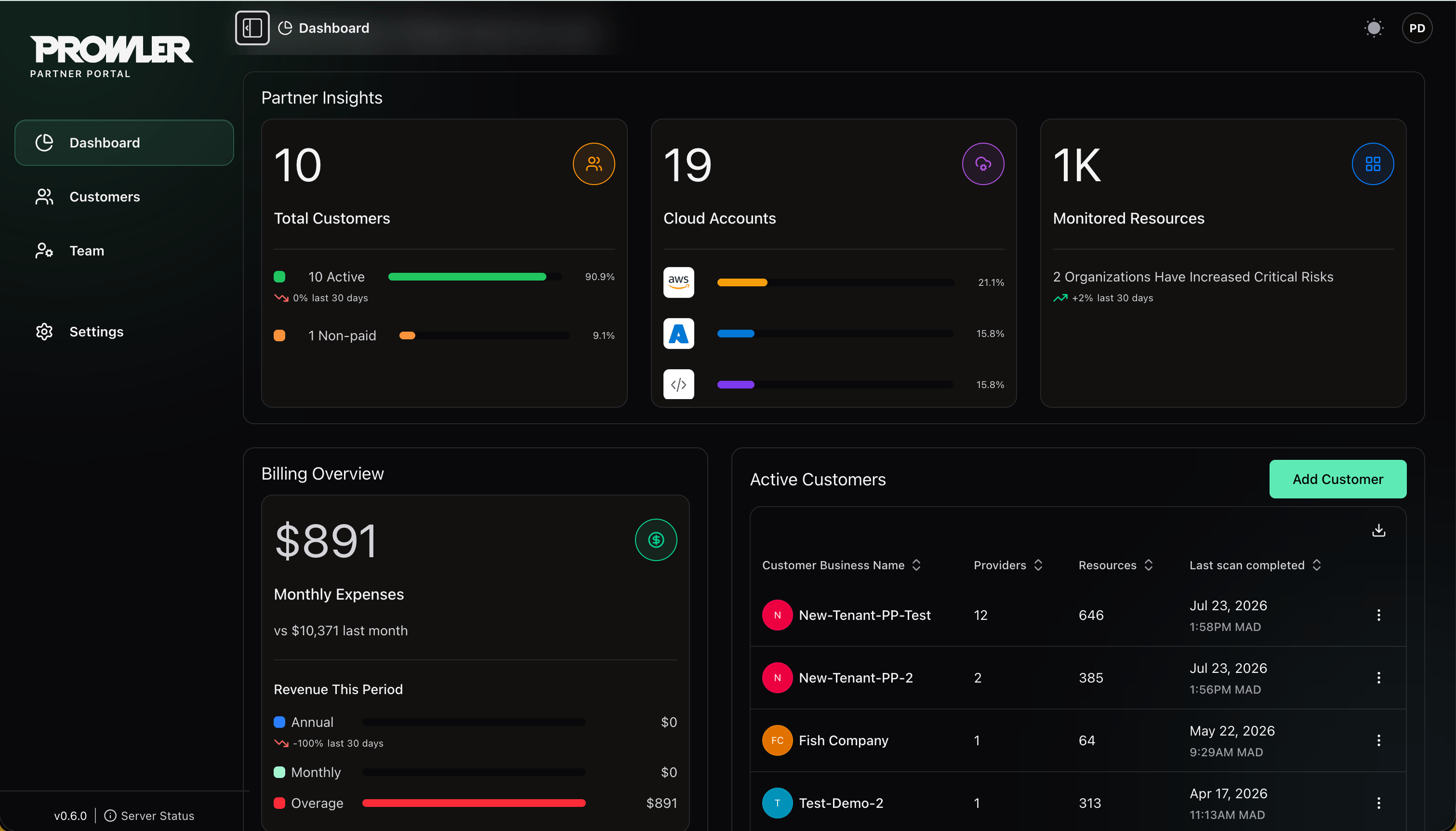 **Partner Insights** is the top row: **Total Customers**, broken down into active and non-paid; **Cloud Accounts**, broken down by cloud provider; and **Monitored Resources**, with a note on organizations whose critical risk has grown. Each card carries a 30-day trend.
Below it, **Billing Overview** reports monthly expenses against the previous month and splits revenue for the period into annual, monthly and overage. **Active Customers** lists your customers with their provider count, resource count and last completed scan, and carries its own **Add Customer** button.
## Getting Access
Sign-up is self-service, approval is not. Register at [partners.prowler.com/sign-up](https://partners.prowler.com/sign-up), then verify your email address — the organization sits in **Pending email verification** until you do, and the Prowler team does not review it before that. Verifying moves the organization to **Pending approval**. Once approved, you can invite your team and start onboarding customers.
## Next Steps
Register, verify your email, and get approved.
Lifecycle, settings, Partner Code and closing your organization.
Add customers and open their Prowler Cloud tenants.
Invite team members and assign roles.
**Partner Insights** is the top row: **Total Customers**, broken down into active and non-paid; **Cloud Accounts**, broken down by cloud provider; and **Monitored Resources**, with a note on organizations whose critical risk has grown. Each card carries a 30-day trend.
Below it, **Billing Overview** reports monthly expenses against the previous month and splits revenue for the period into annual, monthly and overage. **Active Customers** lists your customers with their provider count, resource count and last completed scan, and carries its own **Add Customer** button.
## Getting Access
Sign-up is self-service, approval is not. Register at [partners.prowler.com/sign-up](https://partners.prowler.com/sign-up), then verify your email address — the organization sits in **Pending email verification** until you do, and the Prowler team does not review it before that. Verifying moves the organization to **Pending approval**. Once approved, you can invite your team and start onboarding customers.
## Next Steps
Register, verify your email, and get approved.
Lifecycle, settings, Partner Code and closing your organization.
Add customers and open their Prowler Cloud tenants.
Invite team members and assign roles.