> ## Documentation Index
> Fetch the complete documentation index at: https://docs.prowler.com/llms.txt
> Use this file to discover all available pages before exploring further.
# Mutelisting
**Muting Findings for Intentional Configurations**
In some cases, certain AWS resources may be intentionally configured in a way that deviates from security best practices but serves a valid use case. Examples include:
An AWS S3 bucket open to the Internet, used for hosting a public website.
An AWS security group with an open port necessary for a specific application.
**Mutelist Option Behavior**
The Mutelist option works in combination with other filtering mechanisms and modifies the output in the following way when a finding is muted:
* JSON-OCSF: `status_id` is `Suppressed`.
* CSV: `muted` is `True`. The field `status` will keep the original status, `MANUAL`, `PASS` or `FAIL`, of the finding.
## How the Mutelist Works
The **Mutelist** uses **AND logic** to evaluate whether a finding should be muted. For a finding to be muted, **ALL** of the following conditions must match:
* **Account** matches (exact match or `*`)
* **Check** matches (exact match, regex pattern, or `*`)
* **Region** matches (exact match, regex pattern, or `*`)
* **Resource** matches (exact match, regex pattern, or `*`)
* **Tags** match (if specified)
If **any** of these criteria do not match, the finding is **not muted**.
### Tag Matching Logic
Tags have special matching behavior:
* **Multiple tags in the list = AND logic**: ALL tags must be present on the resource
```yaml theme={null}
Tags:
- "environment=dev"
- "team=backend" # BOTH tags required
```
* **Regex alternation within a single tag = OR logic**: Use the pipe operator `|` for OR
```yaml theme={null}
Tags:
- "environment=dev|environment=stg" # Matches EITHER dev OR stg
```
* **Complex tag patterns**: Combine AND and OR using regex
```yaml theme={null}
Tags:
- "team=backend" # Required
- "environment=dev|environment=stg" # AND (dev OR stg)
```
Remember that mutelist can be used with regular expressions.
## Mutelist Specification
* For Azure provider, the Account ID is the Subscription Name and the Region is the Location.
* For GCP provider, the Account ID is the Project ID and the Region is the Zone.
* For Kubernetes provider, the Account ID is the Cluster Name and the Region is the Namespace.
The Mutelist file uses the [YAML](https://en.wikipedia.org/wiki/YAML) format with the following syntax:
```yaml theme={null}
### Account, Check and/or Region can be * to apply for all the cases.
### Resources and tags are lists that can have either Regex or Keywords.
### Multiple tags in the list are "ANDed" together (ALL must match).
### Use regex alternation (|) within a single tag for "OR" logic (e.g., "env=dev|env=stg").
### For each check you can use Exceptions to unmute specific Accounts, Regions, Resources and/or Tags.
### All conditions (Account, Check, Region, Resource, Tags) are ANDed together.
########################### MUTELIST EXAMPLE ###########################
Mutelist:
Accounts:
"123456789012":
Checks:
"iam_user_hardware_mfa_enabled":
Regions:
- "us-east-1"
Resources:
- "user-1" # Will mute user-1 in check iam_user_hardware_mfa_enabled
- "user-2" # Will mute user-2 in check iam_user_hardware_mfa_enabled
Description: "Findings related with the check iam_user_hardware_mfa_enabled will be muted for us-east-1 region and user-1, user-2 resources"
"ec2_*":
Regions:
- "*"
Resources:
- "*" # Will mute every EC2 check in every account and region
"*":
Regions:
- "*"
Resources:
- "test"
Tags:
- "test=test" # Will mute every resource containing the string "test" and the tags 'test=test' and
- "project=test|project=stage" # either of ('project=test' OR project=stage) in account 123456789012 and every region
"*":
Regions:
- "*"
Resources:
- "test"
Tags:
- "test=test"
- "project=test" # This will mute every resource containing the string "test" and BOTH tags at the same time.
"*":
Regions:
- "*"
Resources:
- "test"
Tags: # This will mute every resource containing the string "test" and the ones that contain EITHER the `test=test` OR `project=test` OR `project=dev`
- "test=test|project=(test|dev)"
"*":
Regions:
- "*"
Resources:
- "test"
Tags:
- "test=test" # This will mute every resource containing the string "test" and the tags `test=test` and either `project=test` OR `project=stage` in every account and region.
- "project=test|project=stage"
"*":
Checks:
"s3_bucket_object_versioning":
Regions:
- "eu-west-1"
- "us-east-1"
Resources:
- "ci-logs" # Will mute bucket "ci-logs" AND ALSO bucket "ci-logs-replica" in specified check and regions
- "logs" # Will mute EVERY BUCKET containing the string "logs" in specified check and regions
- ".+-logs" # Will mute all buckets containing the terms ci-logs, qa-logs, etc. in specified check and regions
"ecs_task_definitions_no_environment_secrets":
Regions:
- "*"
Resources:
- "*"
Exceptions:
Accounts:
- "0123456789012"
Regions:
- "eu-west-1"
- "eu-south-2" # Will mute every resource in check ecs_task_definitions_no_environment_secrets except the ones in account 0123456789012 located in eu-south-2 or eu-west-1
"*":
Regions:
- "*"
Resources:
- "*"
Tags:
- "environment=dev" # Will mute every resource containing the tag 'environment=dev' in every account and region
"123456789012":
Checks:
"*":
Regions:
- "*"
Resources:
- "*"
Exceptions:
Resources:
- "test"
Tags:
- "environment=prod" # Will mute every resource except in account 123456789012 except the ones containing the string "test" and tag environment=prod
"*":
Checks:
"ec2_*":
Regions:
- "*"
Resources:
- "test-resource" # Will mute the resource "test-resource" in all accounts and regions for whatever check from the EC2 service
```
### Account, Check, Region, Resource, and Tag
| Field | Description | Logic |
| ------------ | -------------------------------------------------------------------------------------------------------------------------------------------------------- | ------------------------------------- |
| `account_id` | Use `*` to apply the mutelist to all accounts. Supports exact match or wildcard. | `AND` (with other fields) |
| `check_name` | The name of the Prowler check. Use `*` to apply the mutelist to all checks, or `service_*` to apply it to all service's checks. Supports regex patterns. | `AND` (with other fields) |
| `region` | The region identifier. Use `*` to apply the mutelist to all regions. Supports regex patterns. | `AND` (with other fields) |
| `resource` | The resource identifier. Use `*` to apply the mutelist to all resources. Supports regex patterns. | `AND` (with other fields) |
| `tags` | List of tag patterns in `key=value` format. **Multiple tags = AND** (all must match). **Regex alternation within single tag = OR** (use `tag1\|tag2`). | `AND` between tags, `OR` within regex |
### Description
This field can be used to add information or some hints for the Mutelist rule.
## How to Use the Mutelist
To use the Mutelist, you need to specify the path to the Mutelist YAML file using the `-w` or `--mutelist-file` option when running Prowler:
```
prowler -w mutelist.yaml
```
Replace `` with the appropriate provider name.
## Considerations
* The Mutelist can be used in combination with other Prowler options, such as the `--service` or `--checks` option, to further customize the scanning process.
* Make sure to review and update the Mutelist regularly to ensure it reflects the desired exclusions and remains up to date with your infrastructure.
## Current Limitations and Workarounds
### Limitation: No OR Logic Between Different Rule Sets
The current Mutelist schema **does not support OR logic** between different condition sets. Each check can have only **one rule object**, and all conditions are **ANDed** together.
**Example of unsupported scenario:**
```yaml theme={null}
# ❌ INVALID: Cannot have multiple rule blocks for the same check
Accounts:
"*":
Checks:
"*": # Rule 1
Regions: ["eu-west-1", "us-west-2"]
Resources: ["*"]
"*": # Rule 2 - This will OVERWRITE Rule 1 (YAML duplicate key)
Regions: ["us-east-1"]
Tags: ["environment=dev"]
```
**Workaround: Use multiple scans with different mutelists**
For complex scenarios requiring OR logic, run separate scans:
```bash theme={null}
# Scan 1: Mute findings in non-critical regions
prowler aws --mutelist-file mutelist_noncritical.yaml
# Scan 2: Mute dev/stg in critical regions
prowler aws --mutelist-file mutelist_critical.yaml --regions us-east-1,sa-east-1
```
Then merge the outputs in your reporting pipeline.
### Limitation: Cannot Negate Regions
You cannot express "all regions **except** X and Y". You must explicitly list all regions you want to mute.
**Workaround:**
```yaml theme={null}
# Must enumerate all unwanted regions
Accounts:
"*":
Checks:
"*":
Regions:
- "af-south-1"
- "ap-east-1"
# ... list all regions EXCEPT the ones you want to monitor
Resources: ["*"]
```
### Best Practices
1. **Use regex patterns for flexibility**: Instead of listing multiple resources, use regex patterns like `"dev-.*"` or `"test-instance-[0-9]+"`
2. **Combine tag OR logic with regex**: Use `"environment=dev|environment=stg|environment=test"` instead of multiple tag entries
3. **Be specific with exceptions**: Use the `Exceptions` field to unmute specific resources within a broader muting rule
4. **Test your mutelist**: Run Prowler with `--output-modes json` and verify that the expected findings are muted
## AWS Mutelist
### Muting specific AWS regions
If you want to mute failed findings only in specific regions, create a file with the following syntax and run it with `prowler aws -w mutelist.yaml`:
Mutelist:
Accounts:
"*":
Checks:
"*":
Regions:
* "ap-southeast-1"
* "ap-southeast-2"
Resources:
* "\*"
Description: "Description related with the muted findings for the check"
### Default Mutelist
For the AWS Provider, Prowler is executed with a default AWS Mutelist with the AWS Resources that should be muted such as all resources created by AWS Control Tower when setting up a landing zone that can be found in [AWS Documentation](https://docs.aws.amazon.com/controltower/latest/userguide/shared-account-resources.html). You can see this Mutelist file in [`prowler/config/aws_mutelist.yaml`](https://github.com/prowler-cloud/prowler/blob/master/prowler/config/aws_mutelist.yaml).
### Supported Mutelist Locations
The mutelisting flag supports the following AWS locations when using the AWS Provider:
#### AWS S3 URI
You will need to pass the S3 URI where your Mutelist YAML file was uploaded to your bucket:
```
prowler aws -w s3:////mutelist.yaml
```
Make sure that the used AWS credentials have `s3:GetObject` permissions in the S3 path where the mutelist file is located.
#### AWS DynamoDB Table ARN
You will need to pass the DynamoDB Mutelist Table ARN:
```
prowler aws -w arn:aws:dynamodb:::table/
```
The DynamoDB Table must have the following String keys:
 The Mutelist Table must have the following columns:
* Accounts (String): This field can contain either an Account ID or an `*` (which applies to all the accounts that use this table as an mutelist).
* Checks (String): This field can contain either a Prowler Check Name or an `*` (which applies to all the scanned checks).
* Regions (List): This field contains a list of regions where this mutelist rule is applied (it can also contains an `*` to apply all scanned regions).
* Resources (List): This field contains a list of regular expressions (regex) that applies to the resources that are wanted to be muted.
* Tags (List): -Optional- This field contains a list of tuples in the form of 'key=value' that applies to the resources tags that are wanted to be muted.
* Exceptions (Map): -Optional- This field contains a map of lists of accounts/regions/resources/tags that are wanted to be excepted in the mutelist.
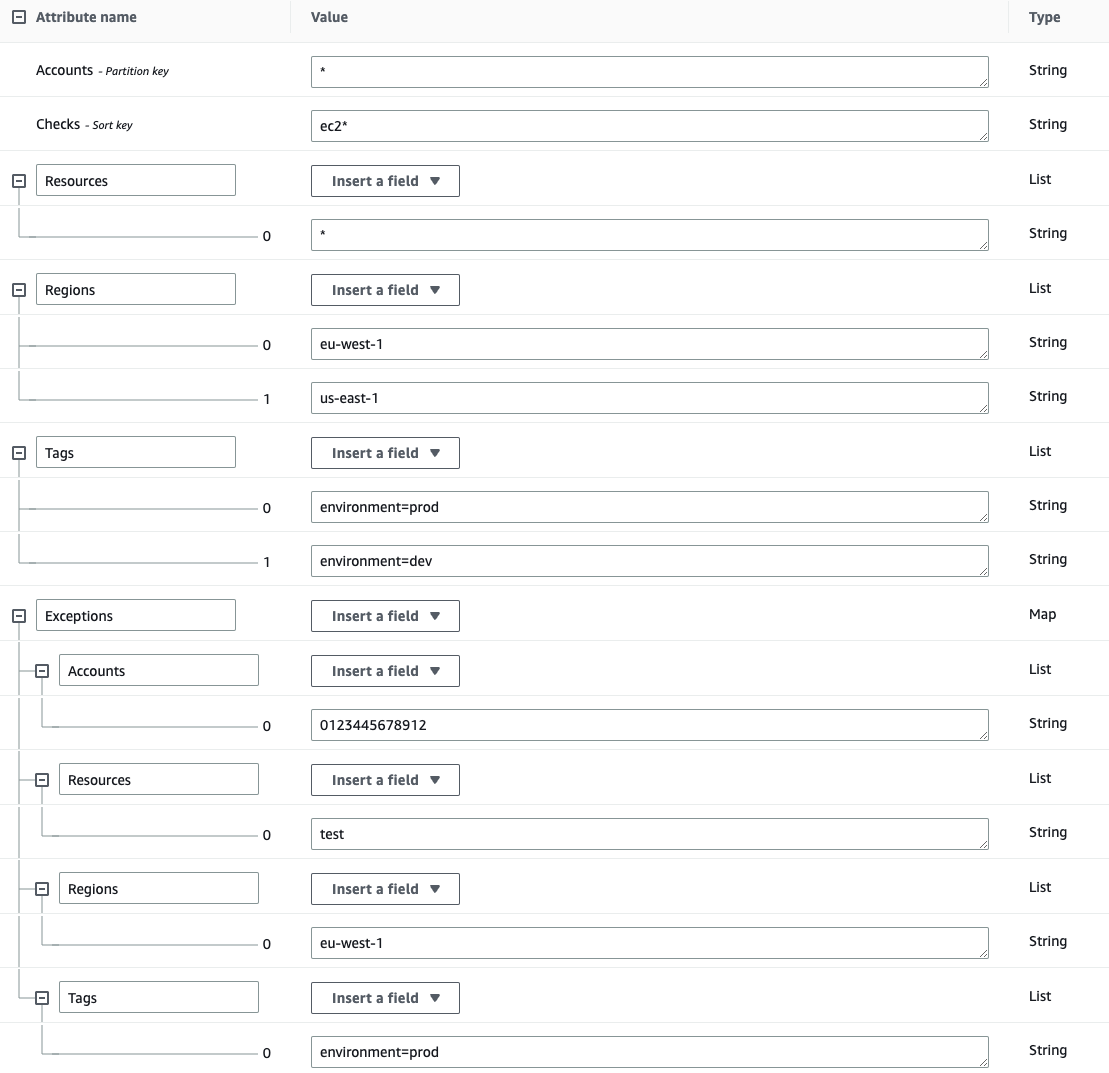
The following example will mute all resources in all accounts for the EC2 checks in the regions `eu-west-1` and `us-east-1` with the tags `environment=dev` and `environment=prod`, except the resources containing the string `test` in the account `012345678912` and region `eu-west-1` with the tag `environment=prod`:
The Mutelist Table must have the following columns:
* Accounts (String): This field can contain either an Account ID or an `*` (which applies to all the accounts that use this table as an mutelist).
* Checks (String): This field can contain either a Prowler Check Name or an `*` (which applies to all the scanned checks).
* Regions (List): This field contains a list of regions where this mutelist rule is applied (it can also contains an `*` to apply all scanned regions).
* Resources (List): This field contains a list of regular expressions (regex) that applies to the resources that are wanted to be muted.
* Tags (List): -Optional- This field contains a list of tuples in the form of 'key=value' that applies to the resources tags that are wanted to be muted.
* Exceptions (Map): -Optional- This field contains a map of lists of accounts/regions/resources/tags that are wanted to be excepted in the mutelist.
The following example will mute all resources in all accounts for the EC2 checks in the regions `eu-west-1` and `us-east-1` with the tags `environment=dev` and `environment=prod`, except the resources containing the string `test` in the account `012345678912` and region `eu-west-1` with the tag `environment=prod`:
 Make sure that the used AWS credentials have `dynamodb:PartiQLSelect` permissions in the table.
#### AWS Lambda ARN
You will need to pass the AWS Lambda Function ARN:
```
prowler aws -w arn:aws:lambda:REGION:ACCOUNT_ID:function:FUNCTION_NAME
```
Make sure that the credentials that Prowler uses can invoke the Lambda Function:
```
- PolicyName: GetMuteList
PolicyDocument:
Version: '2012-10-17'
Statement:
- Action: 'lambda:InvokeFunction'
Effect: Allow
Resource: arn:aws:lambda:REGION:ACCOUNT_ID:function:FUNCTION_NAME
```
The Lambda Function can then generate an Mutelist dynamically. Here is the code an example Python Lambda Function that generates an Mutelist:
```
def handler(event, context):
checks = {}
checks["vpc_flow_logs_enabled"] = { "Regions": [ "*" ], "Resources": [ "" ], Optional("Tags"): [ "key:value" ] }
al = { "Mutelist": { "Accounts": { "*": { "Checks": checks } } } }
return al
```
Make sure that the used AWS credentials have `dynamodb:PartiQLSelect` permissions in the table.
#### AWS Lambda ARN
You will need to pass the AWS Lambda Function ARN:
```
prowler aws -w arn:aws:lambda:REGION:ACCOUNT_ID:function:FUNCTION_NAME
```
Make sure that the credentials that Prowler uses can invoke the Lambda Function:
```
- PolicyName: GetMuteList
PolicyDocument:
Version: '2012-10-17'
Statement:
- Action: 'lambda:InvokeFunction'
Effect: Allow
Resource: arn:aws:lambda:REGION:ACCOUNT_ID:function:FUNCTION_NAME
```
The Lambda Function can then generate an Mutelist dynamically. Here is the code an example Python Lambda Function that generates an Mutelist:
```
def handler(event, context):
checks = {}
checks["vpc_flow_logs_enabled"] = { "Regions": [ "*" ], "Resources": [ "" ], Optional("Tags"): [ "key:value" ] }
al = { "Mutelist": { "Accounts": { "*": { "Checks": checks } } } }
return al
```