> ## Documentation Index
> Fetch the complete documentation index at: https://docs.prowler.com/llms.txt
> Use this file to discover all available pages before exploring further.
# Cross-Provider Compliance
> Aggregate a single universal compliance framework across every connected provider in Prowler Cloud, review a consolidated roll-up and per-provider breakdown, and download a combined PDF report.
export const SubscriptionBanner = ({children}) => {
return
This feature is available exclusively in Prowler Cloud and Prowler Enterprise with a subscription.
{children}
;
};
export const VersionBadge = ({version}) => {
return
Added in:
{version}
;
};
Cross-Provider Compliance consolidates a single **universal compliance framework** across all of your connected providers into one unified view. Instead of reviewing the same framework on AWS, Azure, Google Cloud, and every other provider as separate reports, Prowler takes the most recent completed scan of every compatible provider, aggregates them by requirement, and produces a single roll-up posture with a per-provider breakdown and a combined executive PDF.
## What Is a Universal Compliance Framework
Most Prowler compliance frameworks target a single provider (for example, CIS AWS or CIS Azure). A **universal** framework declares its requirements once in a single JSON and maps each requirement to checks for many providers at the same time, so the same CSA CCM control maps to both AWS and Azure checks. Universal frameworks live at the top of the compliance catalog (`prowler/compliance/.json`), as opposed to the legacy per-provider frameworks under `prowler/compliance//`. For real definitions, see [`csa_ccm_4.0.json`](https://github.com/prowler-cloud/prowler/blob/master/prowler/compliance/csa_ccm_4.0.json), [`cis_controls_8.1.json`](https://github.com/prowler-cloud/prowler/blob/master/prowler/compliance/cis_controls_8.1.json), and [`dora_2022_2554.json`](https://github.com/prowler-cloud/prowler/blob/master/prowler/compliance/dora_2022_2554.json) in the Prowler repository.
Prowler currently ships three universal frameworks: [CSA CCM](https://hub.prowler.com/compliance/csa_ccm_4.0), [CIS Controls](https://hub.prowler.com/compliance/cis_controls_8.1), and [DORA](https://hub.prowler.com/compliance/dora_2022_2554). Each framework page on Prowler Hub lists the full requirement-to-check mapping per provider.
## How Cross-Provider Compliance Works
Cross-Provider Compliance uses this structure to answer a single question: **"How compliant is my whole estate against this framework, regardless of provider?"** For a chosen universal framework, Prowler Cloud:
1. Selects **one scan per compatible provider**: by default, the latest completed scan of each provider the framework supports and that you are allowed to see.
2. Aggregates the requirement results across those scans, folding multiple accounts of the same provider type together.
3. Computes a **roll-up status** for each requirement and an overall pass / fail / manual summary for the framework.
4. Exposes a **per-provider breakdown** so you can see exactly which provider is failing a given control.
Cross-Provider Compliance never mixes different frameworks. It aggregates one universal framework at a time across providers. To review a single provider in isolation, use the standard per-scan [Compliance](/user-guide/compliance/tutorials/compliance) view.
### Supported Universal Frameworks
The Cross-Provider Compliance view currently supports the following universal frameworks. The compatible providers are the ones each framework declares checks for; a provider only contributes to the roll-up when it has a completed scan.
| Framework | Version | Compatible providers |
| -------------------------------------------------------------------------------------------------- | --------- | -------------------------------------------------------------------------------------------------------------------------------------------------------------- |
| [**CSA CCM**](https://hub.prowler.com/compliance/csa_ccm_4.0) (Cloud Controls Matrix) | 4.0 | AWS, Azure, Google Cloud, Alibaba Cloud, Oracle Cloud |
| [**CIS Controls**](https://hub.prowler.com/compliance/cis_controls_8.1) | 8.1 | AWS, Azure, Google Cloud, Microsoft 365, Kubernetes, GitHub, Google Workspace, Okta, Oracle Cloud, Alibaba Cloud, Cloudflare, MongoDB Atlas, OpenStack, Vercel |
| [**DORA**](https://hub.prowler.com/compliance/dora_2022_2554) (Digital Operational Resilience Act) | 2022/2554 | AWS, Azure, Google Cloud, Alibaba Cloud, Cloudflare |
The catalog grows as new universal frameworks ship in Prowler. Browse the full compliance catalog at [Prowler Hub](https://hub.prowler.com/compliance).
## Accessing the Cross-Provider View
Sign in to Prowler Cloud at [cloud.prowler.com](https://cloud.prowler.com/sign-in) and select **Compliance** from the left navigation.
At the top of the Compliance page, select the **Cross-provider** tab. The **Per Scan** tab (the default) keeps the single-provider compliance experience unchanged.
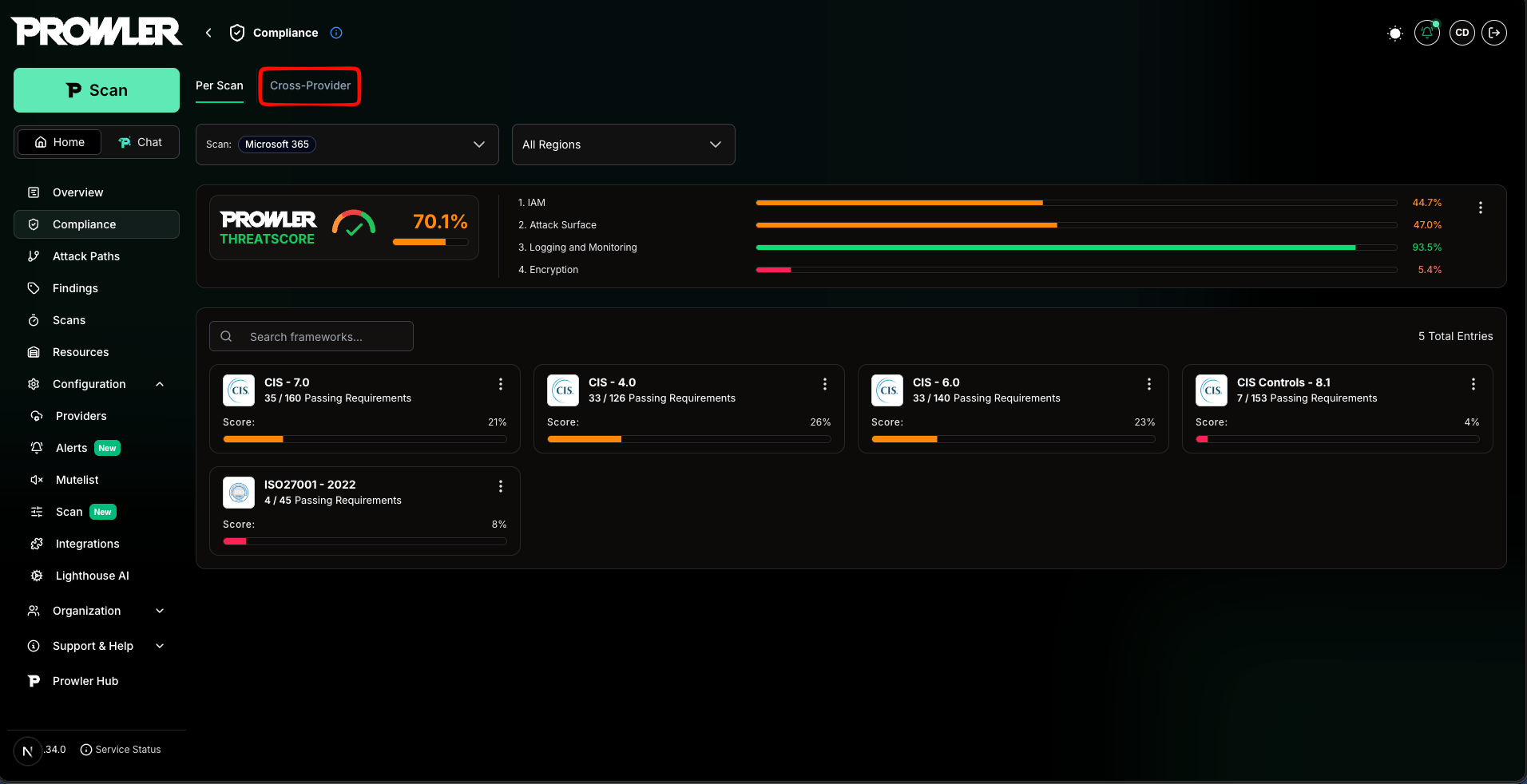 Cross-Provider Compliance requires at least one completed scan for a compatible provider. If no compatible provider has finished a scan yet, the page shows a notice prompting you to launch or wait for a scan to complete.
## Exploring the Overview
The overview presents one card per supported universal framework, each summarizing the consolidated posture across every contributing provider.
Cross-Provider Compliance requires at least one completed scan for a compatible provider. If no compatible provider has finished a scan yet, the page shows a notice prompting you to launch or wait for a scan to complete.
## Exploring the Overview
The overview presents one card per supported universal framework, each summarizing the consolidated posture across every contributing provider.
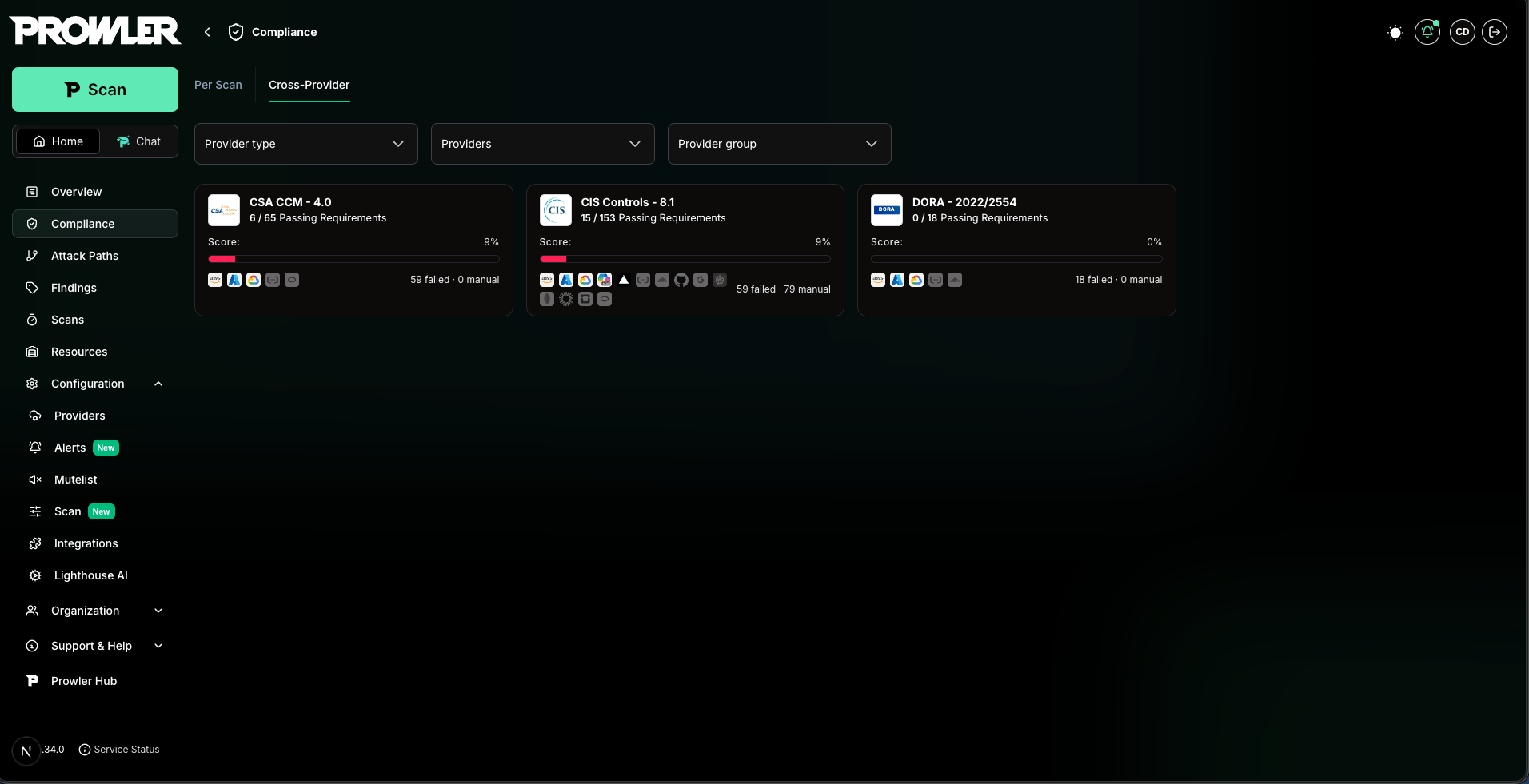 Each **framework card** includes:
* **Framework logo, name, and version:** Identifies the universal standard (CSA CCM, CIS Controls, DORA).
* **Score:** The percentage of passing requirements over the total evaluated, aggregated across every contributing provider. Color coding follows three thresholds: red for severely low compliance, amber for partial compliance, and green for healthy posture.
* **Passing Requirements:** A `passed / total` counter with the aggregated roll-up.
* **Provider chips:** One icon per compatible provider. Providers with a completed scan appear active with their passing percentage; providers without a scan appear dimmed with a "no completed scan yet" tooltip so coverage gaps are obvious at a glance.
* **Failed and manual counts:** The number of failing and manual requirements in the roll-up.
Select any card to open the framework detail page.
### Filtering the Roll-Up
The filters bar controls which providers and accounts feed every card and detail view. Cross-Provider Compliance supports three filters:
* **Provider type:** Narrow the roll-up to specific provider types (for example, only AWS and Azure).
* **Provider / account:** Narrow to specific connected accounts.
* **Provider group:** Narrow to accounts within one or more provider groups.
Select **Clear filters** to reset all filters. Filters applied on the overview are carried through into the detail page and the PDF report so the view stays consistent end to end.
Filters narrow **which providers contribute** to the aggregation. They do not change how a requirement rolls up (see [Understanding the Roll-Up Status](#understanding-the-roll-up-status)).
## Working With the Framework Detail Page
The detail page provides the full breakdown for a single universal framework: aggregate metrics, provider coverage, top failing sections, and a requirement-by-requirement view with per-provider status.
Each **framework card** includes:
* **Framework logo, name, and version:** Identifies the universal standard (CSA CCM, CIS Controls, DORA).
* **Score:** The percentage of passing requirements over the total evaluated, aggregated across every contributing provider. Color coding follows three thresholds: red for severely low compliance, amber for partial compliance, and green for healthy posture.
* **Passing Requirements:** A `passed / total` counter with the aggregated roll-up.
* **Provider chips:** One icon per compatible provider. Providers with a completed scan appear active with their passing percentage; providers without a scan appear dimmed with a "no completed scan yet" tooltip so coverage gaps are obvious at a glance.
* **Failed and manual counts:** The number of failing and manual requirements in the roll-up.
Select any card to open the framework detail page.
### Filtering the Roll-Up
The filters bar controls which providers and accounts feed every card and detail view. Cross-Provider Compliance supports three filters:
* **Provider type:** Narrow the roll-up to specific provider types (for example, only AWS and Azure).
* **Provider / account:** Narrow to specific connected accounts.
* **Provider group:** Narrow to accounts within one or more provider groups.
Select **Clear filters** to reset all filters. Filters applied on the overview are carried through into the detail page and the PDF report so the view stays consistent end to end.
Filters narrow **which providers contribute** to the aggregation. They do not change how a requirement rolls up (see [Understanding the Roll-Up Status](#understanding-the-roll-up-status)).
## Working With the Framework Detail Page
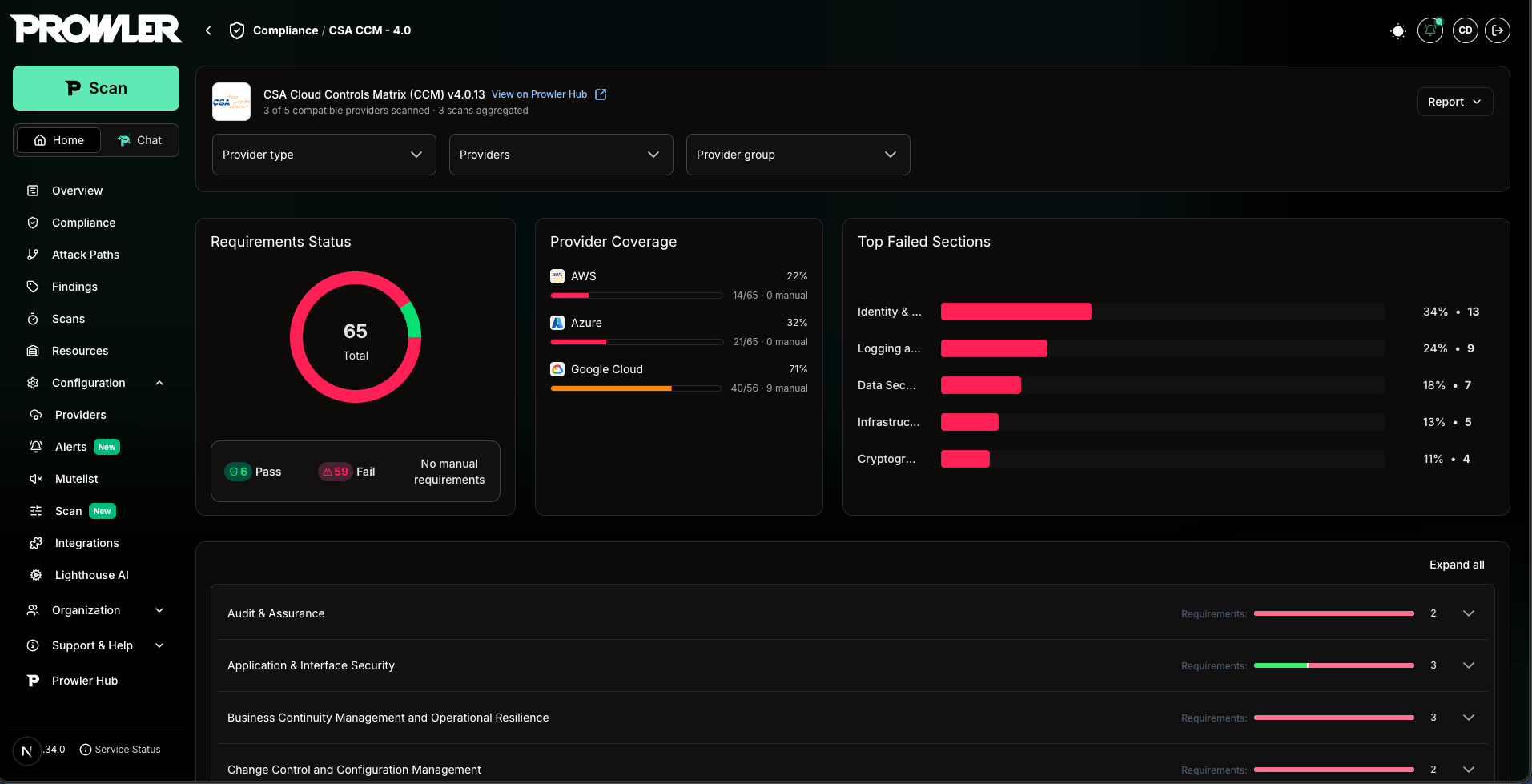
The detail page provides the full breakdown for a single universal framework: aggregate metrics, provider coverage, top failing sections, and a requirement-by-requirement view with per-provider status.
 ### Header
The header shows the framework name and version, a link to the framework page on [Prowler Hub](https://hub.prowler.com/compliance), and a summary such as *"X of Y compatible providers scanned · N scans aggregated"* so you always know the coverage behind the numbers. The **Report** button in the top-right generates and downloads the combined PDF (see [Downloading the Combined PDF Report](#downloading-the-combined-pdf-report)).
### Summary Cards
Below the header, three summary cards condense the framework state:
* **Requirements Status:** Donut chart with `Pass`, `Fail`, and `Manual` counts plus the total number of requirements, reflecting the consolidated roll-up.
* **Provider Coverage:** Shows which compatible providers contributed a scan and their individual posture, so coverage gaps and per-provider weak spots are visible at a glance.
* **Top Failed Sections:** Ranks the framework sections with the highest number of failing requirements, with deep links into the requirements accordion.
### Requirements Accordion
The accordion organizes every requirement of the framework. For each requirement you see:
* **Requirement ID and title:** The official identifier from the framework.
* **Roll-up status badge:** A single `Pass`, `Fail`, or `Manual` badge representing the consolidated status across all contributing providers.
* **Per-provider status:** The status each contributing provider returned for that requirement, so a single failing provider is immediately attributable.
* **Provider-labeled checks:** When you expand a requirement, the underlying checks are labeled with the provider they belong to (each universal requirement maps to different check IDs per provider).
Expand a requirement to review the failing checks per provider, the affected resources, and remediation guidance. Findings are queried across every contributing scan and merged into a single table.
### Header
The header shows the framework name and version, a link to the framework page on [Prowler Hub](https://hub.prowler.com/compliance), and a summary such as *"X of Y compatible providers scanned · N scans aggregated"* so you always know the coverage behind the numbers. The **Report** button in the top-right generates and downloads the combined PDF (see [Downloading the Combined PDF Report](#downloading-the-combined-pdf-report)).
### Summary Cards
Below the header, three summary cards condense the framework state:
* **Requirements Status:** Donut chart with `Pass`, `Fail`, and `Manual` counts plus the total number of requirements, reflecting the consolidated roll-up.
* **Provider Coverage:** Shows which compatible providers contributed a scan and their individual posture, so coverage gaps and per-provider weak spots are visible at a glance.
* **Top Failed Sections:** Ranks the framework sections with the highest number of failing requirements, with deep links into the requirements accordion.
### Requirements Accordion
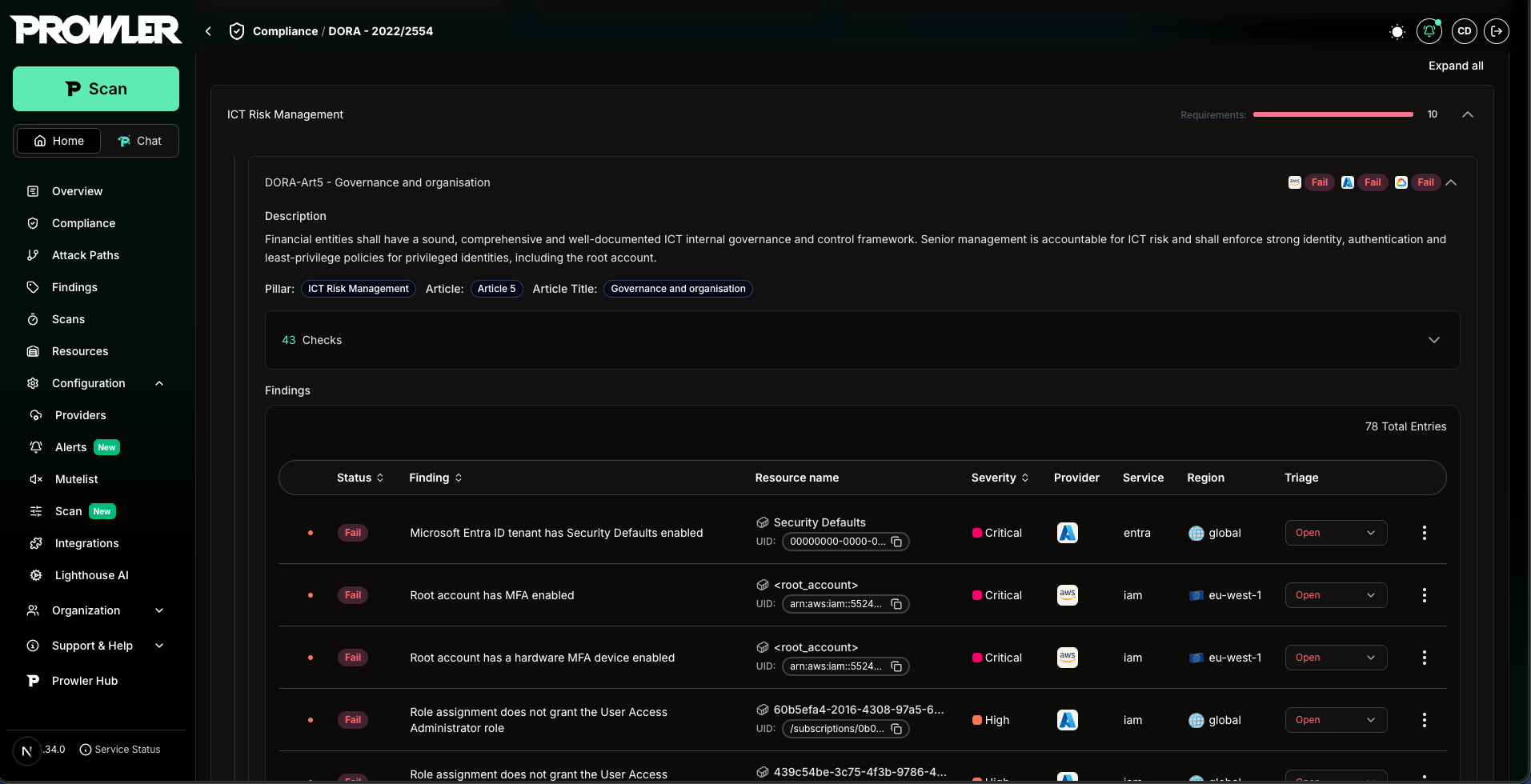
The accordion organizes every requirement of the framework. For each requirement you see:
* **Requirement ID and title:** The official identifier from the framework.
* **Roll-up status badge:** A single `Pass`, `Fail`, or `Manual` badge representing the consolidated status across all contributing providers.
* **Per-provider status:** The status each contributing provider returned for that requirement, so a single failing provider is immediately attributable.
* **Provider-labeled checks:** When you expand a requirement, the underlying checks are labeled with the provider they belong to (each universal requirement maps to different check IDs per provider).
Expand a requirement to review the failing checks per provider, the affected resources, and remediation guidance. Findings are queried across every contributing scan and merged into a single table.
 ## Understanding the Roll-Up Status
Cross-Provider Compliance rolls up results in two stages, with a strict **FAIL > PASS > MANUAL** precedence.
**Per provider, per requirement:**
* If any check fails → the provider contributes **FAIL** for that requirement.
* Else if every check passes → **PASS**.
* Otherwise (no pass/fail evidence) → **MANUAL**.
Multiple accounts of the same provider type (for example, three AWS accounts) are folded together first, so a failure in any one account marks that provider type as failing.
**Across providers, per requirement (the roll-up badge):**
* If at least one contributing provider is **FAIL** → the requirement is **FAIL**.
* Else if at least one contributing provider is **PASS** → **PASS**.
* Otherwise → **MANUAL**.
Only providers that **actually contributed a result** for a requirement are counted. A provider that has a scan in the aggregation but produced no result for a specific requirement (for example, because the framework maps no checks to that provider for that control) does **not** degrade the requirement to Manual. This keeps the roll-up focused on real evidence.
### How Scans Are Selected
By default, Cross-Provider Compliance auto-selects the **latest completed scan** of each compatible provider you are allowed to see. This means:
* The view always reflects your most recent posture per provider, without any manual scan selection.
* Adding a new compatible provider and running a scan automatically brings it into the roll-up.
* Provider visibility follows your role: you only ever see providers your permissions allow, and the roll-up is scoped accordingly.
## Downloading the Combined PDF Report
The **Report** button on the detail page generates a single PDF that combines every contributing provider's latest scan for the framework into one executive document: a cover page listing all providers and accounts, an executive summary with the consolidated roll-up, charts, a requirements index, and detailed findings grouped by requirement, provider, and account.
### The Report Follows Your Filters
A report covers the exact set of scans your current filters resolve to. The provider type, provider / account, and provider group filters applied on the detail page determine which providers contribute, and the auto-select rule pins each contributing provider's latest completed scan. The PDF is built from that resolved scan set together with the framework.
As a result, each filter combination produces its own report. For example:
* No filters → a report covering every compatible provider that has a completed scan.
* `Provider type = AWS, Azure` → a report covering only your AWS and Azure scans.
* `Provider group = Production` → a report covering only the accounts in that group.
Changing the filters and generating again produces a different, independent report. Each combination is tracked on its own, so switching filters back and forth never overwrites a previously generated report.
Region filtering is **not** supported for the combined PDF report. The report recomputes status live across every region of the contributing scans, so a region-scoped request is rejected rather than producing a report that contradicts a region-filtered view.
### Generating and Reusing a Report
Because the report aggregates many scans, it is generated **asynchronously**:
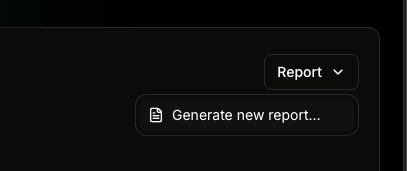
Select **Report → Generate new report…**, optionally give it a name, and confirm. Prowler starts a background job and shows a "Report generation started" confirmation.
The button shows a "Generating report…" state while the job runs. Generation continues in the background: you can navigate away, and a toast notification appears when the report is ready, even after a page reload.
When the report is ready, select **Download** from the notification, or use **Report → Download latest** at any time to fetch the most recent report for the current filters.
## Understanding the Roll-Up Status
Cross-Provider Compliance rolls up results in two stages, with a strict **FAIL > PASS > MANUAL** precedence.
**Per provider, per requirement:**
* If any check fails → the provider contributes **FAIL** for that requirement.
* Else if every check passes → **PASS**.
* Otherwise (no pass/fail evidence) → **MANUAL**.
Multiple accounts of the same provider type (for example, three AWS accounts) are folded together first, so a failure in any one account marks that provider type as failing.
**Across providers, per requirement (the roll-up badge):**
* If at least one contributing provider is **FAIL** → the requirement is **FAIL**.
* Else if at least one contributing provider is **PASS** → **PASS**.
* Otherwise → **MANUAL**.
Only providers that **actually contributed a result** for a requirement are counted. A provider that has a scan in the aggregation but produced no result for a specific requirement (for example, because the framework maps no checks to that provider for that control) does **not** degrade the requirement to Manual. This keeps the roll-up focused on real evidence.
### How Scans Are Selected
By default, Cross-Provider Compliance auto-selects the **latest completed scan** of each compatible provider you are allowed to see. This means:
* The view always reflects your most recent posture per provider, without any manual scan selection.
* Adding a new compatible provider and running a scan automatically brings it into the roll-up.
* Provider visibility follows your role: you only ever see providers your permissions allow, and the roll-up is scoped accordingly.
## Downloading the Combined PDF Report
The **Report** button on the detail page generates a single PDF that combines every contributing provider's latest scan for the framework into one executive document: a cover page listing all providers and accounts, an executive summary with the consolidated roll-up, charts, a requirements index, and detailed findings grouped by requirement, provider, and account.
### The Report Follows Your Filters
A report covers the exact set of scans your current filters resolve to. The provider type, provider / account, and provider group filters applied on the detail page determine which providers contribute, and the auto-select rule pins each contributing provider's latest completed scan. The PDF is built from that resolved scan set together with the framework.
As a result, each filter combination produces its own report. For example:
* No filters → a report covering every compatible provider that has a completed scan.
* `Provider type = AWS, Azure` → a report covering only your AWS and Azure scans.
* `Provider group = Production` → a report covering only the accounts in that group.
Changing the filters and generating again produces a different, independent report. Each combination is tracked on its own, so switching filters back and forth never overwrites a previously generated report.
Region filtering is **not** supported for the combined PDF report. The report recomputes status live across every region of the contributing scans, so a region-scoped request is rejected rather than producing a report that contradicts a region-filtered view.
### Generating and Reusing a Report
Because the report aggregates many scans, it is generated **asynchronously**:
Select **Report → Generate new report…**, optionally give it a name, and confirm. Prowler starts a background job and shows a "Report generation started" confirmation.
The button shows a "Generating report…" state while the job runs. Generation continues in the background: you can navigate away, and a toast notification appears when the report is ready, even after a page reload.
When the report is ready, select **Download** from the notification, or use **Report → Download latest** at any time to fetch the most recent report for the current filters.
 A report already generated for a given set of filters does not need to be generated again. When you open the detail page with a filter combination that was reported before, Prowler detects the existing report and surfaces **Report → Download latest** so you can download it immediately, without launching a new job. You only need to generate a fresh report when:
* You apply a filter combination that has never been reported before, or
* A contributing provider has run a new scan since the report was generated. The report is tied to the specific scans it was built from, so a newer scan makes the previous report stale; Prowler recognizes it no longer matches the current selection and offers to generate an up-to-date one.
"Download latest" reuses an existing report only when it matches the framework, the exact resolved scan set for the current filters, and the same report options. This guarantees the PDF you download reflects the posture you are looking at, rather than a report generated for a different filter or an older scan.
The PDF detail section renders only **failed** requirements by default so the report stays focused as an executive/auditor document. As with every Prowler PDF, the detail section is capped at the first 100 failed findings per check; use the per-scan CSV or JSON-OCSF exports for the complete, untruncated list. See [Downloading Compliance Reports](/user-guide/compliance/tutorials/compliance#downloading-compliance-reports) for the full PDF behavior and the `DJANGO_PDF_MAX_FINDINGS_PER_CHECK` setting.
## Related Documentation
* [Compliance](/user-guide/compliance/tutorials/compliance)
* [Prowler ThreatScore Documentation](/user-guide/compliance/tutorials/threatscore)
* [Creating a New Security Compliance Framework in Prowler](/developer-guide/security-compliance-framework)
* [Prowler App — Getting Started](/user-guide/tutorials/prowler-app)
A report already generated for a given set of filters does not need to be generated again. When you open the detail page with a filter combination that was reported before, Prowler detects the existing report and surfaces **Report → Download latest** so you can download it immediately, without launching a new job. You only need to generate a fresh report when:
* You apply a filter combination that has never been reported before, or
* A contributing provider has run a new scan since the report was generated. The report is tied to the specific scans it was built from, so a newer scan makes the previous report stale; Prowler recognizes it no longer matches the current selection and offers to generate an up-to-date one.
"Download latest" reuses an existing report only when it matches the framework, the exact resolved scan set for the current filters, and the same report options. This guarantees the PDF you download reflects the posture you are looking at, rather than a report generated for a different filter or an older scan.
The PDF detail section renders only **failed** requirements by default so the report stays focused as an executive/auditor document. As with every Prowler PDF, the detail section is capped at the first 100 failed findings per check; use the per-scan CSV or JSON-OCSF exports for the complete, untruncated list. See [Downloading Compliance Reports](/user-guide/compliance/tutorials/compliance#downloading-compliance-reports) for the full PDF behavior and the `DJANGO_PDF_MAX_FINDINGS_PER_CHECK` setting.
## Related Documentation
* [Compliance](/user-guide/compliance/tutorials/compliance)
* [Prowler ThreatScore Documentation](/user-guide/compliance/tutorials/threatscore)
* [Creating a New Security Compliance Framework in Prowler](/developer-guide/security-compliance-framework)
* [Prowler App — Getting Started](/user-guide/tutorials/prowler-app)