> ## Documentation Index
> Fetch the complete documentation index at: https://docs.prowler.com/llms.txt
> Use this file to discover all available pages before exploring further.
# Okta Authentication in Prowler
export const VersionBadge = ({version}) => {
return
Added in:
{version}
;
};
Prowler authenticates to Okta as a **service application** using **OAuth 2.0 with a private-key JWT** (Client Credentials grant). The integration is read-only by scope and follows DISA STIG guidance for least-privilege access.
## Common Setup
### Prerequisites
* An Okta organization. The UI examples below use **Identity Engine** terminology such as **Global Session Policy**; Classic Engine exposes equivalent sign-on policy concepts under older naming.
* A **Super Administrator** account on that organization for the one-time service-app setup.
* An **API Services** app integration created in the Okta Admin Console.
### Authentication Method Overview
| Method | Status | Use Case |
| ------------------------------- | --------- | ------------------------------------- |
| **OAuth 2.0 (private-key JWT)** | Supported | Production scans, CI/CD, Prowler App. |
The private-key JWT flow is the only supported authentication method in the initial release. The service application proves possession of a private key on every token request; Okta returns a short-lived access token, refreshed automatically by the SDK.
If a different authentication method is needed (SSWS API token, OAuth with user delegation, etc.), please open a [feature request](https://github.com/prowler-cloud/prowler/issues/new?template=feature-request.yml) describing the use case.
### Required OAuth Scopes
The bundled checks require the following read-only scopes:
* `okta.policies.read`
* `okta.brands.read`
* `okta.apps.read`
* `okta.authenticators.read`
* `okta.networkZones.read`
* `okta.apiTokens.read`
* `okta.roles.read`
* `okta.groups.read`
* `okta.logStreams.read`
* `okta.idps.read`
Additional scopes will be needed as more services and checks are added. These are the current ones needed:
| Scope | Used by |
| -------------------------- | ------------------------------------------------------------------------------------------------------------------------------------------------------------ |
| `okta.policies.read` | Sign-on, password, authentication, and `USER_LIFECYCLE` (Workflow > Automations) policies |
| `okta.brands.read` | Sign-in page customizations (DOD Notice and Consent Banner check) |
| `okta.apps.read` | First-party app settings (Okta Admin Console session), integrated app inventory, and the Authentication Policies bound to Okta applications |
| `okta.authenticators.read` | Okta authenticator configuration, including Okta Verify and Smart Card IdP |
| `okta.networkZones.read` | Network Zone inventory, anonymized-proxy blocklist checks, and API token Network Zone validation |
| `okta.apiTokens.read` | API token metadata and token network conditions |
| `okta.roles.read` | Admin role assignments for API token owners (both direct and group-inherited) |
| `okta.groups.read` | Group memberships of API token owners, used to resolve admin roles inherited via group assignment (e.g. Super Admin granted through the default admin group) |
| `okta.logStreams.read` | Log Stream configuration (`/api/v1/logStreams`) |
| `okta.idps.read` | Identity Providers, including Smart Card (X509) IdPs (`/api/v1/idps`) |
### Required Admin Role
The service application must be assigned **one** of the following Okta admin roles:
* **Read-Only Administrator** — covers every `signon` check and runs `application_authentication_policy_network_zone_enforced` against the apps it can see. **Visibility caveat:** under Read-Only Administrator the `/api/v1/apps` endpoint returns only the apps the service application is itself assigned to — typically just the service app's own row (for example, `Prowler Scanner`). The check still produces a finding for that app, but the rest of the org's app inventory is invisible at this role level.
* **Super Administrator** — required additionally to evaluate five application-service checks that target Okta's first-party apps (Okta Admin Console, Okta Dashboard). With Super Administrator, `application_authentication_policy_network_zone_enforced` also evaluates the full org-wide app inventory instead of the service-app-only slice.
Okta's Management API enforces a two-layer authorization model: an OAuth **scope** decides which API endpoints the token can call, and an **admin role** decides whether the call returns data. With only a scope granted, the token mint succeeds but every read returns `403 Forbidden`. Read-Only Administrator is the minimum role that lets the granted `okta.*.read` scopes return configuration data to Prowler's checks; without it, the credential probe at provider startup fails and the scan never gets to evaluate any check.
#### When Super Administrator is required
Four checks need to resolve the Authentication Policy bound to Okta's first-party apps (Okta Admin Console, Okta Dashboard) and depend on `/api/v1/apps` returning those system apps — which Okta restricts to Super Administrator:
| Check | STIG |
| ------------------------------------------------------------- | -------- |
| `application_admin_console_mfa_required` | V-273193 |
| `application_admin_console_phishing_resistant_authentication` | V-273191 |
| `application_dashboard_mfa_required` | V-273194 |
| `application_dashboard_phishing_resistant_authentication` | V-273190 |
Okta filters the first-party apps (`saasure`, `okta_enduser`) out of `/api/v1/apps` for every role below Super Administrator, so `okta.apps.read` alone is not enough. The `okta.apps.manageFirstPartyApps` permission exists only in the paid Okta Identity Governance role `ACCESS_REQUESTS_ADMIN` and cannot be added to custom roles ([Okta Permissions Catalog](https://developer.okta.com/docs/api/openapi/okta-management/guides/permissions)).
A fifth check — `application_admin_console_session_idle_timeout_15min` (STIG V-273187) — also requires Super Administrator: it calls `GET /api/v1/first-party-app-settings/admin-console`, which returns `403 E0000006` for every role below Super Administrator.
`user_inactivity_automation_35d_enabled` (STIG V-273188) reads `USER_LIFECYCLE` policies (`list_policies(type='USER_LIFECYCLE')`) using the `okta.policies.read` scope. The Read-Only Administrator role is enough to list them; no Super Administrator requirement.
When the service app runs with Read-Only Administrator, the checks listed in this section return **MANUAL** instead of PASS/FAIL — the rest of the scan keeps running.
Read-Only Administrator stays the recommended default for the least-privilege framing that aligns with DISA STIG. Assign Super Administrator on a separate run when full coverage of the first-party app checks is needed.
## Step-by-Step Setup
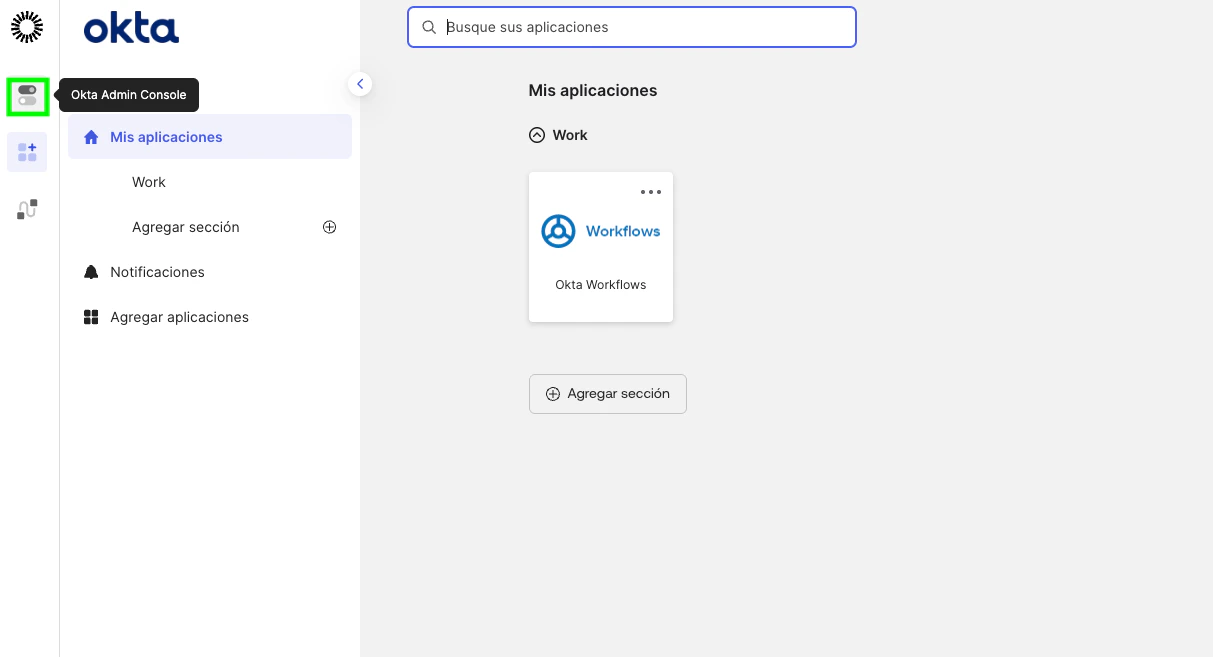
### 1. Go to the admin console
 ### 2. \[Optional] - Disable the privilege-escalation bypass (org-wide, one-time)
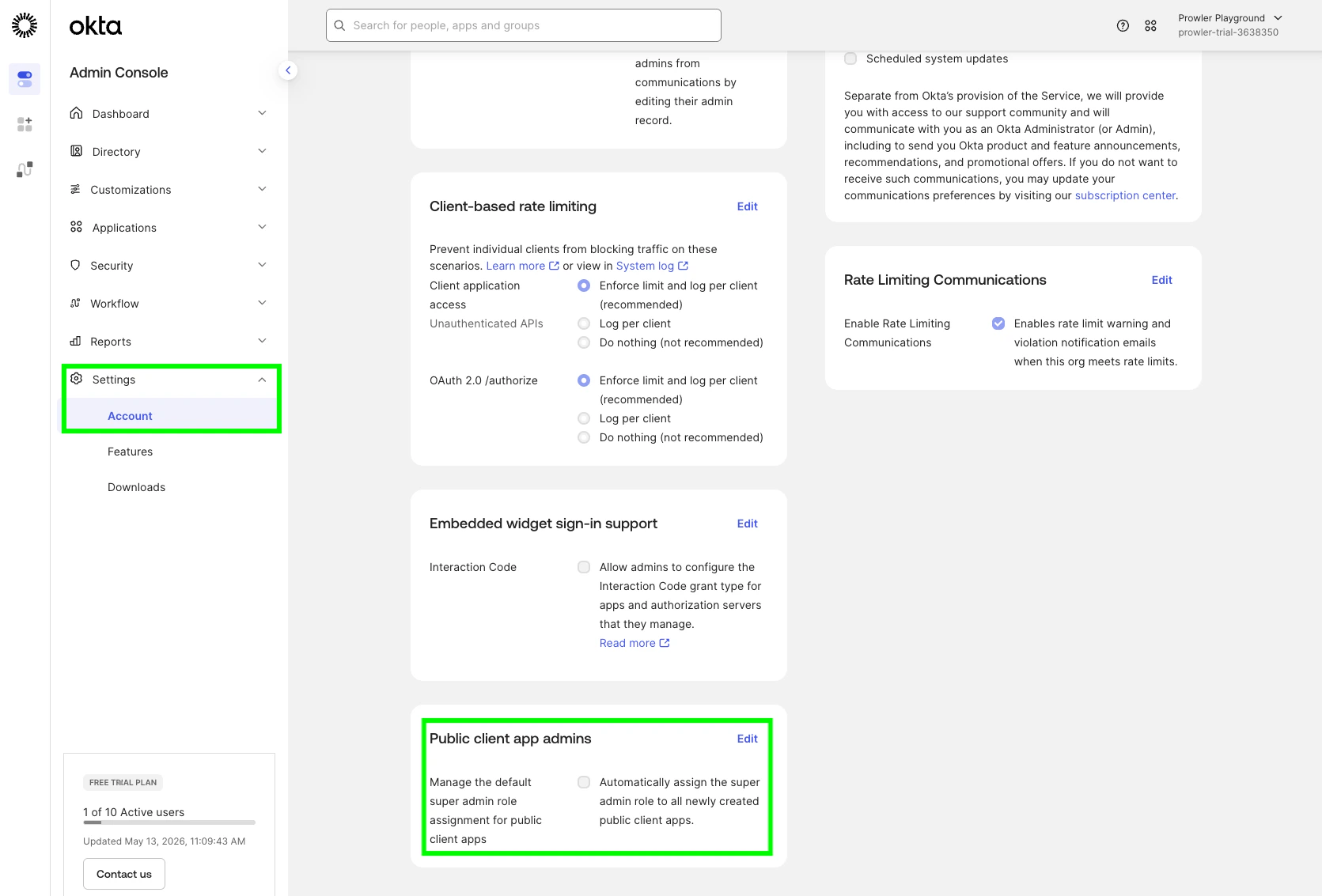
In the Okta Admin Console, go to **Settings → Account → Public client app admins** and ensure it is **off**. When enabled, every API Services app can be auto-assigned the Super Administrator role after scopes are granted, which would invalidate the read-only premise of this integration.
### 2. \[Optional] - Disable the privilege-escalation bypass (org-wide, one-time)
In the Okta Admin Console, go to **Settings → Account → Public client app admins** and ensure it is **off**. When enabled, every API Services app can be auto-assigned the Super Administrator role after scopes are granted, which would invalidate the read-only premise of this integration.
 ### 3. Create the API Services app
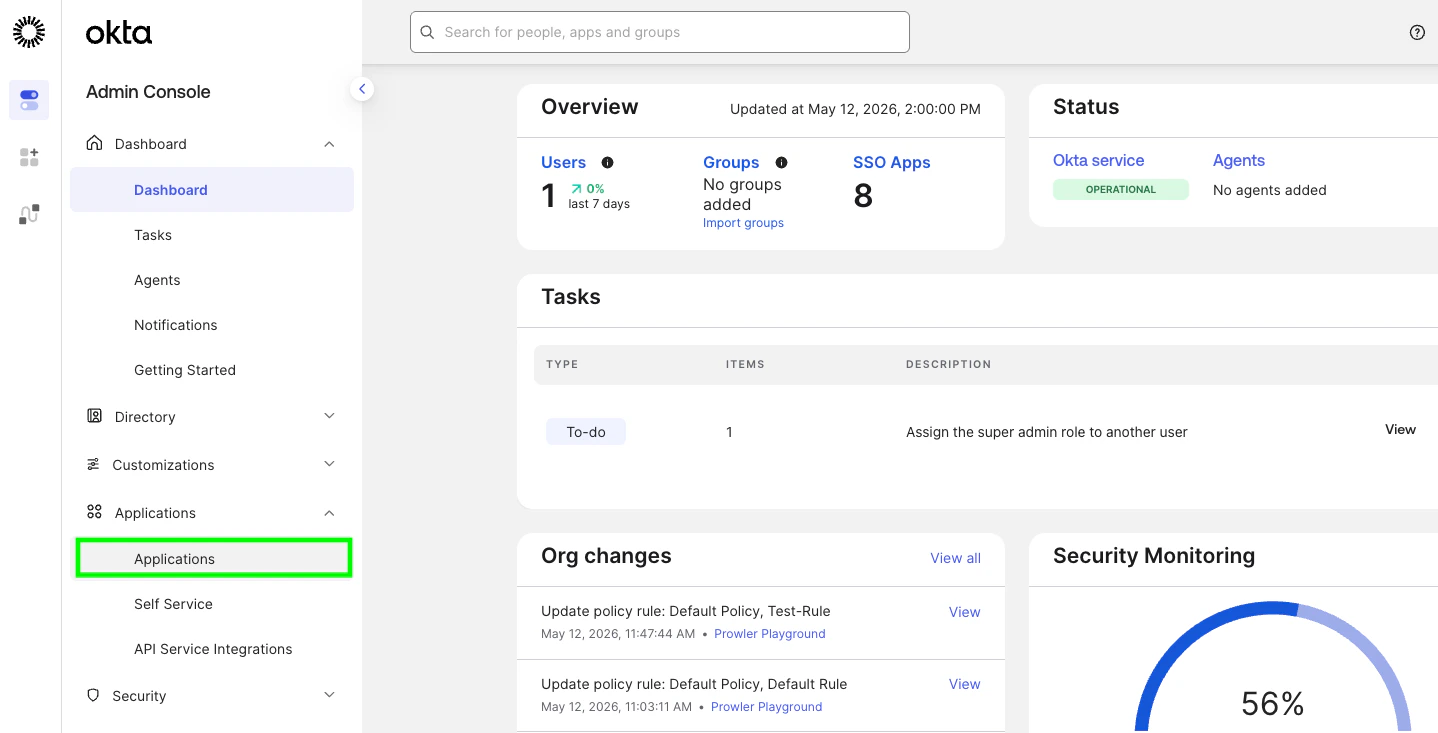
1. Go to **Applications → Applications**.
### 3. Create the API Services app
1. Go to **Applications → Applications**.
 2. **Create App Integration**
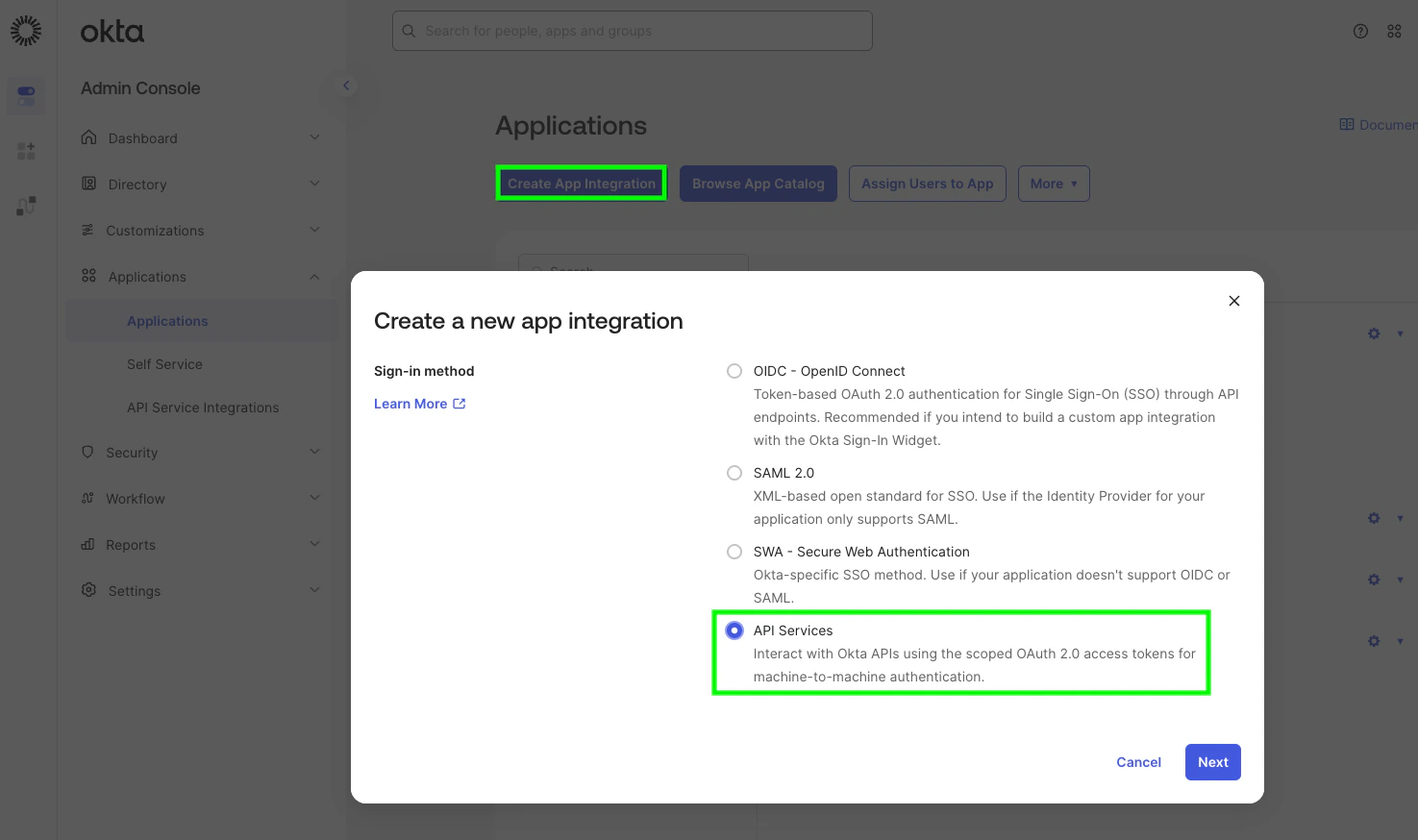 3. Sign-in method: **API Services**. Click **Next**.
4. Name the app (for example, `Prowler Scanner`) and click **Save**.
5. Copy the displayed **Client ID** — you'll use it as `OKTA_CLIENT_ID`.
3. Sign-in method: **API Services**. Click **Next**.
4. Name the app (for example, `Prowler Scanner`) and click **Save**.
5. Copy the displayed **Client ID** — you'll use it as `OKTA_CLIENT_ID`.
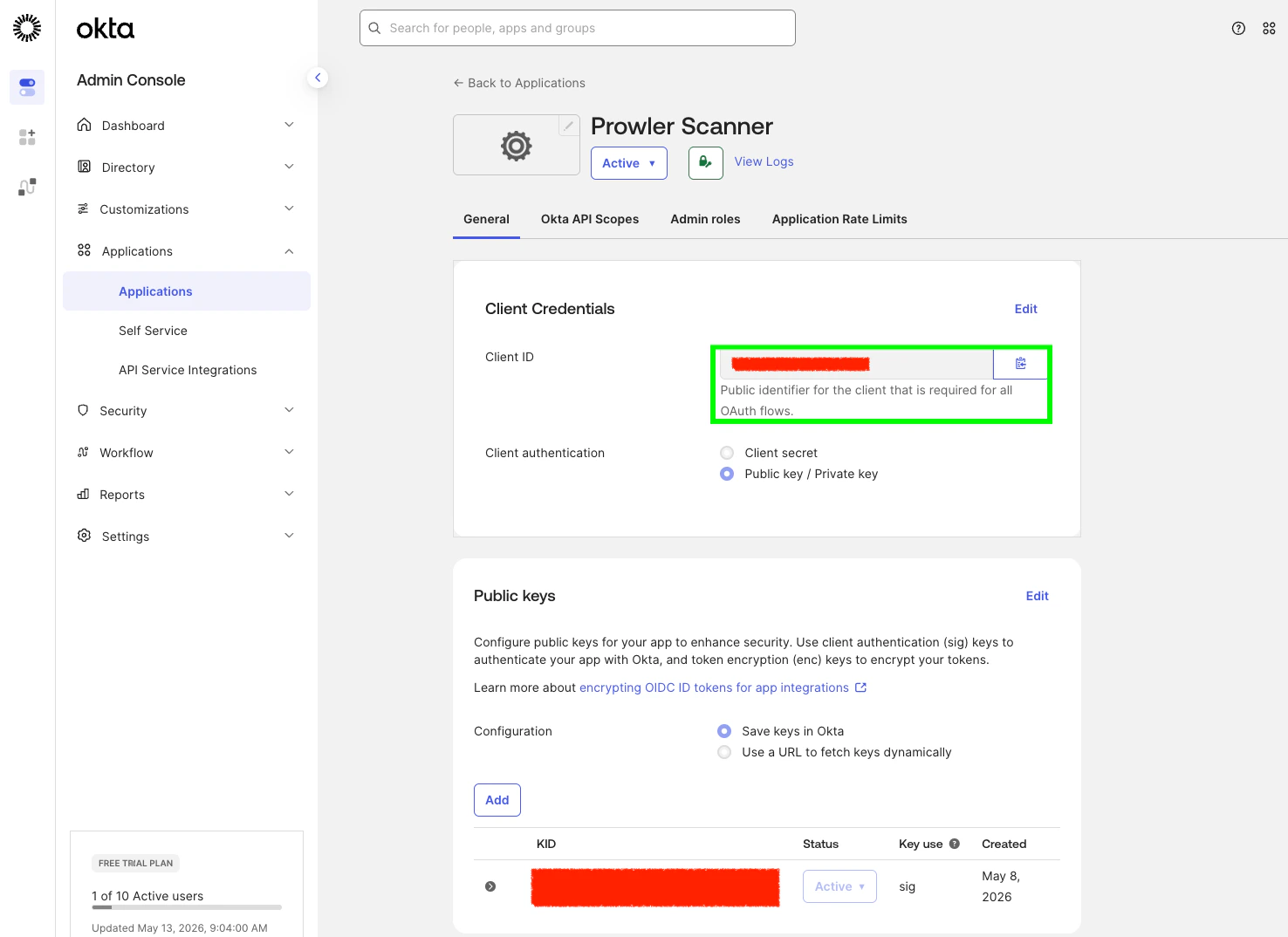 ### 4. Switch to private-key authentication and generate a keypair
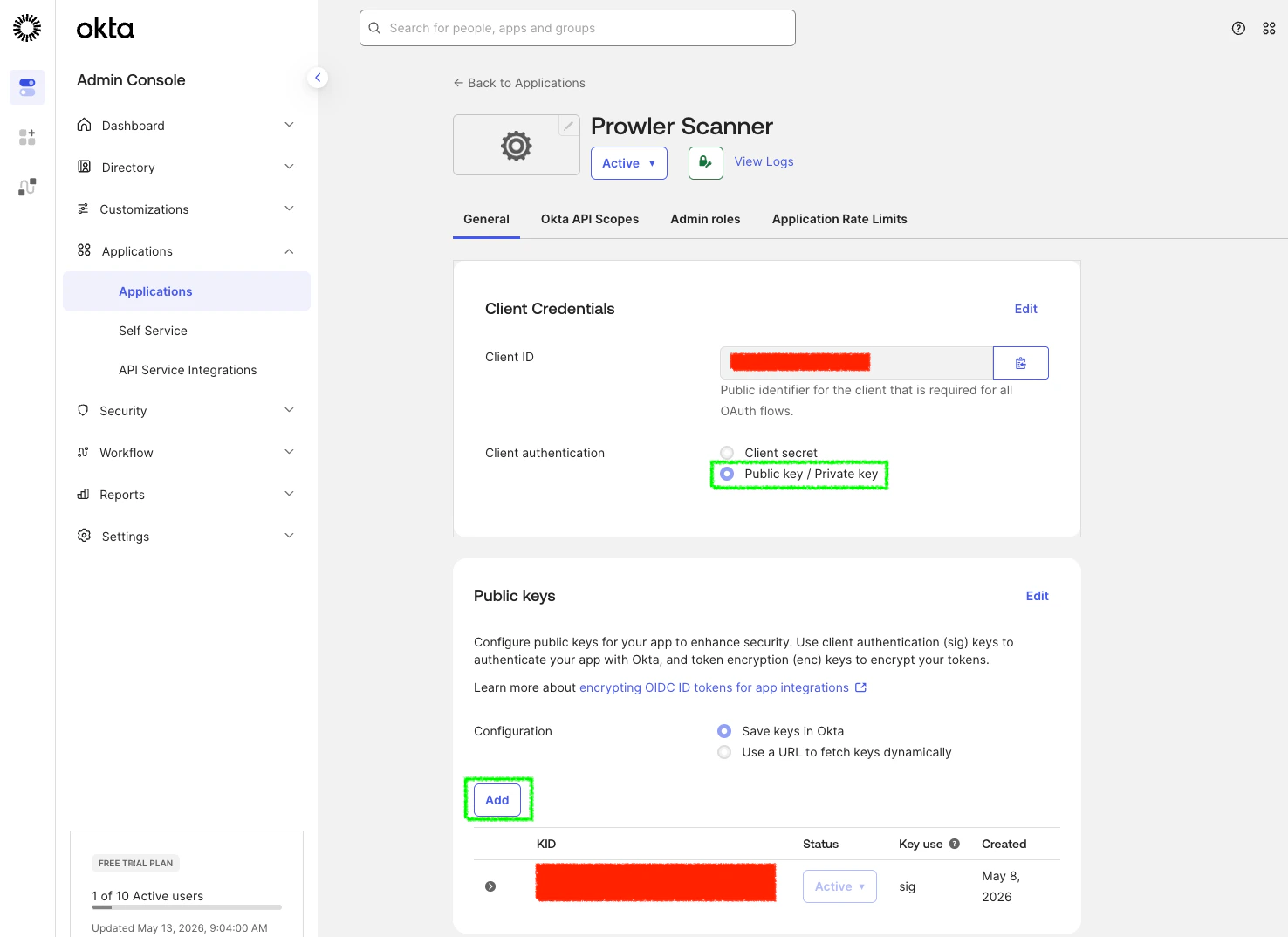
On the new app's **General** tab, scroll to **Client Credentials**:
1. Click **Edit**.
2. Set **Client authentication** to **Public key / Private key**.
3. Under **Public Keys**, click **Add key**.
4. In the modal, click **Generate new key**. Okta creates a JWK pair.
5. Click the **PEM** tab to switch the displayed format (or keep JWK — Prowler accepts both).
6. Copy the entire `-----BEGIN PRIVATE KEY-----` block (or the JWK JSON).
7. Click **Done**, then **Save**.
Okta displays the private key **only once**. If you close the modal without copying, you must generate a new key.
### 4. Switch to private-key authentication and generate a keypair
On the new app's **General** tab, scroll to **Client Credentials**:
1. Click **Edit**.
2. Set **Client authentication** to **Public key / Private key**.
3. Under **Public Keys**, click **Add key**.
4. In the modal, click **Generate new key**. Okta creates a JWK pair.
5. Click the **PEM** tab to switch the displayed format (or keep JWK — Prowler accepts both).
6. Copy the entire `-----BEGIN PRIVATE KEY-----` block (or the JWK JSON).
7. Click **Done**, then **Save**.
Okta displays the private key **only once**. If you close the modal without copying, you must generate a new key.
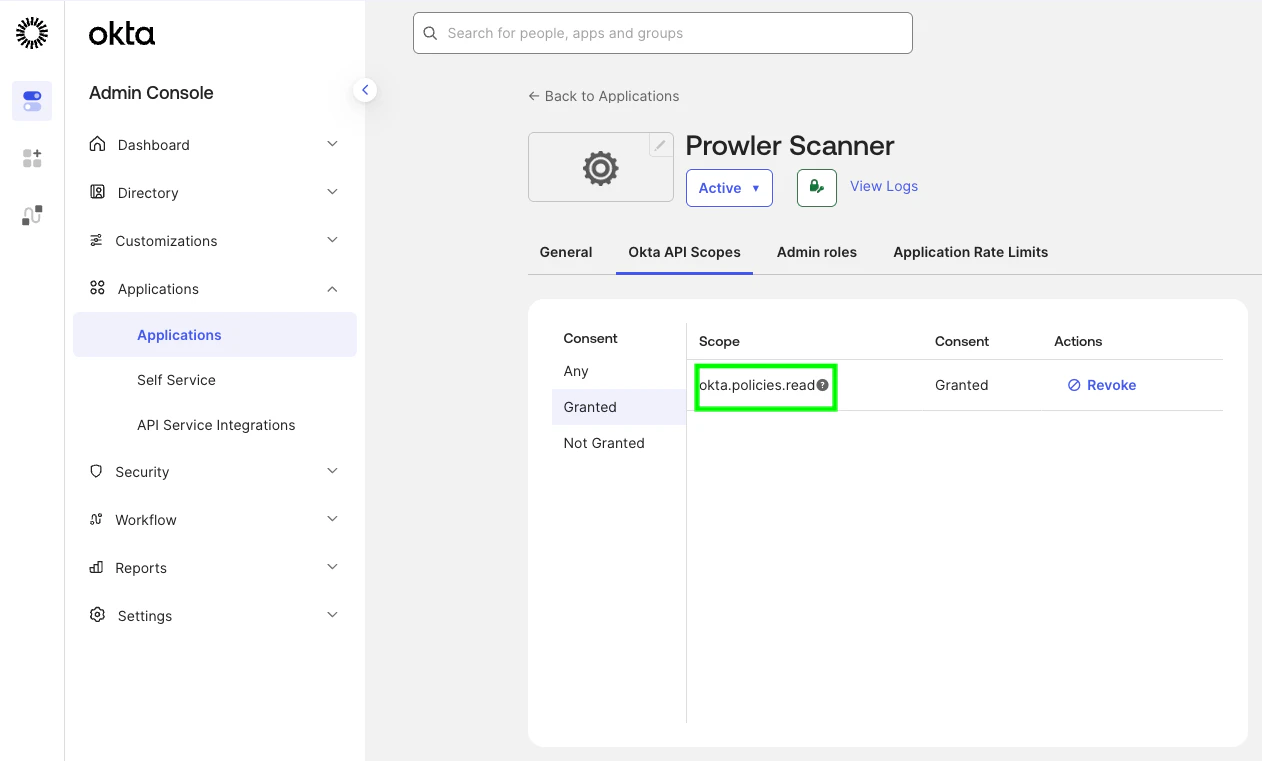
 ### 5. Grant the required OAuth scopes
On the app, open the **Okta API Scopes** tab and click **Grant** on every scope Prowler needs. The bundled checks require `okta.policies.read`, `okta.brands.read`, `okta.apps.read`, `okta.authenticators.read`, `okta.networkZones.read`, `okta.apiTokens.read`, `okta.roles.read`, `okta.groups.read`, `okta.logStreams.read`, and `okta.idps.read`.
### 5. Grant the required OAuth scopes
On the app, open the **Okta API Scopes** tab and click **Grant** on every scope Prowler needs. The bundled checks require `okta.policies.read`, `okta.brands.read`, `okta.apps.read`, `okta.authenticators.read`, `okta.networkZones.read`, `okta.apiTokens.read`, `okta.roles.read`, `okta.groups.read`, `okta.logStreams.read`, and `okta.idps.read`.
 ### 6. Assign an admin role
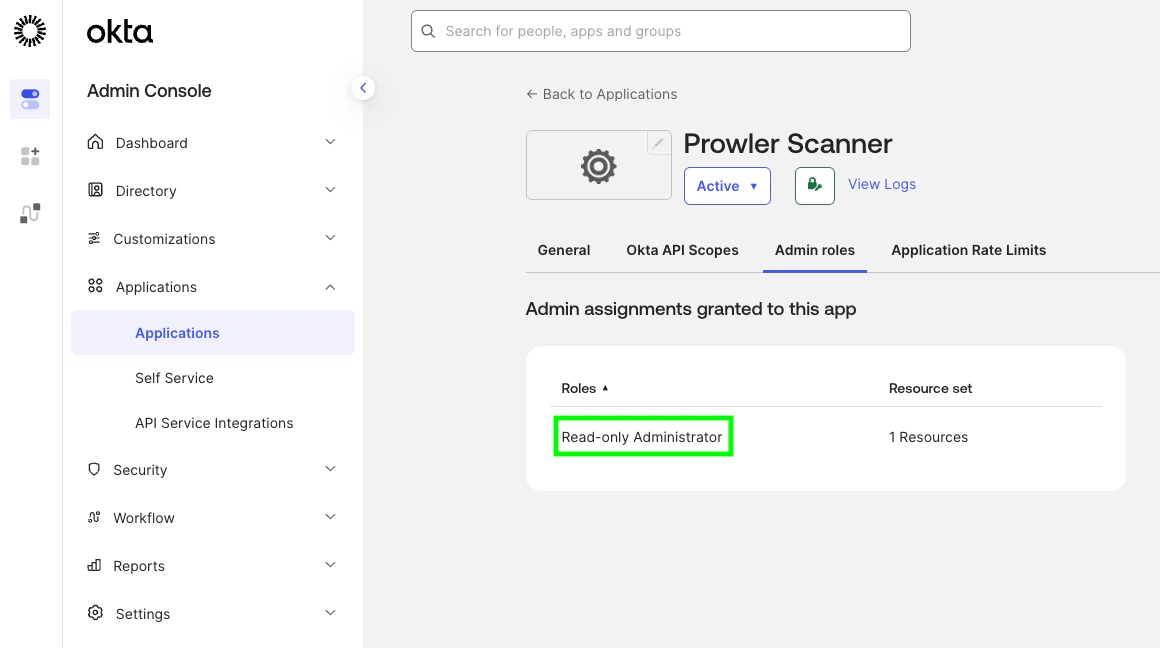
On the app, open the **Admin roles** tab and click **Edit assignments → Add assignment**:
* **Role:** Read-Only Administrator (default) — covers every `signon` check and runs the per-app network-zone check against the apps the service app can see (typically only the service app's own row).
* **Resources:** All resources
Save the changes.
To additionally evaluate the first-party application checks (Okta Admin Console / Okta Dashboard idle timeout, MFA, and phishing-resistant authentication) and to widen the per-app network-zone check to the full org-wide app inventory, assign **Super Administrator** instead. Without Super Administrator, the five first-party checks return MANUAL and the network-zone check is limited to the service app's own visibility — the rest of the scan still runs. See [Required Admin Role](#required-admin-role) for the full breakdown.
### 6. Assign an admin role
On the app, open the **Admin roles** tab and click **Edit assignments → Add assignment**:
* **Role:** Read-Only Administrator (default) — covers every `signon` check and runs the per-app network-zone check against the apps the service app can see (typically only the service app's own row).
* **Resources:** All resources
Save the changes.
To additionally evaluate the first-party application checks (Okta Admin Console / Okta Dashboard idle timeout, MFA, and phishing-resistant authentication) and to widen the per-app network-zone check to the full org-wide app inventory, assign **Super Administrator** instead. Without Super Administrator, the five first-party checks return MANUAL and the network-zone check is limited to the service app's own visibility — the rest of the scan still runs. See [Required Admin Role](#required-admin-role) for the full breakdown.
 ### 7. \[Optional] Verify DPoP setting
Prowler sends DPoP (Demonstrating Proof of Possession) proofs on every token request. The integration works whether the **Require Demonstrating Proof of Possession (DPoP) header in token requests** setting on the service app is on or off — but enabling it is the more secure default.
## Prowler CLI Authentication
### Using Environment Variables (Required for Secrets)
Private key material **must** be supplied via environment variables — Prowler does not accept secrets through CLI flags.
```bash theme={null}
export OKTA_ORG_DOMAIN="YOUR-ORG.okta.com"
export OKTA_CLIENT_ID="0oa1234567890abcdef"
# Either of the two — content takes precedence over file when both are set.
export OKTA_PRIVATE_KEY_FILE="/secure/path/to/prowler-okta.pem"
# or
export OKTA_PRIVATE_KEY="$(cat /secure/path/to/prowler-okta.pem)"
# Optional — defaults to "okta.policies.read,okta.brands.read,okta.apps.read,okta.authenticators.read,okta.networkZones.read,okta.apiTokens.read,okta.roles.read,okta.groups.read,okta.logStreams.read,okta.idps.read"
export OKTA_SCOPES="okta.policies.read,okta.brands.read,okta.apps.read,okta.authenticators.read,okta.networkZones.read,okta.apiTokens.read,okta.roles.read,okta.groups.read,okta.logStreams.read,okta.idps.read"
uv run python prowler-cli.py okta
```
### Non-Secret CLI Flags
Non-secret values are also available as CLI flags for ergonomic overrides:
| Flag | Equivalent env var |
| ------------------- | ------------------ |
| `--okta-org-domain` | `OKTA_ORG_DOMAIN` |
| `--okta-client-id` | `OKTA_CLIENT_ID` |
| `--okta-scopes` | `OKTA_SCOPES` |
Run a single check directly:
```bash theme={null}
uv run python prowler-cli.py okta --check signon_global_session_idle_timeout_15min
```
## Troubleshooting
### `OktaInvalidOrgDomainError`
The org domain must be `.okta.com` (or `.oktapreview.com` / `.okta-emea.com` / `.okta-gov.com` / `.okta.mil` / `.okta-miltest.com` / `.trex-govcloud.com`). Pass the bare hostname only — no `https://` scheme, no path, no trailing slash. Custom (vanity) domains are not currently accepted.
### `OktaPrivateKeyFileError`
The file at `OKTA_PRIVATE_KEY_FILE` is missing, unreadable, or empty. Confirm the path and that the file contains a non-empty PEM block or JWK JSON document.
### `OktaInvalidCredentialsError` at provider init
Prowler validates credentials at startup by listing one sign-on policy. This error indicates the credential material itself was rejected:
* **`invalid_client`** — the public key registered in Okta does not match the private key on disk. Generate a fresh keypair and try again.
### `OktaInsufficientPermissionsError` at provider init
Raised when the credential probe succeeds at the OAuth layer but the request is rejected because the service app lacks the required scope or admin role:
* **`invalid_scope`** — one of the requested scopes (`okta.policies.read`, `okta.brands.read`, `okta.apps.read`, `okta.authenticators.read`, `okta.networkZones.read`, `okta.apiTokens.read`, `okta.roles.read`, `okta.groups.read`, `okta.logStreams.read`, and `okta.idps.read`) is not granted on the service app. Grant the missing scope from **Okta API Scopes**.
* **`Forbidden` / `not authorized`** — no admin role is assigned to the service app. Assign **Read-Only Administrator** (or **Super Administrator** for the first-party application checks) from **Admin roles**.
### Application-service checks return MANUAL on first-party apps
When the service app runs with Read-Only Administrator, the five application-service checks targeting the Okta Admin Console and Okta Dashboard return MANUAL. This is by design — Okta restricts the underlying endpoints (`/api/v1/first-party-app-settings/{appName}` and `/api/v1/apps` for first-party app `name` values `saasure` / `okta_enduser`) to **Super Administrator**. Assign the Super Administrator role to the service app to evaluate those checks. See [Required Admin Role](#required-admin-role) for the full list.
### `invalid_dpop_proof`
The org or the service app requires DPoP. The provider always sends DPoP proofs, so this error indicates the SDK could not build a valid proof — typically because the private key on disk does not match the public key uploaded to Okta. Regenerate the keypair.
## Additional Resources
* [Implement OAuth 2.0 for an Okta service app](https://developer.okta.com/docs/guides/implement-oauth-for-okta-serviceapp/main/)
* [Okta Policy API reference](https://developer.okta.com/docs/api/openapi/okta-management/management/tag/Policy/)
* [DISA STIG for Okta (V-273186)](https://stigviewer.com/stigs/okta/)
### 7. \[Optional] Verify DPoP setting
Prowler sends DPoP (Demonstrating Proof of Possession) proofs on every token request. The integration works whether the **Require Demonstrating Proof of Possession (DPoP) header in token requests** setting on the service app is on or off — but enabling it is the more secure default.
## Prowler CLI Authentication
### Using Environment Variables (Required for Secrets)
Private key material **must** be supplied via environment variables — Prowler does not accept secrets through CLI flags.
```bash theme={null}
export OKTA_ORG_DOMAIN="YOUR-ORG.okta.com"
export OKTA_CLIENT_ID="0oa1234567890abcdef"
# Either of the two — content takes precedence over file when both are set.
export OKTA_PRIVATE_KEY_FILE="/secure/path/to/prowler-okta.pem"
# or
export OKTA_PRIVATE_KEY="$(cat /secure/path/to/prowler-okta.pem)"
# Optional — defaults to "okta.policies.read,okta.brands.read,okta.apps.read,okta.authenticators.read,okta.networkZones.read,okta.apiTokens.read,okta.roles.read,okta.groups.read,okta.logStreams.read,okta.idps.read"
export OKTA_SCOPES="okta.policies.read,okta.brands.read,okta.apps.read,okta.authenticators.read,okta.networkZones.read,okta.apiTokens.read,okta.roles.read,okta.groups.read,okta.logStreams.read,okta.idps.read"
uv run python prowler-cli.py okta
```
### Non-Secret CLI Flags
Non-secret values are also available as CLI flags for ergonomic overrides:
| Flag | Equivalent env var |
| ------------------- | ------------------ |
| `--okta-org-domain` | `OKTA_ORG_DOMAIN` |
| `--okta-client-id` | `OKTA_CLIENT_ID` |
| `--okta-scopes` | `OKTA_SCOPES` |
Run a single check directly:
```bash theme={null}
uv run python prowler-cli.py okta --check signon_global_session_idle_timeout_15min
```
## Troubleshooting
### `OktaInvalidOrgDomainError`
The org domain must be `.okta.com` (or `.oktapreview.com` / `.okta-emea.com` / `.okta-gov.com` / `.okta.mil` / `.okta-miltest.com` / `.trex-govcloud.com`). Pass the bare hostname only — no `https://` scheme, no path, no trailing slash. Custom (vanity) domains are not currently accepted.
### `OktaPrivateKeyFileError`
The file at `OKTA_PRIVATE_KEY_FILE` is missing, unreadable, or empty. Confirm the path and that the file contains a non-empty PEM block or JWK JSON document.
### `OktaInvalidCredentialsError` at provider init
Prowler validates credentials at startup by listing one sign-on policy. This error indicates the credential material itself was rejected:
* **`invalid_client`** — the public key registered in Okta does not match the private key on disk. Generate a fresh keypair and try again.
### `OktaInsufficientPermissionsError` at provider init
Raised when the credential probe succeeds at the OAuth layer but the request is rejected because the service app lacks the required scope or admin role:
* **`invalid_scope`** — one of the requested scopes (`okta.policies.read`, `okta.brands.read`, `okta.apps.read`, `okta.authenticators.read`, `okta.networkZones.read`, `okta.apiTokens.read`, `okta.roles.read`, `okta.groups.read`, `okta.logStreams.read`, and `okta.idps.read`) is not granted on the service app. Grant the missing scope from **Okta API Scopes**.
* **`Forbidden` / `not authorized`** — no admin role is assigned to the service app. Assign **Read-Only Administrator** (or **Super Administrator** for the first-party application checks) from **Admin roles**.
### Application-service checks return MANUAL on first-party apps
When the service app runs with Read-Only Administrator, the five application-service checks targeting the Okta Admin Console and Okta Dashboard return MANUAL. This is by design — Okta restricts the underlying endpoints (`/api/v1/first-party-app-settings/{appName}` and `/api/v1/apps` for first-party app `name` values `saasure` / `okta_enduser`) to **Super Administrator**. Assign the Super Administrator role to the service app to evaluate those checks. See [Required Admin Role](#required-admin-role) for the full list.
### `invalid_dpop_proof`
The org or the service app requires DPoP. The provider always sends DPoP proofs, so this error indicates the SDK could not build a valid proof — typically because the private key on disk does not match the public key uploaded to Okta. Regenerate the keypair.
## Additional Resources
* [Implement OAuth 2.0 for an Okta service app](https://developer.okta.com/docs/guides/implement-oauth-for-okta-serviceapp/main/)
* [Okta Policy API reference](https://developer.okta.com/docs/api/openapi/okta-management/management/tag/Policy/)
* [DISA STIG for Okta (V-273186)](https://stigviewer.com/stigs/okta/)