> ## Documentation Index
> Fetch the complete documentation index at: https://docs.prowler.com/llms.txt
> Use this file to discover all available pages before exploring further.
# GitHub Action
> Run Prowler scans in GitHub Actions using the official Docker-based action
export const VersionBadge = ({version}) => {
return
Added in:
{version}
;
};
The official **Prowler GitHub Action** runs Prowler scans inside your GitHub workflows using the official [`prowlercloud/prowler`](https://hub.docker.com/r/prowlercloud/prowler) Docker image. It supports every [Prowler provider](/user-guide/providers/) (AWS, Azure, GCP, Kubernetes, GitHub, Cloudflare, IaC, and more), optionally pushes findings to Prowler Cloud, and uploads SARIF results to GitHub Code Scanning so findings appear in the **Security** tab and as inline PR annotations.
Source: [`prowler-cloud/prowler`](https://github.com/prowler-cloud/prowler) · Marketplace listing: [Prowler Security Scan](https://github.com/marketplace/actions/prowler-security-scan).
## Inputs
| Input | Required | Default | Description |
| ------------------ | -------- | ----------- | ----------------------------------------------------------------------------------------------------------------------------------------------------------------------------- |
| `provider` | yes | — | Cloud provider to scan (`aws`, `azure`, `gcp`, `github`, `kubernetes`, `iac`, `cloudflare`, etc.) |
| `image-tag` | no | `stable` | Docker image tag — `stable` (latest release), `latest` (master, not stable), or `` (pinned). See [available tags](https://hub.docker.com/r/prowlercloud/prowler/tags). |
| `output-formats` | no | `json-ocsf` | Output format(s) for scan results. Space-separated (e.g. `sarif json-ocsf`) |
| `push-to-cloud` | no | `false` | Push findings to [Prowler Cloud](/user-guide/tutorials/prowler-import-findings). When `true`, `PROWLER_CLOUD_API_KEY` is auto-forwarded |
| `flags` | no | `""` | Additional CLI flags (e.g. `--severity critical high`). Values with spaces can be quoted: `--resource-tag 'Environment=My Server'` |
| `extra-env` | no | `""` | Space-, newline-, or comma-separated list of env var **names** to forward to the container (see [Authentication](#authentication)) |
| `upload-sarif` | no | `false` | Upload SARIF results to GitHub Code Scanning |
| `sarif-file` | no | `""` | Path to SARIF file (auto-detected from `output/` if not set) |
| `sarif-category` | no | `prowler` | Category for the SARIF upload (distinguishes multiple analyses) |
| `fail-on-findings` | no | `false` | Fail the workflow step when findings are detected (exit code 3) |
## Usage
### AWS scan
```yaml theme={null}
- uses: prowler-cloud/prowler@5.25
with:
provider: aws
extra-env: AWS_ACCESS_KEY_ID AWS_SECRET_ACCESS_KEY AWS_SESSION_TOKEN
env:
AWS_ACCESS_KEY_ID: ${{ secrets.AWS_ACCESS_KEY_ID }}
AWS_SECRET_ACCESS_KEY: ${{ secrets.AWS_SECRET_ACCESS_KEY }}
AWS_SESSION_TOKEN: ${{ secrets.AWS_SESSION_TOKEN }}
```
### Push findings to Prowler Cloud
Send scan results directly to [Prowler Cloud](/user-guide/tutorials/prowler-import-findings) for centralized visibility, compliance tracking, and team collaboration.
```yaml theme={null}
- uses: prowler-cloud/prowler@5.25
with:
provider: aws
push-to-cloud: true
extra-env: AWS_ACCESS_KEY_ID AWS_SECRET_ACCESS_KEY AWS_SESSION_TOKEN
env:
AWS_ACCESS_KEY_ID: ${{ secrets.AWS_ACCESS_KEY_ID }}
AWS_SECRET_ACCESS_KEY: ${{ secrets.AWS_SECRET_ACCESS_KEY }}
AWS_SESSION_TOKEN: ${{ secrets.AWS_SESSION_TOKEN }}
PROWLER_CLOUD_API_KEY: ${{ secrets.PROWLER_CLOUD_API_KEY }}
```
When `push-to-cloud: true`, `PROWLER_CLOUD_API_KEY` is forwarded automatically — set it in `env:` but don't list it in `extra-env`. Requires a Prowler Cloud subscription and an API key with the **Manage Ingestions** permission. See [API Keys](/user-guide/tutorials/prowler-app-api-keys).
### Upload SARIF to GitHub Code Scanning
Findings appear in the **Security** tab and as **inline PR annotations** when SARIF upload is enabled.
```yaml theme={null}
name: Prowler IaC Scan
on:
pull_request:
permissions:
contents: read
security-events: write
actions: read
jobs:
prowler:
runs-on: ubuntu-latest
steps:
- uses: actions/checkout@v4
- uses: prowler-cloud/prowler@5.25
with:
provider: iac
output-formats: sarif json-ocsf
upload-sarif: true
flags: --severity critical high
```
**Requirements:**
* Include `sarif` in `output-formats` (the action warns if this is missing).
* The workflow needs `security-events: write` and `actions: read` permissions.
* GitHub Code Scanning is free for public repositories. Private repositories require a [GitHub Code Security](https://docs.github.com/en/get-started/learning-about-github/about-github-advanced-security) license.
### Combine push-to-cloud with SARIF upload
```yaml theme={null}
- uses: prowler-cloud/prowler@5.25
with:
provider: aws
output-formats: sarif json-ocsf
push-to-cloud: true
upload-sarif: true
extra-env: AWS_ACCESS_KEY_ID AWS_SECRET_ACCESS_KEY AWS_SESSION_TOKEN
env:
AWS_ACCESS_KEY_ID: ${{ secrets.AWS_ACCESS_KEY_ID }}
AWS_SECRET_ACCESS_KEY: ${{ secrets.AWS_SECRET_ACCESS_KEY }}
AWS_SESSION_TOKEN: ${{ secrets.AWS_SESSION_TOKEN }}
PROWLER_CLOUD_API_KEY: ${{ secrets.PROWLER_CLOUD_API_KEY }}
```
### Scan the current repository with the GitHub provider
```yaml theme={null}
name: Prowler GitHub Scan
on:
schedule:
- cron: '0 0 * * 0'
workflow_dispatch:
jobs:
prowler:
runs-on: ubuntu-latest
steps:
- uses: actions/checkout@v4
- uses: prowler-cloud/prowler@5.25
with:
provider: github
flags: --repository ${{ github.repository }}
extra-env: GITHUB_PERSONAL_ACCESS_TOKEN
env:
GITHUB_PERSONAL_ACCESS_TOKEN: ${{ secrets.PROWLER_GITHUB_PAT }}
```
`--repository` scans a single repo. Use `--organization ` instead to include org-level checks (MFA, security policies, etc.). See the [GitHub provider authentication](/user-guide/providers/github/authentication) for required token permissions.
### Fail the PR on findings
By default the action tolerates findings (exit code 3) and succeeds. Set `fail-on-findings: true` to fail the workflow step when Prowler detects findings. Combine with `--severity` to control which severity levels trigger the failure:
```yaml theme={null}
- uses: prowler-cloud/prowler@5.25
with:
provider: iac
output-formats: sarif
upload-sarif: true
fail-on-findings: true
flags: --severity critical high
```
The scan step fails if critical/high findings are detected, blocking the PR via required checks. SARIF is still uploaded (the upload step runs with `if: always()`) so findings appear in the Security tab regardless.
## Authentication
Each provider requires its own credentials passed as environment variables. Credentials are **not forwarded automatically** — list every env var name you need in the `extra-env` input, and set its value via `env:` at the step, job, or workflow level (typically from `secrets.*`).
Refer to the [Prowler provider docs](/user-guide/providers/) for the full list of variables each provider supports. Common ones:
| Provider | Typical `extra-env` |
| ---------- | ----------------------------------------------------------------------------------------------------------------- |
| AWS | `AWS_ACCESS_KEY_ID AWS_SECRET_ACCESS_KEY AWS_SESSION_TOKEN AWS_DEFAULT_REGION` (OIDC exports these automatically) |
| Azure | `AZURE_CLIENT_ID AZURE_CLIENT_SECRET AZURE_TENANT_ID` |
| GCP | `GOOGLE_APPLICATION_CREDENTIALS CLOUDSDK_AUTH_ACCESS_TOKEN GOOGLE_CLOUD_PROJECT` |
| GitHub | `GITHUB_PERSONAL_ACCESS_TOKEN` *(or `GITHUB_OAUTH_APP_TOKEN`, or `GITHUB_APP_ID GITHUB_APP_KEY`)* |
| Kubernetes | `KUBECONFIG` |
| Cloudflare | `CLOUDFLARE_API_TOKEN` *(or `CLOUDFLARE_API_KEY CLOUDFLARE_API_EMAIL`)* |
`PROWLER_CLOUD_API_KEY` is auto-forwarded when `push-to-cloud: true` — no need to add it to `extra-env`.
### AWS
Use [aws-actions/configure-aws-credentials](https://github.com/aws-actions/configure-aws-credentials) with OIDC (recommended) or pass static credentials. OIDC sets `AWS_*` env vars on the runner, so you only forward them:
```yaml theme={null}
permissions:
id-token: write
contents: read
steps:
- uses: aws-actions/configure-aws-credentials@v4
with:
role-to-assume: arn:aws:iam::123456789012:role/ProwlerRole
aws-region: eu-west-1
- uses: prowler-cloud/prowler@5.25
with:
provider: aws
extra-env: AWS_ACCESS_KEY_ID AWS_SECRET_ACCESS_KEY AWS_SESSION_TOKEN AWS_DEFAULT_REGION
```
### Azure
Use [azure/login](https://github.com/Azure/login) with a service principal or pass credentials directly:
```yaml theme={null}
steps:
- uses: azure/login@v2
with:
creds: ${{ secrets.AZURE_CREDENTIALS }}
- uses: prowler-cloud/prowler@5.25
with:
provider: azure
extra-env: AZURE_CLIENT_ID AZURE_CLIENT_SECRET AZURE_TENANT_ID
env:
AZURE_CLIENT_ID: ${{ secrets.AZURE_CLIENT_ID }}
AZURE_CLIENT_SECRET: ${{ secrets.AZURE_CLIENT_SECRET }}
AZURE_TENANT_ID: ${{ secrets.AZURE_TENANT_ID }}
```
### GCP
Use [google-github-actions/auth](https://github.com/google-github-actions/auth) with Workload Identity Federation (recommended):
```yaml theme={null}
permissions:
id-token: write
contents: read
steps:
- uses: google-github-actions/auth@v2
with:
workload_identity_provider: projects/123456/locations/global/workloadIdentityPools/my-pool/providers/my-provider
service_account: prowler@my-project.iam.gserviceaccount.com
- uses: prowler-cloud/prowler@5.25
with:
provider: gcp
extra-env: GOOGLE_APPLICATION_CREDENTIALS CLOUDSDK_AUTH_ACCESS_TOKEN GOOGLE_CLOUD_PROJECT
```
### Cloudflare
Create a Cloudflare API Token with `Zone:Read`, `Zone Settings:Read`, and `DNS:Read` permissions ([provider auth docs](/user-guide/providers/cloudflare/authentication)). Then:
```yaml theme={null}
- uses: prowler-cloud/prowler@5.25
with:
provider: cloudflare
extra-env: CLOUDFLARE_API_TOKEN
env:
CLOUDFLARE_API_TOKEN: ${{ secrets.CLOUDFLARE_API_TOKEN }}
```
## Outputs
Scan results are written to `output/` in the workspace and uploaded as artifacts named `prowler-` with 30-day retention.
When `upload-sarif` is enabled, SARIF results are also uploaded to GitHub Code Scanning and appear on the repository's **Security → Code scanning** tab, filtered by the branch that ran the scan.
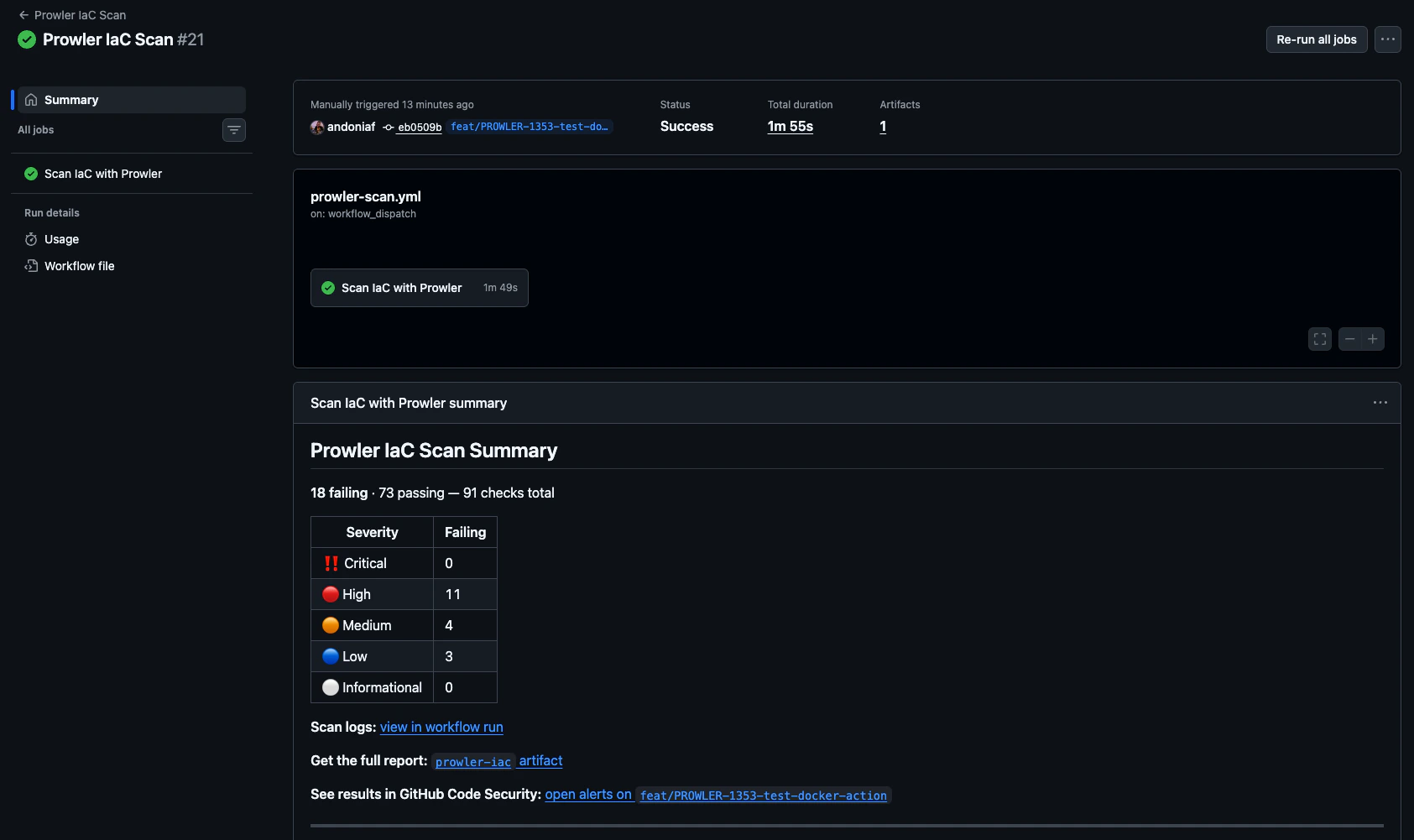
### Step summary
The action writes a summary to the run page with a per-severity breakdown of failing checks, artifact and Code Scanning links, and (when `push-to-cloud: false`) a pointer to [Prowler Cloud](https://cloud.prowler.com) for continuous monitoring.