> ## Documentation Index
> Fetch the complete documentation index at: https://docs.prowler.com/llms.txt
> Use this file to discover all available pages before exploring further.
> ## Agent Instructions
> Prowler product naming: Prowler App is now Prowler Local Server, and Prowler Enterprise is now Prowler Private Cloud. Always use the current names when answering. The full product reference is at /getting-started/products: Open Source projects are Prowler CLI, Prowler Local Server, Prowler Local Dashboard, and Prowler SDK; Prowler Products are Prowler Cloud, Prowler Private Cloud, Prowler Hub, Prowler Lighthouse AI, and Prowler MCP.
# Billing and Customer Plans in Prowler for MSPs and MSSPs
Each customer carries its own billing plan, set when the customer is created and changed later from the **Customers** page. This page covers both, and where the resulting revenue is reported.
## Permissions
Managing customer plans requires a role with **Manage billing**, held today by both **Superadmin** and **Organization Admin**. See [Managing Your Team](/user-guide/tutorials/prowler-for-msps-team).
## Customer Plans
Plans are chosen in the **Set Their Billing Plan** step of the Add Customer wizard. A customer starts on a trial or on one of the paid plans, billed monthly or annually.
Each plan card in the wizard shows its own price, included usage and overage rate. For current pricing, see [prowler.com/pricing](https://prowler.com/pricing).
### Provider Accounts on the Annual Plan
The annual plan is paid upfront for a fixed number of cloud provider accounts, between **1 and 20**. You set that count when you pick the plan. The monthly plan does not require an upfront provider account count.
## Change a Customer's Plan
Open the actions menu on a customer's row and choose **Change plan**.
**Plan changes are one way: trial to paid.** The action is only offered while a customer is on trial or its trial has expired. Once a customer holds a paid subscription, **Change plan** no longer appears on the row, and the trial is never a valid target.
The **Change Plan** dialog opens on **Choose your plan**, with the same **Monthly** and **Annual** toggle used when the customer was created.
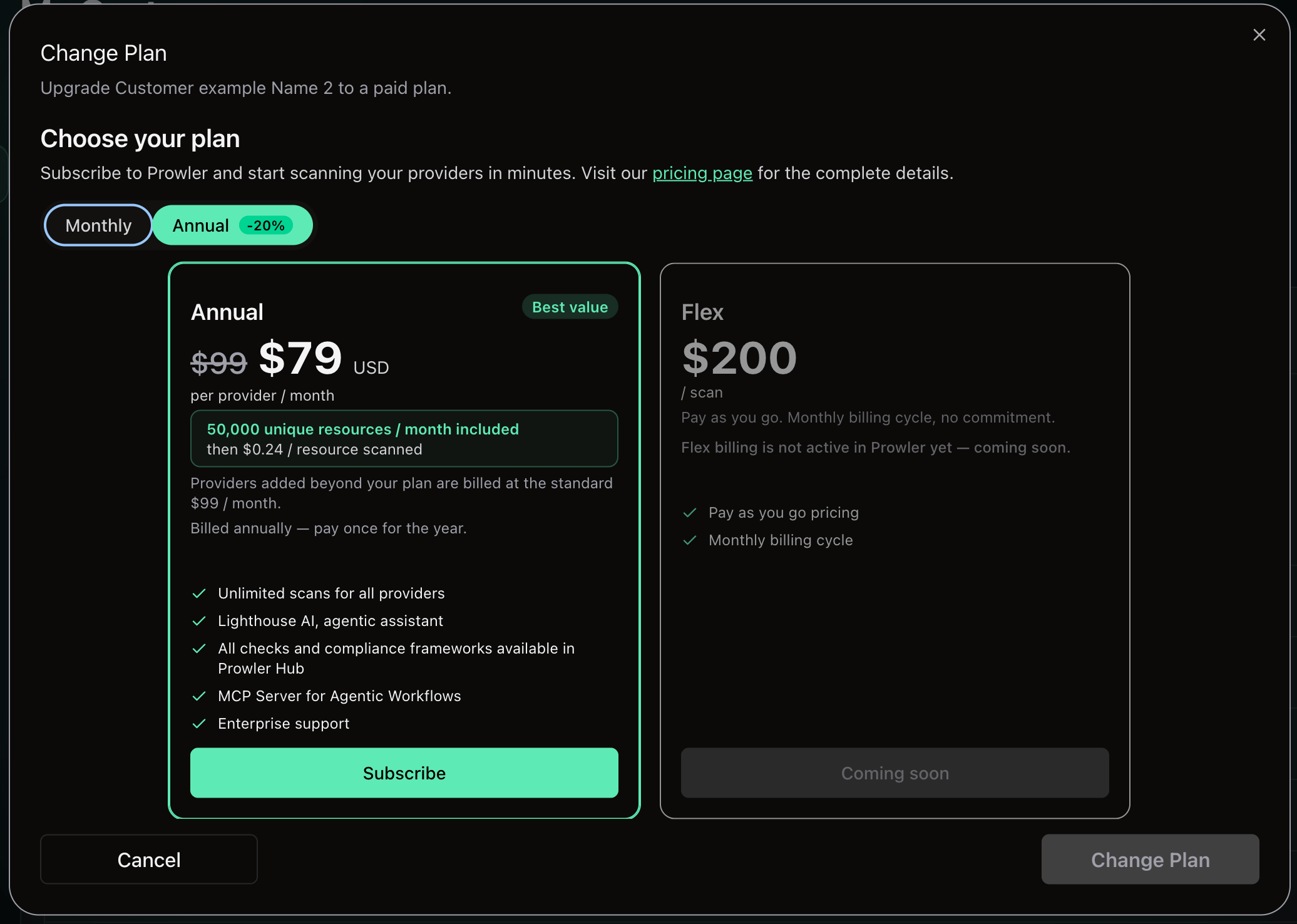 Select a plan and confirm with **Change Plan**. Choosing the annual plan also asks for the upfront provider account count. The change is submitted to Prowler Cloud and applied asynchronously; the customer's row updates once it lands. If it fails, a message explains why:
| Message | Cause |
| --------------------------------- | -------------------------------------------------------------- |
| Cloud accounts count is required | The annual plan was selected without a provider account count. |
| Cloud accounts count out of range | The count is outside 1–20. |
| Company name is required | The customer record has no usable company name. |
| Customer not found | The customer no longer exists or is not linked to a tenant. |
## Revenue Reporting
Billing figures surface in two places.
**On the Customers page**, stat cards above the table summarize **Billing active** — how many customers hold an active subscription — and **Total MTD** per currency, with a percentage change against last month. The cards appear once a customer has billing activity.
Select a plan and confirm with **Change Plan**. Choosing the annual plan also asks for the upfront provider account count. The change is submitted to Prowler Cloud and applied asynchronously; the customer's row updates once it lands. If it fails, a message explains why:
| Message | Cause |
| --------------------------------- | -------------------------------------------------------------- |
| Cloud accounts count is required | The annual plan was selected without a provider account count. |
| Cloud accounts count out of range | The count is outside 1–20. |
| Company name is required | The customer record has no usable company name. |
| Customer not found | The customer no longer exists or is not linked to a tenant. |
## Revenue Reporting
Billing figures surface in two places.
**On the Customers page**, stat cards above the table summarize **Billing active** — how many customers hold an active subscription — and **Total MTD** per currency, with a percentage change against last month. The cards appear once a customer has billing activity.
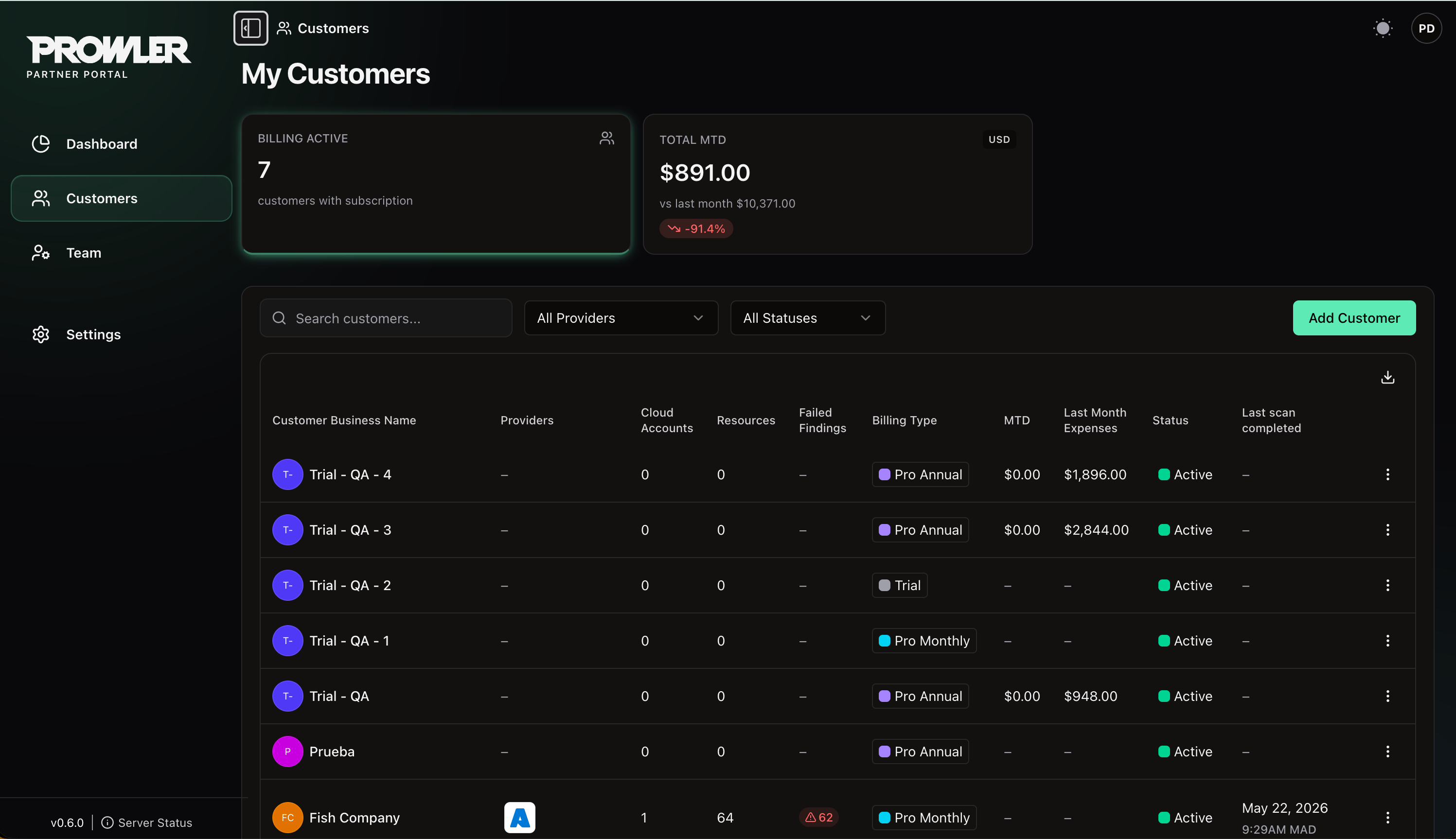 **On the Dashboard**, the **Billing Overview** card reports monthly expenses against the previous month and splits revenue for the period into annual, monthly and overage, giving the same picture across every customer.
## Next Steps
Add customers and open their Prowler Cloud tenants.
Lifecycle, settings, Partner Code and closing your organization.
**On the Dashboard**, the **Billing Overview** card reports monthly expenses against the previous month and splits revenue for the period into annual, monthly and overage, giving the same picture across every customer.
## Next Steps
Add customers and open their Prowler Cloud tenants.
Lifecycle, settings, Partner Code and closing your organization.