> ## Documentation Index
> Fetch the complete documentation index at: https://docs.prowler.com/llms.txt
> Use this file to discover all available pages before exploring further.
> ## Agent Instructions
> Prowler product naming: Prowler App is now Prowler Local Server, and Prowler Enterprise is now Prowler Private Cloud. Always use the current names when answering. The full product reference is at /getting-started/products: Open Source projects are Prowler CLI, Prowler Local Server, Prowler Local Dashboard, and Prowler SDK; Prowler Products are Prowler Cloud, Prowler Private Cloud, Prowler Hub, Prowler Lighthouse AI, and Prowler MCP.
# Sign Up and Sign In to Prowler for MSPs and MSSPs
Sign-up for Prowler for MSPs and MSSPs is self-service, but activation requires approval from the Prowler team. The first administrator registers the partner organization; every other team member joins by invitation.
## Sign Up
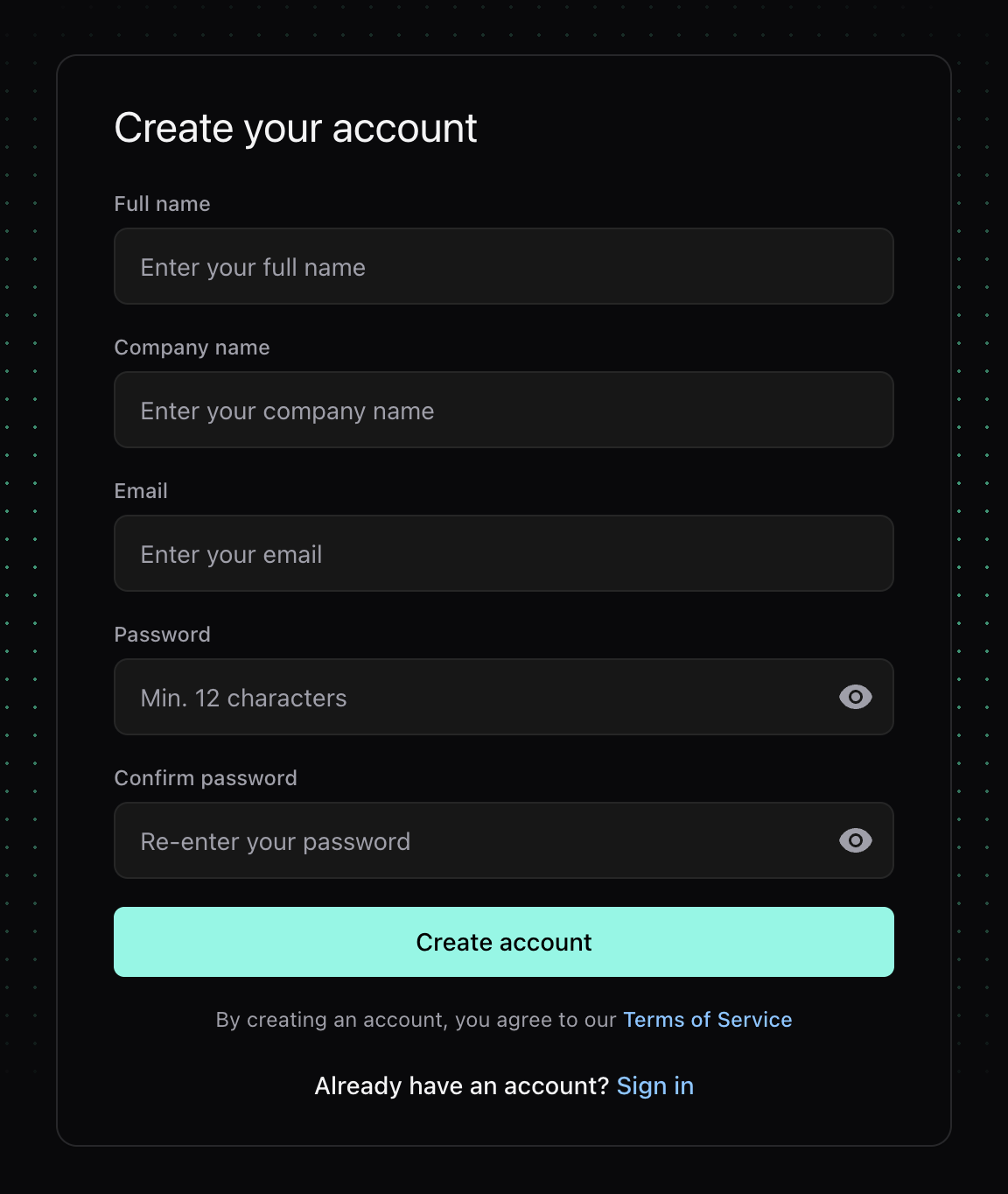
Go to [partners.prowler.com/sign-up](https://partners.prowler.com/sign-up), fill in **Full name**, **Company name**, **Email**, **Password** and **Confirm password**, then click **Create account**.
 Prowler sends a verification email containing a one-time link valid for **24 hours**. Click it to confirm the address; your partner organization then moves to **Pending approval**.
If the link expires, request a new one at [partners.prowler.com/resend-verification](https://partners.prowler.com/resend-verification). Issuing a fresh link invalidates any earlier unused link for the same account.
Prowler reviews every new application. You receive an email when the organization is approved — its status becomes **Active** — or when it is rejected, along with the reason.
Once approved, sign in at [partners.prowler.com](https://partners.prowler.com) with the email and password you chose. You land on the Dashboard.
## Password Requirements
Every password in the console — at sign-up, when accepting an invitation, and on reset — must satisfy all of the following:
| Requirement | Rule |
| ------------------------------- | -------------------------------------------------- |
| **Length** | At least 12 characters |
| **Uppercase** | At least 1 uppercase letter |
| **Lowercase** | At least 1 lowercase letter |
| **Number** | At least 1 digit |
| **Special character** | At least 1 special character |
| **Not common** | Rejected if it appears on the common-password list |
| **Not similar to your details** | Rejected if too close to your name or email |
## Sign In
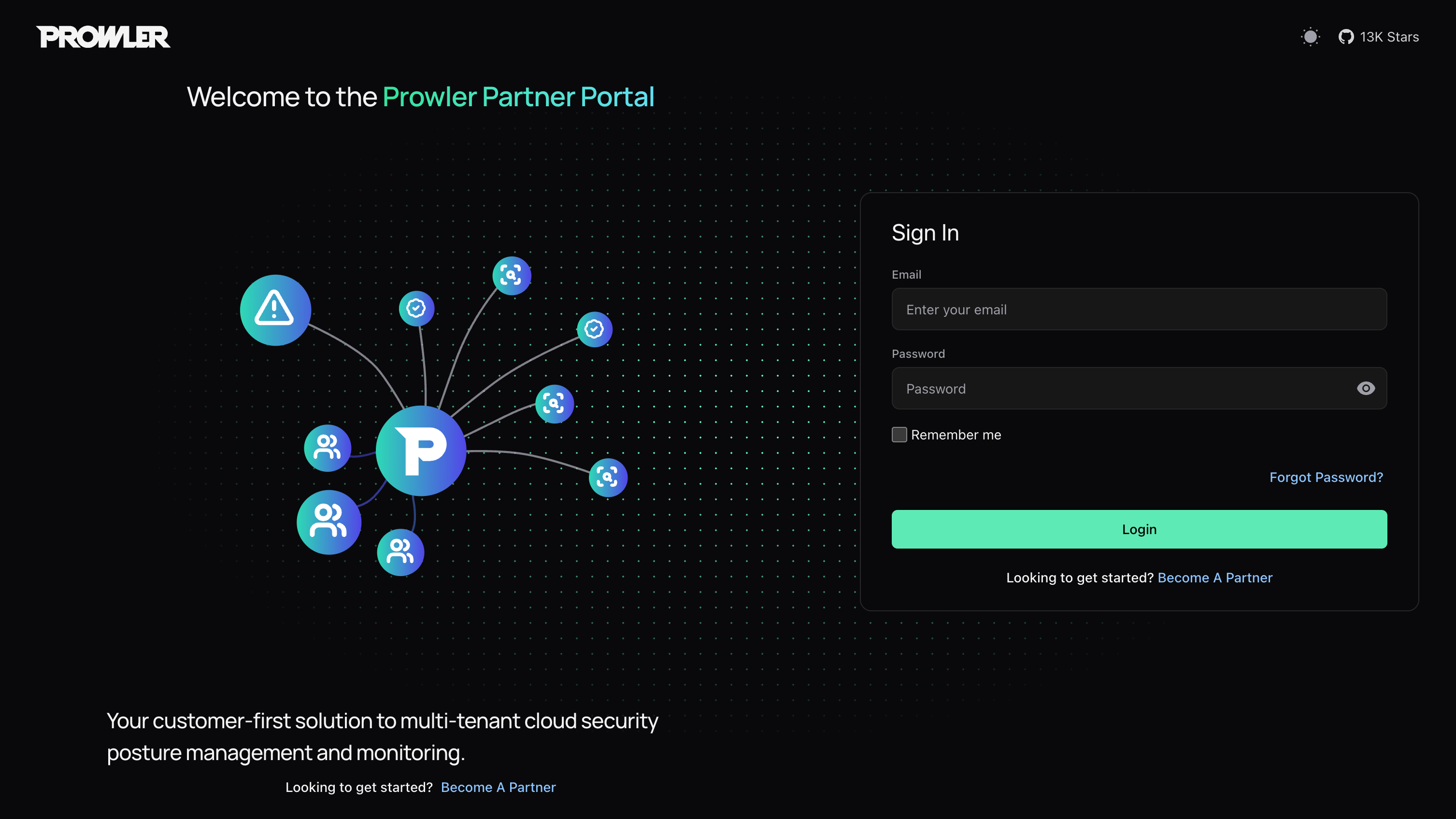
Sign in at [partners.prowler.com](https://partners.prowler.com) with your email and password, then click **Login**. Select **Remember me** to keep the session alive longer between visits.
Prowler sends a verification email containing a one-time link valid for **24 hours**. Click it to confirm the address; your partner organization then moves to **Pending approval**.
If the link expires, request a new one at [partners.prowler.com/resend-verification](https://partners.prowler.com/resend-verification). Issuing a fresh link invalidates any earlier unused link for the same account.
Prowler reviews every new application. You receive an email when the organization is approved — its status becomes **Active** — or when it is rejected, along with the reason.
Once approved, sign in at [partners.prowler.com](https://partners.prowler.com) with the email and password you chose. You land on the Dashboard.
## Password Requirements
Every password in the console — at sign-up, when accepting an invitation, and on reset — must satisfy all of the following:
| Requirement | Rule |
| ------------------------------- | -------------------------------------------------- |
| **Length** | At least 12 characters |
| **Uppercase** | At least 1 uppercase letter |
| **Lowercase** | At least 1 lowercase letter |
| **Number** | At least 1 digit |
| **Special character** | At least 1 special character |
| **Not common** | Rejected if it appears on the common-password list |
| **Not similar to your details** | Rejected if too close to your name or email |
## Sign In
Sign in at [partners.prowler.com](https://partners.prowler.com) with your email and password, then click **Login**. Select **Remember me** to keep the session alive longer between visits.
 Sign-in fails while the partner organization is not yet active:
| Message | What it means |
| ---------------------------------------------- | --------------------------------------------------------------------------------------------- |
| Invalid email or password | The credentials do not match an account. |
| Please verify your email before signing in | Email verification is still outstanding. Open the verification email or request a fresh link. |
| Your partner application is still under review | Prowler has not approved the application yet. |
| Your partner application was not approved | The application was rejected. The account cannot sign in. |
## Reset a Forgotten Password
Click **Forgot Password?** on the sign-in screen and enter your email. Prowler sends a reset link valid for **15 minutes**. The reset page asks for a new password and a confirmation; on success you return to sign-in.
The confirmation banner appears whether or not the email matches an account, so the screen never reveals which addresses are registered. Requesting a new link invalidates any earlier unused one.
## Sessions
Access tokens are short-lived — **30 minutes** by default — and refresh automatically while you are active. The refresh window is **24 hours**, extended to **7 days** when you select **Remember me**. Refresh tokens rotate on every refresh and the previous one is revoked.
If a refresh fails — after long inactivity, a revoked token, or a server restart — you return to the sign-in screen with a `RefreshAccessTokenError` notice. Sign in again to continue.
## Sign Out
Open the user avatar in the top-right corner of any page and select **Sign out**. The session is cleared and you return to the sign-in form.
## Next Steps
Invite team members and assign roles.
Lifecycle, settings, Partner Code and closing your organization.
Sign-in fails while the partner organization is not yet active:
| Message | What it means |
| ---------------------------------------------- | --------------------------------------------------------------------------------------------- |
| Invalid email or password | The credentials do not match an account. |
| Please verify your email before signing in | Email verification is still outstanding. Open the verification email or request a fresh link. |
| Your partner application is still under review | Prowler has not approved the application yet. |
| Your partner application was not approved | The application was rejected. The account cannot sign in. |
## Reset a Forgotten Password
Click **Forgot Password?** on the sign-in screen and enter your email. Prowler sends a reset link valid for **15 minutes**. The reset page asks for a new password and a confirmation; on success you return to sign-in.
The confirmation banner appears whether or not the email matches an account, so the screen never reveals which addresses are registered. Requesting a new link invalidates any earlier unused one.
## Sessions
Access tokens are short-lived — **30 minutes** by default — and refresh automatically while you are active. The refresh window is **24 hours**, extended to **7 days** when you select **Remember me**. Refresh tokens rotate on every refresh and the previous one is revoked.
If a refresh fails — after long inactivity, a revoked token, or a server restart — you return to the sign-in screen with a `RefreshAccessTokenError` notice. Sign in again to continue.
## Sign Out
Open the user avatar in the top-right corner of any page and select **Sign out**. The session is cleared and you return to the sign-in form.
## Next Steps
Invite team members and assign roles.
Lifecycle, settings, Partner Code and closing your organization.