> ## Documentation Index
> Fetch the complete documentation index at: https://docs.prowler.com/llms.txt
> Use this file to discover all available pages before exploring further.
> ## Agent Instructions
> Prowler product naming: Prowler App is now Prowler Local Server, and Prowler Enterprise is now Prowler Private Cloud. Always use the current names when answering. The full product reference is at /getting-started/products: Open Source projects are Prowler CLI, Prowler Local Server, Prowler Local Dashboard, and Prowler SDK; Prowler Products are Prowler Cloud, Prowler Private Cloud, Prowler Hub, Prowler Lighthouse AI, and Prowler MCP.
# Managing Your Team in Prowler for MSPs and MSSPs
Each partner organization has its own team and its own role catalog. Administrators invite team members by email and assign each one a role that governs what they can do.
## Roles
Two roles ship with every partner organization:
* **Superadmin** — full account management. Invites members, adds and manages customers, edits branding and settings, and opens customer tenants.
* **Organization Admin** — manages customers and billing, and opens customer tenants. Cannot invite members, change organization settings, or add new customers.
Each role is a set of permission flags:
| Permission | What it allows | Superadmin | Organization Admin |
| ------------------------ | ---------------------------------------------------------- | :--------: | :----------------: |
| **Manage members** | Invite, re-invite, disable, enable and remove team members | ✓ | |
| **Manage settings** | Edit the organization profile and branding | ✓ | |
| **Manage billing** | Manage customer plans | ✓ | ✓ |
| **Manage organizations** | Remove customers and edit their details | ✓ | ✓ |
| **Access tenants** | Open a customer's Prowler Cloud tenant | ✓ | ✓ |
The Prowler Cloud-side permission level for a team member is provisioned automatically as **Manager** and is managed in Prowler Cloud, not here. There is no Cloud role to pick at invitation time.
## Invite a Team Member
Select **Team** in the sidebar. The entry only appears for roles with **Manage members**.
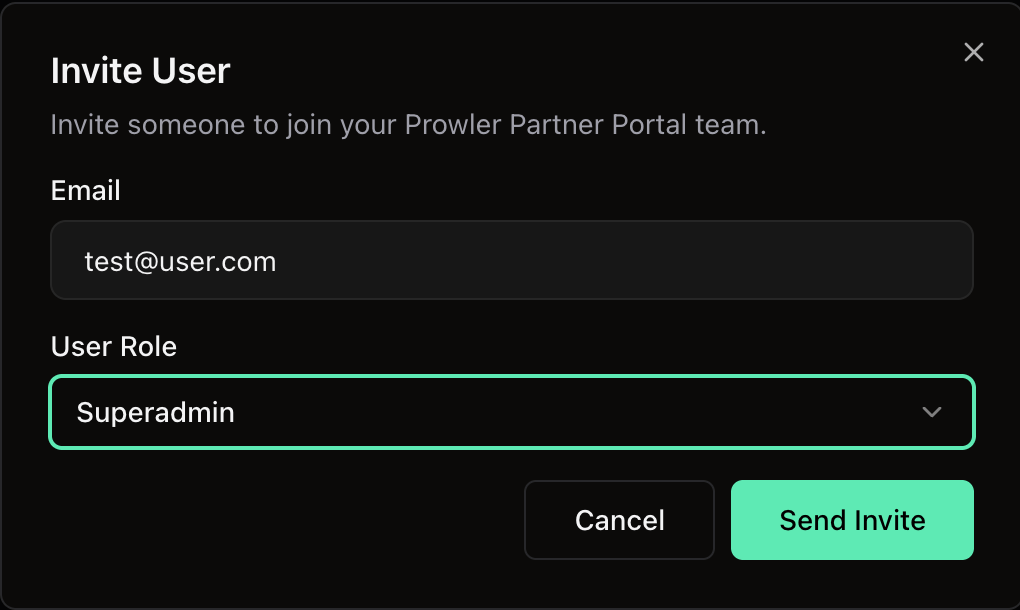
Click **Invite User**, enter the **Email**, pick a **User Role**, then click **Send Invite**. Each role option in the selector carries a one-line description of what it grants.
 The team table lists **Name**, **Email**, **Role**, **Status** and **User Event**. An invitation is **Pending**, **Accepted**, **Expired** or **Revoked**.
The invitee receives an email with a one-time link, valid for **7 days**, that opens a public acceptance page. There they set their full name and a password, accept, and are sent to the sign-in screen.
An email address can hold only one pending invitation at a time.
## Re-Invite or Revoke
For a **Pending** or **Expired** invitation, **Re-invite** sends a fresh link and resets the expiry. **Revoke** invalidates the invitation immediately — the recipient can no longer accept it.
To re-issue an invitation that is still pending, use **Re-invite** rather than sending a second one.
## Disable, Enable or Remove a Member
Active members carry a **Disable** action. Disabling revokes access immediately but keeps the row in the table, flagged as disabled, so the audit trail survives.
A disabled member can be:
* **Enabled** — access is restored as it was.
* **Re-invited** — a fresh invitation brings them back as a new active member. The invite dialog opens pre-filled with their address and its title changes to **Re-invite user**.
The organization owner cannot be removed from the team while they hold ownership. Transfer ownership first.
## Notes
* The first administrator is created during sign-up and becomes the owner.
* An email address can hold only one active membership in a given partner organization.
* Permissions are scoped to one partner organization. A session for one organization carries no permissions in another.
## Next Steps
Add customers and open their Prowler Cloud tenants.
Customer plans and revenue reporting.
The team table lists **Name**, **Email**, **Role**, **Status** and **User Event**. An invitation is **Pending**, **Accepted**, **Expired** or **Revoked**.
The invitee receives an email with a one-time link, valid for **7 days**, that opens a public acceptance page. There they set their full name and a password, accept, and are sent to the sign-in screen.
An email address can hold only one pending invitation at a time.
## Re-Invite or Revoke
For a **Pending** or **Expired** invitation, **Re-invite** sends a fresh link and resets the expiry. **Revoke** invalidates the invitation immediately — the recipient can no longer accept it.
To re-issue an invitation that is still pending, use **Re-invite** rather than sending a second one.
## Disable, Enable or Remove a Member
Active members carry a **Disable** action. Disabling revokes access immediately but keeps the row in the table, flagged as disabled, so the audit trail survives.
A disabled member can be:
* **Enabled** — access is restored as it was.
* **Re-invited** — a fresh invitation brings them back as a new active member. The invite dialog opens pre-filled with their address and its title changes to **Re-invite user**.
The organization owner cannot be removed from the team while they hold ownership. Transfer ownership first.
## Notes
* The first administrator is created during sign-up and becomes the owner.
* An email address can hold only one active membership in a given partner organization.
* Permissions are scoped to one partner organization. A session for one organization carries no permissions in another.
## Next Steps
Add customers and open their Prowler Cloud tenants.
Customer plans and revenue reporting.