

 About Us
https://mcp.prowler.com/mcp so Copilot can query findings, inspect security checks, and manage your Prowler providers.
Prerequisites
- VS Code 1.102 or later. MCP support became generally available in 1.102.
- GitHub Copilot enabled, with access to agent mode.
- A Prowler Cloud account. The free tier is enough to start. Sign up at cloud.prowler.com.
Step 1: Get Your Prowler API Key
Create an API key in Prowler Cloud and copy it. The key begins withpk_ and is shown only once. Check the API Keys guide for details.
Step 2: Add the Prowler MCP Server
VS Code stores MCP servers in anmcp.json file. Choose the scope that fits your use case:
For Prowler, the user scope is usually the right choice — your findings are not tied to a single repository, and it keeps the API key out of any project directory that might be committed.
1
Open the MCP configuration
Open the command palette with 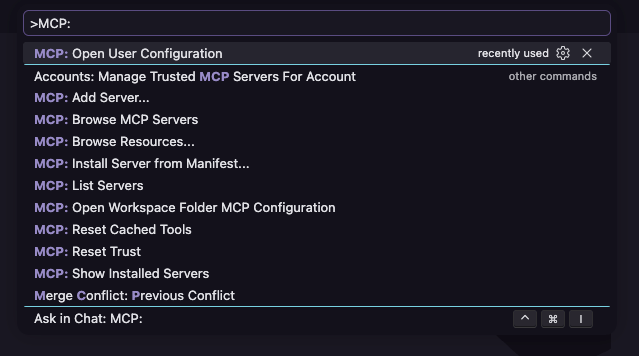
Cmd + Shift + P (macOS) or Ctrl + Shift + P (Windows/Linux), then run MCP: Open User Configuration.VS Code opens your user-level mcp.json. Use this command rather than navigating to the file by hand — the file lives inside your active profile folder, and the path differs per profile.2
Add the Prowler configuration
Paste the following. This version prompts you for the API key on first use and stores it securely, so the key is never written into the file:Save the file.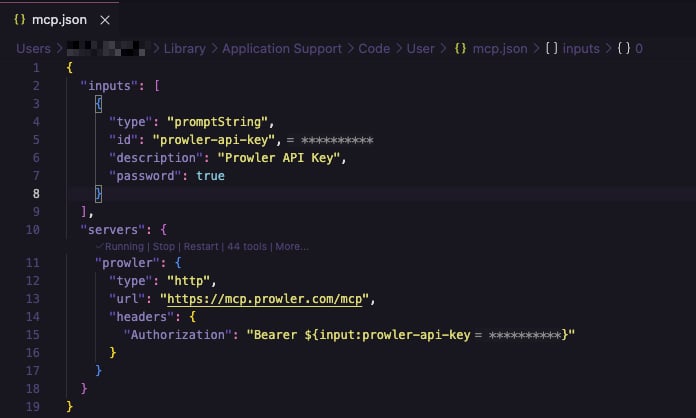
3
Enter your API key
Start the server. VS Code prompts for the Prowler API key. Paste it and press Enter — VS Code stores it securely and does not ask again.
Local server: Replace the URL with your own HTTP endpoint. Everything else stays the same.
Step 3: Verify the Connection
Run MCP: List Servers from the command palette. Theprowler server should appear as running.

Step 4: Start Using Prowler MCP
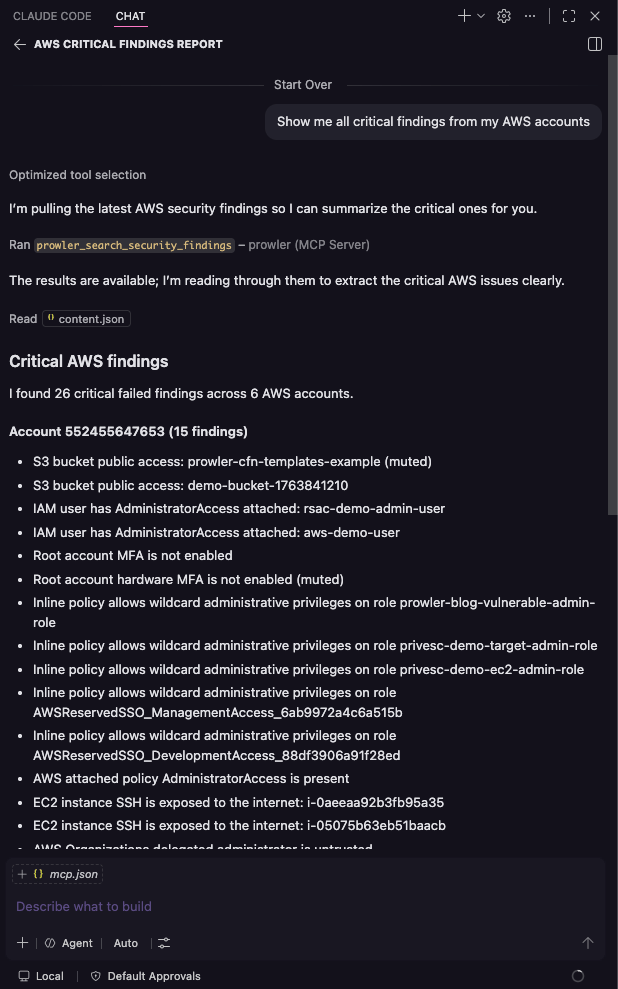
Open the Chat view and switch the mode selector to Agent. Click the tools icon to confirm the Prowler tools are available, then ask:- “Show me all critical findings from my AWS accounts”
- “What does the S3 bucket public access check do?”
- “Summarize my CIS compliance status by provider”
Troubleshooting
Server Does Not Appear
- Confirm the root key is
servers, notmcpServers. - Confirm each server entry has
"type": "http". - Check that
mcp.jsonis valid JSON. - Verify your VS Code version is 1.102 or later.
Authentication Fails With 401
- Verify the header value includes the
Bearerprefix. - Confirm the key has not been revoked in Prowler Cloud.
- If you mistyped the key at the prompt, run MCP: List Servers, select
prowler, and restart it to be prompted again.
Tools Do Not Appear in Chat
- Make sure the Chat view is in Agent mode. MCP tools are not available in Ask mode.
- Open the tools picker and confirm the Prowler tools are enabled.
Next Steps
Tools Reference
Explore all available tools and capabilities
All MCP Clients
Configuration reference for every supported client
Getting Help
- Search for existing GitHub issues
- Ask for help in our Slack community
- Report a new issue on GitHub