The official Prowler GitHub Action runs Prowler scans inside your GitHub workflows using the official prowlercloud/prowler Docker image. It supports every Prowler provider (AWS, Azure, GCP, Kubernetes, GitHub, Cloudflare, IaC, and more), optionally pushes findings to Prowler Cloud, and uploads SARIF results to GitHub Code Scanning so findings appear in the Security tab and as inline PR annotations. Source: prowler-cloud/prowler · Marketplace listing: Prowler Security Scan.

Inputs

InputRequiredDefaultDescription
provideryesCloud provider to scan (aws, azure, gcp, github, kubernetes, iac, cloudflare, etc.)
image-tagnostableDocker image tag — stable (latest release), latest (master, not stable), or <x.y.z> (pinned). See available tags.
output-formatsnojson-ocsfOutput format(s) for scan results. Space-separated (e.g. sarif json-ocsf)
push-to-cloudnofalsePush findings to Prowler Cloud. When true, PROWLER_CLOUD_API_KEY is auto-forwarded
flagsno""Additional CLI flags (e.g. --severity critical high). Values with spaces can be quoted: --resource-tag 'Environment=My Server'
extra-envno""Space-, newline-, or comma-separated list of env var names to forward to the container (see Authentication)
upload-sarifnofalseUpload SARIF results to GitHub Code Scanning
sarif-fileno""Path to SARIF file (auto-detected from output/ if not set)
sarif-categorynoprowlerCategory for the SARIF upload (distinguishes multiple analyses)
fail-on-findingsnofalseFail the workflow step when findings are detected (exit code 3)

Usage

AWS scan

- uses: prowler-cloud/prowler@5.25
  with:
    provider: aws
    extra-env: AWS_ACCESS_KEY_ID AWS_SECRET_ACCESS_KEY AWS_SESSION_TOKEN
  env:
    AWS_ACCESS_KEY_ID: ${{ secrets.AWS_ACCESS_KEY_ID }}
    AWS_SECRET_ACCESS_KEY: ${{ secrets.AWS_SECRET_ACCESS_KEY }}
    AWS_SESSION_TOKEN: ${{ secrets.AWS_SESSION_TOKEN }}

Push findings to Prowler Cloud

Send scan results directly to Prowler Cloud for centralized visibility, compliance tracking, and team collaboration.
- uses: prowler-cloud/prowler@5.25
  with:
    provider: aws
    push-to-cloud: true
    extra-env: AWS_ACCESS_KEY_ID AWS_SECRET_ACCESS_KEY AWS_SESSION_TOKEN
  env:
    AWS_ACCESS_KEY_ID: ${{ secrets.AWS_ACCESS_KEY_ID }}
    AWS_SECRET_ACCESS_KEY: ${{ secrets.AWS_SECRET_ACCESS_KEY }}
    AWS_SESSION_TOKEN: ${{ secrets.AWS_SESSION_TOKEN }}
    PROWLER_CLOUD_API_KEY: ${{ secrets.PROWLER_CLOUD_API_KEY }}
When push-to-cloud: true, PROWLER_CLOUD_API_KEY is forwarded automatically — set it in env: but don’t list it in extra-env. Requires a Prowler Cloud subscription and an API key with the Manage Ingestions permission. See API Keys.

Upload SARIF to GitHub Code Scanning

Findings appear in the Security tab and as inline PR annotations when SARIF upload is enabled.
name: Prowler IaC Scan
on:
  pull_request:

permissions:
  contents: read
  security-events: write
  actions: read

jobs:
  prowler:
    runs-on: ubuntu-latest
    steps:
      - uses: actions/checkout@v4

      - uses: prowler-cloud/prowler@5.25
        with:
          provider: iac
          output-formats: sarif json-ocsf
          upload-sarif: true
          flags: --severity critical high
Requirements:
  • Include sarif in output-formats (the action warns if this is missing).
  • The workflow needs security-events: write and actions: read permissions.
  • GitHub Code Scanning is free for public repositories. Private repositories require a GitHub Code Security license.

Combine push-to-cloud with SARIF upload

- uses: prowler-cloud/prowler@5.25
  with:
    provider: aws
    output-formats: sarif json-ocsf
    push-to-cloud: true
    upload-sarif: true
    extra-env: AWS_ACCESS_KEY_ID AWS_SECRET_ACCESS_KEY AWS_SESSION_TOKEN
  env:
    AWS_ACCESS_KEY_ID: ${{ secrets.AWS_ACCESS_KEY_ID }}
    AWS_SECRET_ACCESS_KEY: ${{ secrets.AWS_SECRET_ACCESS_KEY }}
    AWS_SESSION_TOKEN: ${{ secrets.AWS_SESSION_TOKEN }}
    PROWLER_CLOUD_API_KEY: ${{ secrets.PROWLER_CLOUD_API_KEY }}

Scan the current repository with the GitHub provider

name: Prowler GitHub Scan
on:
  schedule:
    - cron: '0 0 * * 0'
  workflow_dispatch:

jobs:
  prowler:
    runs-on: ubuntu-latest
    steps:
      - uses: actions/checkout@v4

      - uses: prowler-cloud/prowler@5.25
        with:
          provider: github
          flags: --repository ${{ github.repository }}
          extra-env: GITHUB_PERSONAL_ACCESS_TOKEN
        env:
          GITHUB_PERSONAL_ACCESS_TOKEN: ${{ secrets.PROWLER_GITHUB_PAT }}
--repository scans a single repo. Use --organization <name> instead to include org-level checks (MFA, security policies, etc.). See the GitHub provider authentication for required token permissions.

Fail the PR on findings

By default the action tolerates findings (exit code 3) and succeeds. Set fail-on-findings: true to fail the workflow step when Prowler detects findings. Combine with --severity to control which severity levels trigger the failure:
- uses: prowler-cloud/prowler@5.25
  with:
    provider: iac
    output-formats: sarif
    upload-sarif: true
    fail-on-findings: true
    flags: --severity critical high
The scan step fails if critical/high findings are detected, blocking the PR via required checks. SARIF is still uploaded (the upload step runs with if: always()) so findings appear in the Security tab regardless.

Authentication

Each provider requires its own credentials passed as environment variables. Credentials are not forwarded automatically — list every env var name you need in the extra-env input, and set its value via env: at the step, job, or workflow level (typically from secrets.*). Refer to the Prowler provider docs for the full list of variables each provider supports. Common ones:
ProviderTypical extra-env
AWSAWS_ACCESS_KEY_ID AWS_SECRET_ACCESS_KEY AWS_SESSION_TOKEN AWS_DEFAULT_REGION (OIDC exports these automatically)
AzureAZURE_CLIENT_ID AZURE_CLIENT_SECRET AZURE_TENANT_ID
GCPGOOGLE_APPLICATION_CREDENTIALS CLOUDSDK_AUTH_ACCESS_TOKEN GOOGLE_CLOUD_PROJECT
GitHubGITHUB_PERSONAL_ACCESS_TOKEN (or GITHUB_OAUTH_APP_TOKEN, or GITHUB_APP_ID GITHUB_APP_KEY)
KubernetesKUBECONFIG
CloudflareCLOUDFLARE_API_TOKEN (or CLOUDFLARE_API_KEY CLOUDFLARE_API_EMAIL)
PROWLER_CLOUD_API_KEY is auto-forwarded when push-to-cloud: true — no need to add it to extra-env.

AWS

Use aws-actions/configure-aws-credentials with OIDC (recommended) or pass static credentials. OIDC sets AWS_* env vars on the runner, so you only forward them:
permissions:
  id-token: write
  contents: read

steps:
  - uses: aws-actions/configure-aws-credentials@v4
    with:
      role-to-assume: arn:aws:iam::123456789012:role/ProwlerRole
      aws-region: eu-west-1

  - uses: prowler-cloud/prowler@5.25
    with:
      provider: aws
      extra-env: AWS_ACCESS_KEY_ID AWS_SECRET_ACCESS_KEY AWS_SESSION_TOKEN AWS_DEFAULT_REGION

Azure

Use azure/login with a service principal or pass credentials directly:
steps:
  - uses: azure/login@v2
    with:
      creds: ${{ secrets.AZURE_CREDENTIALS }}

  - uses: prowler-cloud/prowler@5.25
    with:
      provider: azure
      extra-env: AZURE_CLIENT_ID AZURE_CLIENT_SECRET AZURE_TENANT_ID
    env:
      AZURE_CLIENT_ID: ${{ secrets.AZURE_CLIENT_ID }}
      AZURE_CLIENT_SECRET: ${{ secrets.AZURE_CLIENT_SECRET }}
      AZURE_TENANT_ID: ${{ secrets.AZURE_TENANT_ID }}

GCP

Use google-github-actions/auth with Workload Identity Federation (recommended):
permissions:
  id-token: write
  contents: read

steps:
  - uses: google-github-actions/auth@v2
    with:
      workload_identity_provider: projects/123456/locations/global/workloadIdentityPools/my-pool/providers/my-provider
      service_account: prowler@my-project.iam.gserviceaccount.com

  - uses: prowler-cloud/prowler@5.25
    with:
      provider: gcp
      extra-env: GOOGLE_APPLICATION_CREDENTIALS CLOUDSDK_AUTH_ACCESS_TOKEN GOOGLE_CLOUD_PROJECT

Cloudflare

Create a Cloudflare API Token with Zone:Read, Zone Settings:Read, and DNS:Read permissions (provider auth docs). Then:
- uses: prowler-cloud/prowler@5.25
  with:
    provider: cloudflare
    extra-env: CLOUDFLARE_API_TOKEN
  env:
    CLOUDFLARE_API_TOKEN: ${{ secrets.CLOUDFLARE_API_TOKEN }}

Outputs

Scan results are written to output/ in the workspace and uploaded as artifacts named prowler-<provider> with 30-day retention. When upload-sarif is enabled, SARIF results are also uploaded to GitHub Code Scanning and appear on the repository’s Security → Code scanning tab, filtered by the branch that ran the scan.

Step summary

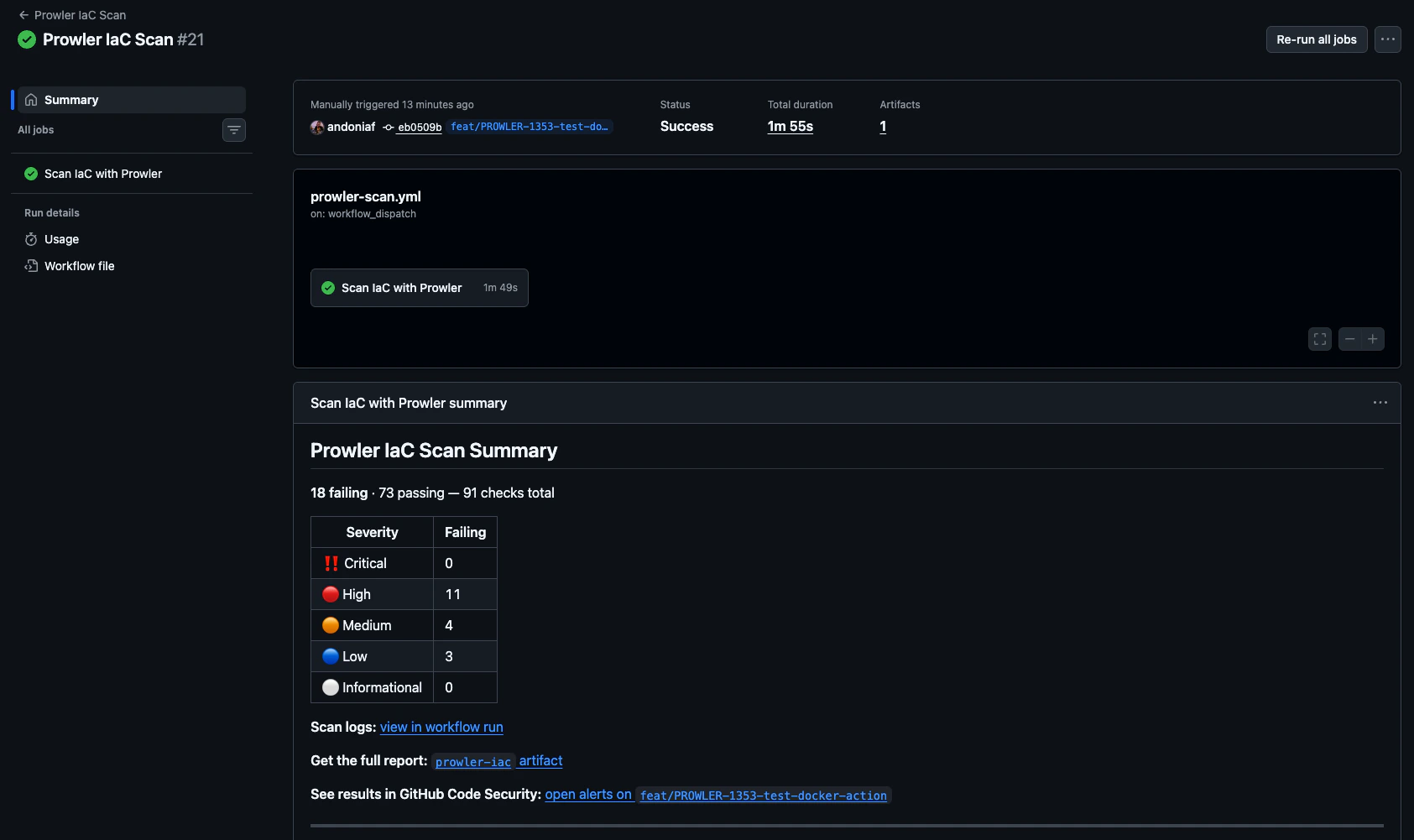
The action writes a summary to the run page with a per-severity breakdown of failing checks, artifact and Code Scanning links, and (when push-to-cloud: false) a pointer to Prowler Cloud for continuous monitoring. GitHub Actions run page showing the Prowler IaC Scan Summary with failing and passing counts, severity breakdown, scan log link, artifact link, and GitHub Code Security link