

Documentation Index
Fetch the complete documentation index at: https://docs.prowler.com/llms.txt
Use this file to discover all available pages before exploring further.
Prowler enables automated provisioning of multiple cloud providers through the Bulk Provider Provisioning tool. This approach streamlines the onboarding process for organizations managing numerous cloud accounts, subscriptions, and projects across AWS, Azure, GCP, Kubernetes, Microsoft 365, and GitHub.
The tool is available in the Prowler repository at: util/prowler-bulk-provisioning
Overview
The Bulk Provider Provisioning tool automates the creation of cloud providers in Prowler App or Prowler Cloud by:
- Reading provider configurations from YAML files
- Creating providers with appropriate authentication credentials
- Testing connections to verify successful authentication
- Processing multiple providers concurrently for efficiency
Using AWS Organizations? For organizations with many AWS accounts, use the automated AWS Organizations Bulk Provisioning tool to automatically discover and generate configuration for all accounts in your organization.
Prerequisites
Requirements
- Python 3.7 or higher
- Prowler API key (from Prowler Cloud or self-hosted Prowler App)
- Authentication credentials for target cloud providers
Installation
Clone the repository and install the required dependencies:
git clone https://github.com/prowler-cloud/prowler.git
cd prowler/util/prowler-bulk-provisioning
pip install -r requirements.txt
Authentication Setup
Configure your Prowler API key:
export PROWLER_API_KEY="pk_example-api-key"
To create an API key:
- Log in to Prowler Cloud or Prowler App
- Click Profile → Account
- Click Create API Key
- Provide a descriptive name and optionally set an expiration date
- Copy the generated API key (it will only be shown once)
For detailed instructions, see: Prowler App API Keys
Configuration File Structure
Create a YAML file listing your cloud providers and credentials:
# providers.yaml
- provider: aws
uid: "123456789012" # AWS Account ID
alias: "production-account"
auth_method: role
credentials:
role_arn: "arn:aws:iam::123456789012:role/ProwlerScanRole"
external_id: "prowler-external-id"
- provider: azure
uid: "00000000-1111-2222-3333-444444444444" # Subscription ID
alias: "azure-production"
auth_method: service_principal
credentials:
tenant_id: "aaaaaaaa-bbbb-cccc-dddd-eeeeeeeeeeee"
client_id: "ffffffff-1111-2222-3333-444444444444"
client_secret: "your-client-secret"
- provider: gcp
uid: "my-gcp-project" # Project ID
alias: "gcp-production"
auth_method: service_account
credentials:
service_account_key_json_path: "./service-account.json"
Basic Usage
To provision all providers from your configuration file:
python prowler_bulk_provisioning.py providers.yaml
The tool automatically tests each provider connection after creation (enabled by default).
Dry Run Mode
Test your configuration without making API calls:
python prowler_bulk_provisioning.py providers.yaml --dry-run
Skip Connection Testing
To provision providers without testing connections:
python prowler_bulk_provisioning.py providers.yaml --test-provider false
Test Existing Providers Only
To verify connections for already provisioned providers:
python prowler_bulk_provisioning.py providers.yaml --test-provider-only
Provider-Specific Configuration
AWS Provider Configuration
Using IAM Role (Recommended)
- provider: aws
uid: "123456789012"
alias: "aws-production"
auth_method: role
credentials:
role_arn: "arn:aws:iam::123456789012:role/ProwlerScanRole"
external_id: "optional-external-id"
session_name: "prowler-scan-session" # optional
duration_seconds: 3600 # optional
Using Access Keys
- provider: aws
uid: "123456789012"
alias: "aws-development"
auth_method: credentials
credentials:
access_key_id: "AKIA..."
secret_access_key: "..."
session_token: "..." # optional for temporary credentials
Azure Provider Configuration
- provider: azure
uid: "subscription-uuid"
alias: "azure-production"
auth_method: service_principal
credentials:
tenant_id: "tenant-uuid"
client_id: "client-uuid"
client_secret: "client-secret"
GCP Provider Configuration
Using Service Account JSON
- provider: gcp
uid: "project-id"
alias: "gcp-production"
auth_method: service_account
credentials:
service_account_key_json_path: "/path/to/key.json"
Using OAuth2 Credentials
- provider: gcp
uid: "project-id"
alias: "gcp-production"
auth_method: oauth2
credentials:
client_id: "123456789.apps.googleusercontent.com"
client_secret: "GOCSPX-xxxx"
refresh_token: "1//0exxxxxx"
Kubernetes Provider Configuration
- provider: kubernetes
uid: "context-name"
alias: "eks-production"
auth_method: kubeconfig
credentials:
kubeconfig_path: "~/.kube/config"
# OR inline configuration:
# kubeconfig_inline: |
# apiVersion: v1
# clusters: ...
Microsoft 365 Provider Configuration
- provider: m365
uid: "domain.onmicrosoft.com"
alias: "m365-tenant"
auth_method: service_principal
credentials:
tenant_id: "tenant-uuid"
client_id: "client-uuid"
client_secret: "client-secret"
GitHub Provider Configuration
Using Personal Access Token
- provider: github
uid: "organization-name"
alias: "github-org"
auth_method: personal_access_token
credentials:
token: "ghp_..."
Using GitHub App
- provider: github
uid: "organization-name"
alias: "github-org"
auth_method: github_app
credentials:
app_id: "123456"
private_key_path: "/path/to/private-key.pem"
Advanced Configuration
Concurrent Processing
Adjust the number of concurrent provider creations:
python prowler_bulk_provisioning.py providers.yaml --concurrency 10
Custom API Endpoints
For self-hosted Prowler App installations:
python prowler_bulk_provisioning.py providers.yaml \
--base-url http://localhost:8080/api/v1
Timeout Configuration
Set custom timeout for API requests:
python prowler_bulk_provisioning.py providers.yaml --timeout 120
Bulk Provider Management
Deleting Multiple Providers
To remove all providers from your Prowler account:
python nuke_providers.py --confirm
Filter deletions by provider type:
python nuke_providers.py --confirm --filter-provider aws
Filter deletions by alias pattern:
python nuke_providers.py --confirm --filter-alias "test-*"
The tool uses YAML format for provider configuration files. Each provider entry requires:
provider: The cloud provider type (aws, azure, gcp, kubernetes, m365, github)
uid: Unique identifier for the provider (account ID, subscription ID, project ID, etc.)
alias: A friendly name for the provider
auth_method: Authentication method to use
credentials: Authentication credentials specific to the provider and method
Example YAML structure:
- provider: aws
uid: "123456789012"
alias: "production"
auth_method: role
credentials:
role_arn: "arn:aws:iam::123456789012:role/ProwlerScan"
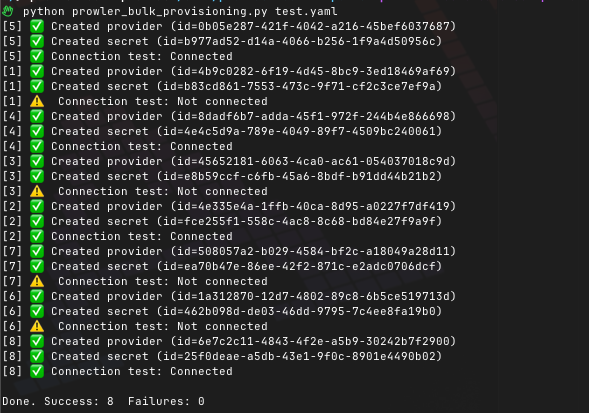
Example Output
Successful provider provisioning:
[1] ✅ Created provider (id=db9a8985-f9ec-4dd8-b5a0-e05ab3880bed)
[1] ✅ Created secret (id=466f76c6-5878-4602-a4bc-13f9522c1fd2)
[1] ✅ Connection test: Connected
[2] ✅ Created provider (id=7a99f789-0cf5-4329-8279-2d443a962676)
[2] ✅ Created secret (id=c5702180-f7c4-40fd-be0e-f6433479b126)
[2] ⚠️ Connection test: Not connected
Done. Success: 2 Failures: 0
Troubleshooting
Invalid API Key
Error: 401 Unauthorized
Solution: Verify your PROWLER_API_KEY environment variable or --api-key parameter
Network Timeouts
Error: Connection timeout
Solution: Increase timeout with --timeout 120
Provider Already Exists
Error: Provider with this UID already exists
Solution: Use different UID or delete existing provider first
Authentication Failures
Connection test: Not connected
Solution: Verify credentials and IAM permissions