

 About Us
- Credentials URI
- OIDC Role Authentication
- ECS RAM Role
- RAM Role Assumption
- STS Temporary Credentials
- Permanent Access Keys
- Default Credential Chain
Choose The Right Method
RAM User And AccessKey
This is the simplest setup for a workstation or a basic CI runner.Create The RAM User
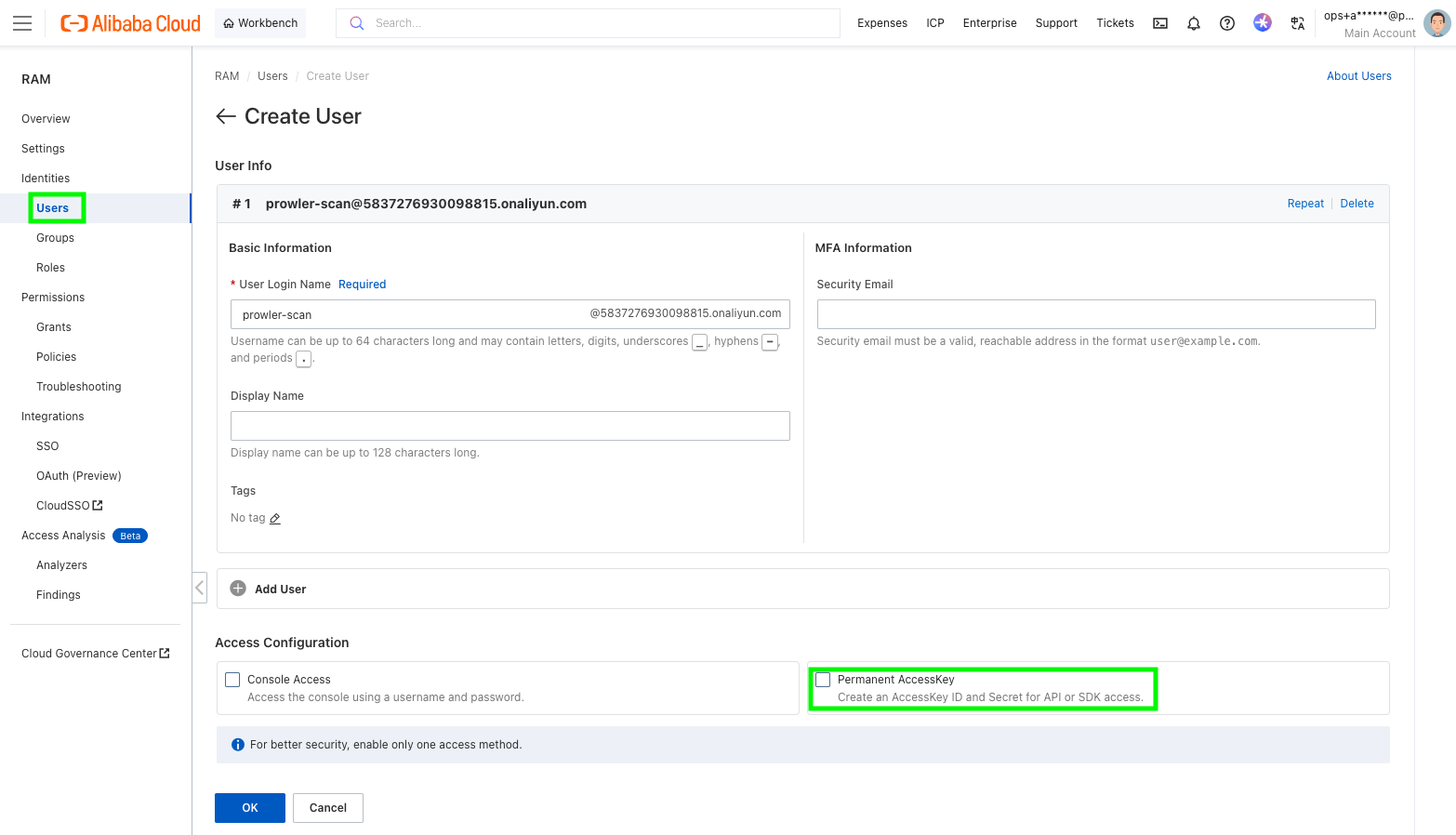
- Open the RAM console.
- Go to
Identities>Users. - Click
Create User. - Enter a logon name and display name.
- In
Access Configuration, selectPermanent AccessKey.
- Save the generated
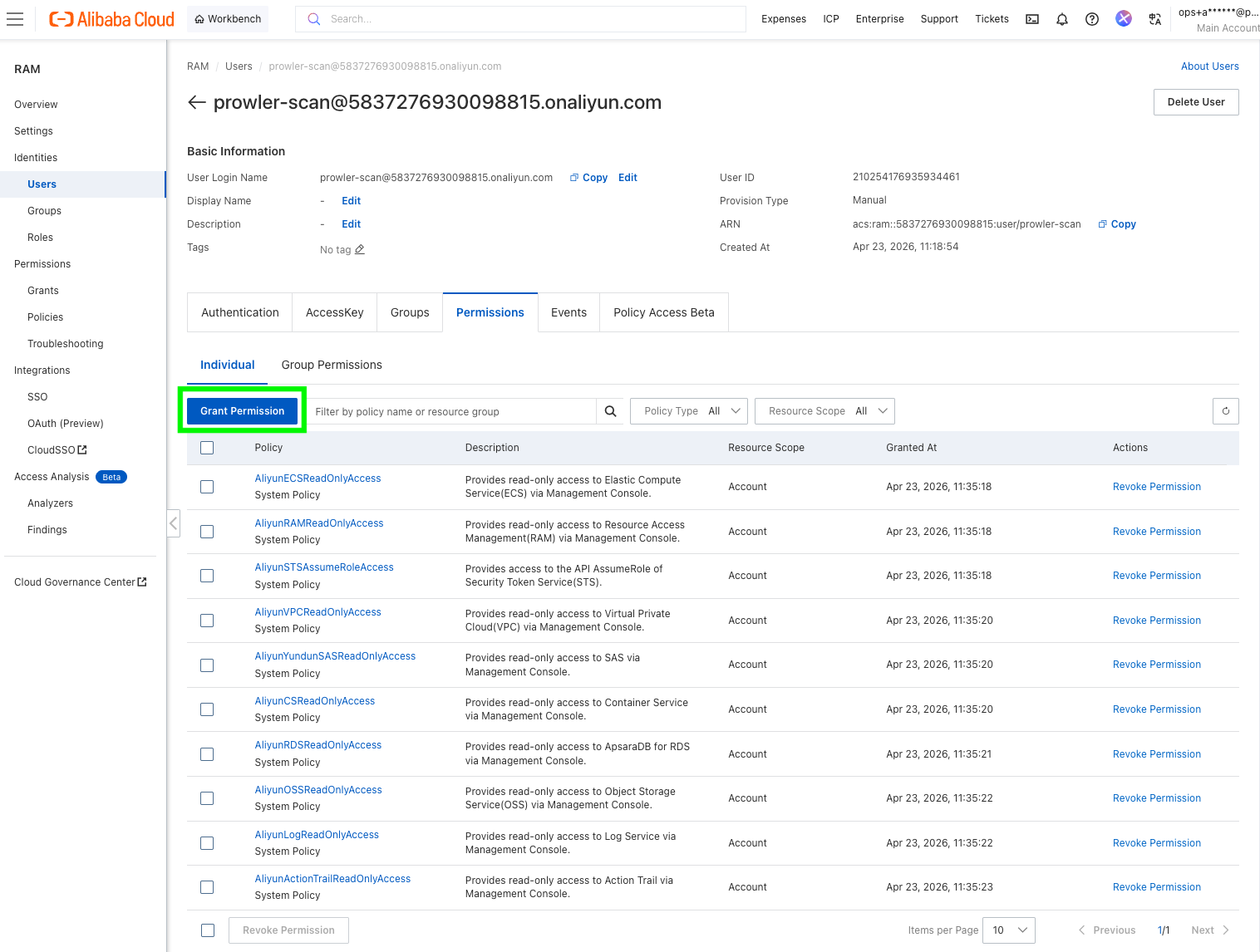
AccessKey IDandAccessKey Secretimmediately. Alibaba Cloud only shows the secret once. - Grant the user the read permissions required for the Alibaba Cloud services you want Prowler to scan.
Use The AccessKey With Prowler
ALIYUN_ACCESS_KEY_ID and ALIYUN_ACCESS_KEY_SECRET for compatibility, but ALIBABA_CLOUD_* is the preferred naming.
Use The Default Credential Chain
If you prefer not to export credentials in every shell, you can store them with the Alibaba Cloud CLI and let Prowler reuse the default credential chain from~/.aliyun/config.json.
RAM Role Assumption (Recommended)
Use this when:- you want short-lived credentials instead of long-lived AccessKeys in Prowler,
- you are scanning another Alibaba Cloud account, or
- you are configuring Alibaba Cloud in Prowler Cloud and want to provide a
Role ARN.
- A source identity that can call
sts:AssumeRole. - A target RAM role that has the scan permissions.
Create The Source Identity
Create a RAM user with an AccessKey pair by following the steps in RAM User And AccessKey, or reuse an existing automation identity.Create The Target Role
- Open the RAM console.
- Go to
Identities>Roles. - Click
Create Role. - Set
Principal TypetoCloud Account. - Choose:
Current Accountif the RAM user and the role are in the same account.Other Accountif the RAM user belongs to a different Alibaba Cloud account.
- Give the role a name such as
ProwlerAuditRole. - Attach the scan permissions to the role.
- Copy the role ARN in the format
acs:ram::<account-id>:role/<role-name>.
Allow The Source Identity To Assume The Role
The source RAM user must be able to callsts:AssumeRole.
The easiest starting point is to attach Alibaba Cloud’s AliyunSTSAssumeRoleAccess policy to that RAM user. If you want tighter scope, attach a custom policy limited to the target role ARN.
Run Prowler
ALIBABA_CLOUD_ROLE_ARN, but the source AccessKey pair is still required for this flow.
STS Temporary Credentials
Use this if another tool already gives you a temporaryAccessKey ID, AccessKey Secret, and SecurityToken.
This is common when:
- a CI platform brokers Alibaba credentials for the job,
- your internal tooling already calls
AssumeRole, or - you want to test with a short-lived session before switching to a RAM role flow.
Prowler does not mint standalone STS sessions for you. If you use this method, you must provide all three STS values from your external workflow.
ECS RAM Role
Use this when Prowler runs on an ECS instance and you do not want to store any AccessKeys on disk.Create And Attach The Role
- Open the RAM console.
- Go to
Identities>Roles. - Click
Create Role. - Set the trusted entity to
Alibaba Cloud Service. - Select
ECSas the trusted service. - Attach the read permissions required for the scan.
- Attach that RAM role to the ECS instance that runs Prowler.
Run Prowler
OIDC Role Authentication
Use this when Prowler runs in ACK or another Kubernetes environment that provides an OIDC token file.Create The OIDC Identity Provider
- Open the RAM console.
- Go to
Integrations>SSO. - Select
Role-based SSO, then theOIDCtab. - Click
Create IdP. - Fill in:
IdP NameIssuer URLFingerprintClient ID
- Create the IdP and note its ARN.
Create The RAM Role Trusted By That IdP
Create a RAM role whose trusted entity is the OIDC IdP, then attach the scan permissions to that role. If you are running in ACK with RRSA, this is typically the role bound to the service account that runs Prowler.Provide The OIDC Variables To Prowler
Prowler currently expects:--oidc-role-arnfor the RAM role ARN,ALIBABA_CLOUD_OIDC_PROVIDER_ARNfor the OIDC provider ARN,ALIBABA_CLOUD_OIDC_TOKEN_FILEfor the token file path.
ack-pod-identity-webhook can inject the three required environment variables and mount the token file into the pod automatically:
Even if your pod already exposes
ALIBABA_CLOUD_ROLE_ARN, use --oidc-role-arn with Prowler. The provider currently reads the role ARN for OIDC from the CLI argument.Credentials URI
Use this only if you already operate an internal credential broker that returns temporary Alibaba Cloud credentials over HTTP. The endpoint must return a JSON body with this structure:Permissions Guidance
The exact minimum policy depends on the checks and services you enable. If you are using the RAM console’sGrant Permission screen, search for the system policy names below. Alibaba Cloud often uses product policy names that differ from the service name shown in Prowler.
System Policies In The RAM Console
Recommended Starting Point
For a broad Alibaba Cloud scan, the identity used by Prowler usually needs read access to the services Prowler currently audits, including:RAMECSVPCOSSActionTrailSimple Log Service (SLS)RDSContainer Service / ACKSecurity Center
- If you use static AccessKeys, attach the read-only policies above directly to the RAM user used by Prowler.
- If you use RAM role assumption, attach
AliyunSTSAssumeRoleAccessto the source RAM user and attach the read-only policies above to the target scan role. - If you use ECS RAM role or OIDC/RRSA, attach the read-only policies above to the role assumed by Prowler.
ram:Get*,ram:List*ecs:Describe*vpc:Describe*oss:Get*,oss:List*actiontrail:Describe*log:Get*,log:List*,log:Query*rds:Describe*cs:Get*,cs:List*,cs:Describe*yundun-sas:Get*,yundun-sas:Describe*,yundun-sas:List*
If a service is denied, Prowler can still start, but checks for that service may fail or return incomplete results.